


October CMS — MCP Server plugin
Turns an October CMS site into a remote Model Context Protocol (MCP) server.
External AI agents (Claude, Cursor, etc.) connect to a single authenticated
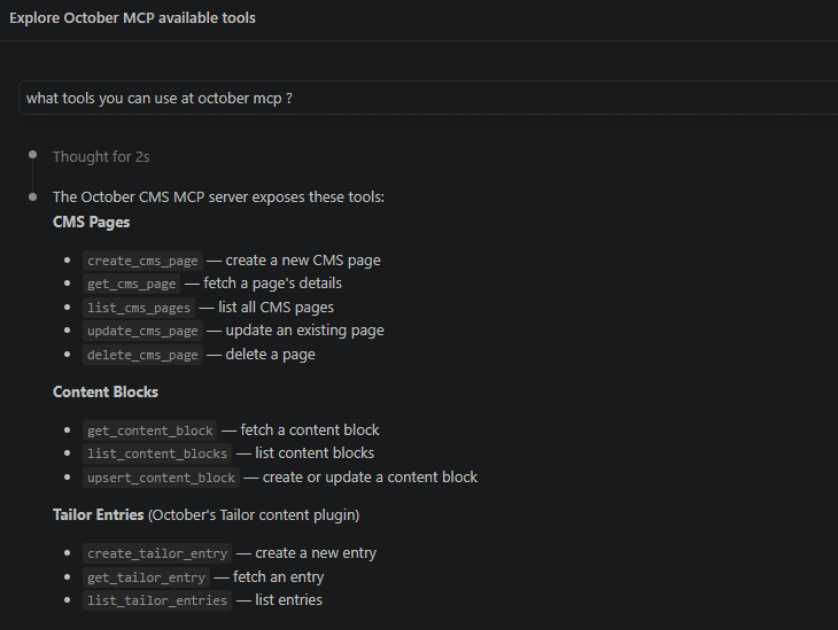
endpoint and manage content through tools such as create_cms_page,
update_cms_page, and list_tailor_entries.
- Transport: remote Streamable HTTP (JSON-RPC 2.0) at
POST /mcp - Auth: per-client bearer tokens (stored only as SHA-256 hashes)
- Scoping: each token can be limited to a subset of tools
- Extensible: other plugins add tools via the
snipi.mcp.registerToolsevent
Namespace/vendor is SNiPI\Mcp (folder plugins/snipi/mcp). Rename to your own
vendor before publishing.
Install
- Copy this folder to
plugins/snipi/mcpin your October project. - Run migrations:
php artisan october:migrate
- Issue a token for an agent, either way:
- Backend: go to MCP → Clients → New Client, set a label and permissions, and save. The next screen reveals the token once with a Copy button and a Download mcp.json button — grab it there, it is only stored as a hash and cannot be shown again.
- CLI:
php artisan mcp:issue-token "My Agent"prints the token once.
Your endpoint is now: https://your-site.com/mcp
Connect an AI agent
Native MCP clients that support remote servers can point straight at the URL with
an Authorization: Bearer <token> header. For clients that only speak the local
stdio transport, bridge with the mcp-remote shim:
{
  "mcpServers": {
    "october": {
      "command": "npx",
      "args": [
        "mcp-remote",
        "https://your-site.com/mcp",
        "--header", "Authorization: Bearer YOUR_TOKEN"
      ]
    }
  }
}
Then ask the agent to, for example, "list the CMS pages" or "create a page at /pricing with a heading and three plan cards".
Included tools
| Tool | Purpose |
|---|---|
get_site_info |
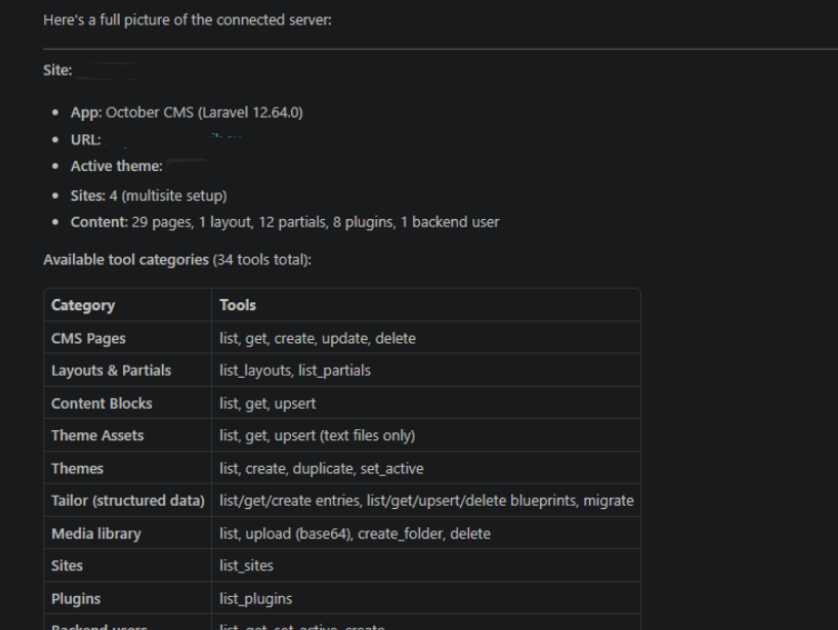
One-shot overview: app name/URL, active theme, counts of pages/layouts/partials/plugins/users/sites |
list_cms_pages / get_cms_page |
Inspect Twig templates in the active theme |
create_cms_page / update_cms_page / delete_cms_page |
Manage pages |
list_layouts / list_partials / list_themes |
Discover theme templates (agent uses these before guessing) |
create_theme / duplicate_theme / set_active_theme |
Create, copy or activate whole themes |
list_content_blocks / get_content_block / upsert_content_block |
Reusable content |
list_tailor_entries / get_tailor_entry / create_tailor_entry |
Structured content (Tailor, October v3+) |
list_blueprints / get_blueprint / upsert_blueprint / delete_blueprint / migrate_blueprints |
Define & migrate Tailor content structures — sensitive (schema/DDL) |
list_boxes_pages / get_boxes_page / create_boxes_page / update_boxes_page / delete_boxes_page / publish_boxes_page |
OFFLINE.Boxes pages — only when the plugin is installed. Edits go to drafts when Boxes revisions are on; delete_boxes_page removes children and all revisions — sensitive |
list_boxes_partials / get_boxes_partial |
Box types from the theme (fields, nesting rules) and page templates from boxes.yaml |
add_box / update_box / move_box / duplicate_box / delete_box |
Edit a Boxes page's box tree; respects template locks and partial nesting rules. Image/file fields not supported yet |
list_sites |
Configured sites (multisite) |
list_plugins |
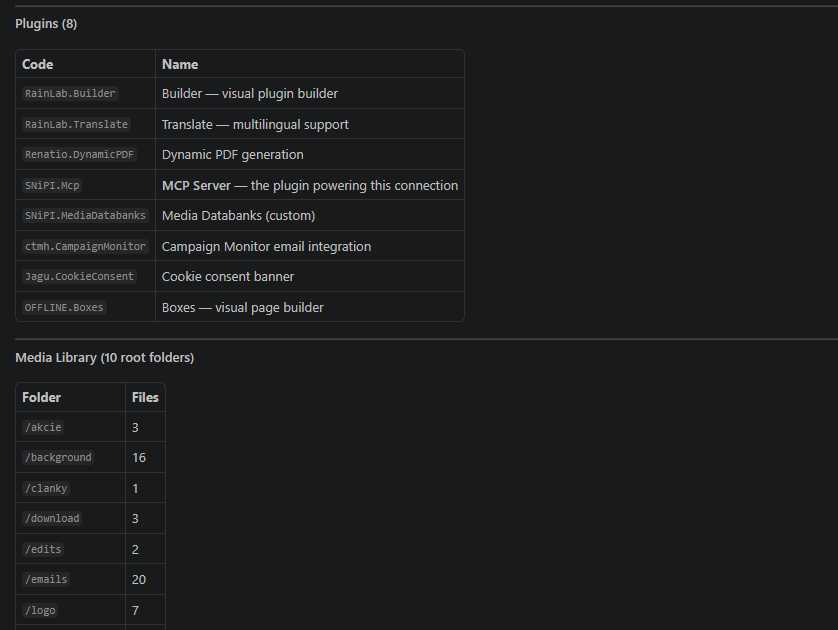
Installed, enabled plugins |
list_media / upload_media / create_media_folder / delete_media |
Media library files & folders |
list_theme_assets / get_theme_asset / upsert_theme_asset |
Text assets (css/js) in the theme, sandboxed to assets/ |
list_backend_users / get_backend_user |
Read admin users |
set_backend_user_active / create_backend_user |
Enable/disable and create admin users — sensitive |
Multisite: which site do edits affect?
Theme-scoped tools (pages, content, layouts, partials, assets) act on a theme, and a theme is a directory — not a site. By default they use the theme the request host resolves to, so on a multisite install the agent would otherwise only ever touch that one site's theme.
To target a specific site, pass an optional theme argument (the theme's
directory name) to any of those tools. The agent can map a site to its theme with
list_sites (each entry includes its theme) and enumerate theme directories
with list_themes. If two sites share one theme, editing it changes both — use
duplicate_theme to split them, then assign the copy to one site in the backend
Settings → Sites area (per-site theme assignment is version-specific, so it's
left to the backend rather than a tool).
Asking the user questions
MCP servers don't prompt the user directly. When information is missing (e.g. a
page's layout), the agent uses the read tools above to discover the options and
then asks you in its own chat. The create_cms_page description tells it to run
list_layouts and confirm before creating.
On connect, the server also returns an instructions string (part of the MCP
initialize handshake) that orients the agent on the tool map and the cross-tool
workflows — theme targeting, the blueprint → migrate flow, the PHP code-section
gate, and the file-upload caveat. Most MCP clients feed this to the model
automatically, so agents start out knowing how to drive the site.
Add your own tools
From any plugin:
Event::listen('snipi.mcp.registerTools', function ($registry) {
    $registry->add(new \SNiPI\Mcp\Classes\Tool(
        'publish_post',
        'Publish a blog post by id.',
        [
            'type' => 'object',
            'properties' => ['id' => ['type' => 'integer']],
            'required' => ['id'],
        ],
        function (array $args) {
            // ... your logic ...
            return \SNiPI\Mcp\Classes\Result::text("Published #{$args['id']}");
        }
    ));
});
Security notes
This endpoint lets a token holder change site content. Treat tokens like passwords.
Writing templates is code execution. October CMS pages have a PHP code section, so any client that can write a page can, in principle, run arbitrary server-side code. The practical security boundary is therefore read vs write, not which specific write tool is enabled. Two controls follow from this:
-
Per-client tool checkboxes. On each MCP client, Allowed tools starts with everything checked; uncheck tools to deny them. For untrusted agents, leave only the
list_*/get_*tools checked to make the token effectively read-only. -
"Allow PHP in templates" switch (default off). While off,
create_cms_pageandupdate_cms_pagereject acodesection. This blocks the most direct route to code execution, but note it is a mitigation, not a sandbox — Twig and components still have some reach, and writing JS assets is stored-XSS territory. Turn it on only for a fully trusted client. -
Always serve over HTTPS. Tokens travel in the
Authorizationheader. -
Scope aggressively. Give read-only agents only the
list_*/get_*tools. In particular, leavecreate_backend_user,set_backend_user_active,delete_cms_pageand thecreate_*/update_*tools out of the "Allowed tools" list for any client that only needs to read.create_backend_usergrants admin access to your site — treat a token that can call it like an admin password. -
Revoke by disabling or deleting the client in the backend.
-
The route is intentionally outside the
webmiddleware group, so it has no CSRF or session state. If you place it behind a firewall or IP allowlist, even better. -
For browser-based MCP clients you would also need CORS headers on
/mcp; native desktop clients do not. -
Consider adding rate limits or an audit log of
tools/callinvocations before exposing this on a production site.
Notes on correctness / things to verify against your version
- CMS page settings. The page tools set
title,url,layout, etc. as direct model attributes, which is the common October pattern. If your version does not serialize a setting into the page front-matter, assign it through thesettingsarray instead ($page->settings = ['url' => '/x', ...]). - Tailor.
EntryRecord::inSection('Handle')is used for reads and writes. Creating entries requires attribute keys that match the blueprint's field handles. The tool degrades to nothing if Tailor is not installed.
Upgrading to the php-mcp/server SDK (optional)
The bundled McpServer implements the handshake plus the tools capability by
hand, which keeps the plugin dependency-free and portable across October v3
(Laravel 9/10) and v4 (Laravel 12). If you later want resources, prompts, session
management, or auto-generated JSON schemas, composer require php-mcp/server and
replace McpServer::handle() with the SDK's HTTP handler — the Tool and
ToolRegistry abstractions map directly onto its tool registration API.
Installation via Command Line
php artisan plugin:install SNiPI.Mcp
SNiPI MCP Server for October CMS — Documentation
What this plugin does
This plugin turns an October CMS website into a Model Context Protocol (MCP) server. Once installed, an external AI agent — Claude, Cursor, or any MCP-capable client — can connect to the site over a single authenticated web endpoint and manage its content: create and edit pages, manage reusable content and theme assets, define and migrate Tailor content structures, work with the media library, create and duplicate themes, and administer backend users.
In short, it lets you point an AI agent at your site and say "build a landing page for the spring workshop" or "add a registrations content type and list this week's sign-ups," and the agent carries it out through well-defined tools rather than by touching the server directly.
The plugin is content-management-shaped: every capability maps to a real October concept (a CMS page, a Tailor blueprint, a theme, a media file), so the operations an agent can perform are the operations that make sense for a CMS.
How it works
The endpoint
The plugin registers one public route, POST /mcp, that speaks JSON-RPC 2.0 over HTTP — the "Streamable HTTP" transport that remote MCP clients use. The route is deliberately stateless: it sits outside October's web middleware group, so there is no session or CSRF handling, only bearer-token authentication and a request throttle. A GET /mcp returns 405, since this server is request/response only and does not push server-initiated messages.
The protocol layer
Incoming requests are handled by a small, self-contained MCP implementation (McpServer). It implements the handshake and the tools capability, which is all an agent needs to discover and call actions:
initialize— returns the protocol version, capabilities, server info, and an instructions string that orients the agent (see below).tools/list— returns the catalog of available tools with their JSON-Schema input definitions.tools/call— runs a named tool with arguments and returns its result.pingand the standard notifications are handled as well.
Because the protocol layer is hand-written rather than dependent on a version-locked package, the plugin runs on both October v3 (Laravel 9/10) and October v4 (Laravel 12) without change. If richer MCP features are wanted later (resources, prompts, sessions), the protocol layer can be swapped for the php-mcp/server package without disturbing the tools.
Tools and the registry
Each capability is a Tool: a name, a description, a JSON-Schema for its arguments, and a handler. Tools are grouped into provider classes by domain (pages, content, themes, assets, Tailor, blueprints, site, media, backend users). On every request a ToolRegistry assembles the full set, filters it against the connecting client's permissions, and dispatches calls. Every tool call is wrapped so that an error becomes a readable message returned to the agent rather than a server crash.
Other plugins can contribute their own tools by listening to the snipi.mcp.registerTools event, so the surface can be extended without modifying this plugin.
Agent instructions
The initialize response includes an instructions string that most MCP clients feed to the model automatically. It describes the tool map and — importantly — the cross-tool workflows that individual tool descriptions cannot express: how to target a specific site's theme, the blueprint-then-migrate flow, the fact that the PHP code section may be gated, and the guidance to ask the user when information is missing. The code-section line is tailored per client, so a restricted token is told the code section is disabled for it while a trusted token is told it is accepted.
Installation
- Copy the plugin to
plugins/snipi/mcpin your October project. - Run migrations:
php artisan october:up(the migrations are idempotent, so re-running is safe). - Issue a client token (see below).
The endpoint is then live at https://your-site.com/mcp.
Client tokens
Access is controlled by per-client bearer tokens. Only a SHA-256 hash of each token is stored, never the plaintext, so a token is shown exactly once at creation.
There are two ways to issue one:
- Backend: go to MCP → Clients → New Client, set a label and permissions, and save. The next screen reveals the token once, with a Copy button and a Download mcp.json button that produces a ready-to-use client config. Grab it there — it cannot be shown again.
- CLI:
php artisan mcp:issue-token "My Agent"prints the token once. Add--tools=name(repeatable) to restrict it.
To revoke a token, disable or delete the client in the backend. A disabled client's token stops working immediately.
Permissions model
Two controls sit on each client, both reflecting the reality that writing to a CMS is powerful.
Allowed tools is a checkbox list, all-checked by default. Uncheck any tool to deny it for that client. Leaving everything checked (or a console token with no restriction) means full access; to switch a client off entirely, use the Enabled toggle rather than unchecking everything. For an agent you don't fully trust, leave only the list_* and get_* tools checked to make the token effectively read-only.
Allow PHP in templates is a switch, off by default. October CMS pages have a PHP code section that executes on the server, so a client that can write pages can, in principle, run arbitrary server-side code. While this switch is off, the page tools reject any code section. It is a meaningful mitigation, not a complete sandbox (Twig and components still have some reach), so turn it on only for a fully trusted client.
The practical takeaway: the real security boundary is read versus write, not which individual write tool is enabled. Treat any write-capable token like an administrator password.
Connecting an AI agent
Native MCP clients that support remote servers can point straight at the URL with an Authorization: Bearer <token> header. For clients that speak only the local transport, the mcp-remote bridge works:
{
  "mcpServers": {
    "october": {
      "command": "npx",
      "args": [
        "mcp-remote",
        "https://your-site.com/mcp",
        "--header", "Authorization: Bearer YOUR_TOKEN"
      ]
    }
  }
}
The Download mcp.json button in the backend produces exactly this file for the token you just created. After connecting, ask the agent to, for example, "list the CMS pages" or "create a page at /pricing with three plan cards."
Tool catalog
Orientation
| Tool | Purpose |
|---|---|
get_site_info |
App name/URL, active theme, and counts of pages, layouts, partials, plugins, backend users and sites |
list_sites |
Configured sites (multisite); each entry includes its theme |
list_plugins |
Installed, enabled plugins |
CMS pages
| Tool | Purpose |
|---|---|
list_cms_pages / get_cms_page |
Inspect Twig templates |
create_cms_page / update_cms_page / delete_cms_page |
Manage pages |
Reusable content and theme templates
| Tool | Purpose |
|---|---|
list_content_blocks / get_content_block / upsert_content_block |
Reusable content snippets |
list_layouts / list_partials / list_themes |
Discover theme templates |
Themes
| Tool | Purpose |
|---|---|
create_theme |
New theme with a proper starter layout (styles/scripts/framework tags, locale-aware lang) |
duplicate_theme |
Copy a theme — used to split a theme shared by two sites |
set_active_theme |
Set the active/default theme |
Theme assets
| Tool | Purpose |
|---|---|
list_theme_assets / get_theme_asset / upsert_theme_asset |
Text assets (css, js, scss, less, json, txt), sandboxed to the theme's assets/ folder |
Tailor structured content
| Tool | Purpose |
|---|---|
list_tailor_entries / get_tailor_entry / create_tailor_entry |
Read and create entries |
list_blueprints / get_blueprint / upsert_blueprint / delete_blueprint / migrate_blueprints |
Define and migrate content structures |
Media library
| Tool | Purpose |
|---|---|
list_media / upload_media / create_media_folder / delete_media |
Files and folders (uploads are base64) |
Backend users
| Tool | Purpose |
|---|---|
list_backend_users / get_backend_user |
Read admin users |
set_backend_user_active / create_backend_user |
Enable/disable and create admin users |
Every theme-scoped tool (pages, content, layouts, partials, assets) accepts an optional theme argument — see below.
Multisite: which site do edits affect?
Theme-scoped tools act on a theme, and a theme is a directory, not a site. With no theme argument they use the theme the request's host resolves to, so on a multisite install an agent would otherwise only ever touch that one site's theme.
To target a specific site, the agent passes the optional theme argument — the theme's directory name. It maps a site to its theme with list_sites (each entry reports its theme) and enumerates theme directories with list_themes. If two sites share one theme, editing it changes both; duplicate_theme splits them, after which the copy is assigned to one site in the backend under Settings → Sites. Per-site theme assignment is left to the backend because how that mapping is stored varies across October versions.
Tailor: defining content structures
The typical flow for a new content type:
- The agent writes a blueprint with
upsert_blueprint, passing the full YAML. Auuidis generated and injected automatically if omitted, since Tailor tracks blueprints by uuid. - It applies the blueprint with
migrate_blueprints(or passesmigrate: truetoupsert_blueprintto do both at once), which runstailor:migrateto create or update the database tables.
Relations between content types use a field of type entries with a source of the related blueprint's handle — for example a Registration blueprint linking to a Workshop. Records are then queried and created with the *_tailor_entries tools using the blueprint handle.
Security summary
- Serve over HTTPS. Tokens travel in the
Authorizationheader. - Writing templates is effectively code execution. Scope untrusted clients to read-only tools, and keep "Allow PHP in templates" off unless fully trusted.
- Writing JS/CSS assets is a client-side risk. Scripts written to a theme run in your visitors' browsers, so an asset-writing token can inject site-wide code (stored XSS / defacement). Grant those tools only to trusted clients.
- Blueprint and delete tools can drop data.
migrate_blueprintsperforms DDL; confirm destructive actions. create_backend_usergrants admin access. Treat any token that can call it like an admin password.- Turn off debug in production so error responses don't leak details to unauthenticated callers.
Extending the plugin
Add tools from any plugin by listening to the registration event:
Event::listen('snipi.mcp.registerTools', function ($registry) {
    $registry->add(new \SNiPI\Mcp\Classes\Tool(
        'publish_post',
        'Publish a blog post by id.',
        ['type' => 'object', 'properties' => ['id' => ['type' => 'integer']], 'required' => ['id']],
        function (array $args) {
            // ... your logic ...
            return \SNiPI\Mcp\Classes\Result::text("Published #{$args['id']}");
        }
    ));
});
New tools automatically appear in tools/list, are governed by the same per-client permission checkboxes, and show up in the backend's Allowed-tools list.
What to expect — and current limitations
The plugin gives an agent broad, honest control over a site's content, with a permission model that reflects the real risks. A few things are worth setting expectations on:
- Tailor file/image fields.
create_tailor_entryfills scalar fields (text, numbers, dropdowns, relations). It cannot yet populatefileupload(image) fields — attaching images to an entry needs a dedicated step that is not yet built. So an agent can create, for example, a workshop registration with all its text and measurement data, but not push the photos through the API today. - Per-site theme assignment is done in the backend, not via a tool, for the version-compatibility reason noted above.
- Client behaviour varies. Most MCP clients surface the server's
instructionsto the model and re-list tools on reconnect; a few ignore instructions (the per-tool descriptions still carry the essentials), and most need a full restart to pick up newly added tools. - Environment-specific verification. A handful of operations depend on October APIs whose exact behaviour can differ slightly across versions (Tailor blueprint field types, media library calls, backend user role assignment). These are coded against the standard APIs and fail into readable error messages rather than crashes, so any mismatch is visible and fixable rather than silent.
Used within those bounds, the plugin lets a person manage an October CMS site conversationally through an AI agent, while keeping the site owner in control of exactly what each connected agent is allowed to do.
-
This plugin has not been reviewed yet.
-
| 1.0.4 |
Added new tool that provides summary of domain, with all sites, themes, plugins, etc. Sep 29, 2026 |
|---|---|
| 1.0.3 |
Added tools for creating new pages using OFFLINE.Boxes and create custom boxes on the fly Sep 29, 2026 |
| 1.0.2 |
Add per-client PHP-in-templates permission Jul 30, 2026 |
| 1.0.1 |
Create MCP client tokens table Jul 30, 2026 |