


Fast Media Search
Fast Media Search replaces the native October CMS Media Manager file search with a fast, database-backed index.
It keeps the standard Media Manager interface exactly where editors already use it, while making media search much faster on large libraries, remote disks, and long-running projects with thousands of uploaded files.
Why use Fast Media Search?
The default Media Manager search can become slow when the media library grows or when files are stored on remote storage. Fast Media Search solves this by indexing media file paths, names, extensions, sizes, MIME types, and modification dates in the database.
When a user searches in the Media Manager, the plugin searches the database index instead of scanning the file storage.
Custom Development & Technical Support
If your October CMS project needs more than a ready-made plugin, Ormid can help with custom development and technical improvements tailored to your specific workflow.
Possible areas of work include:
- custom October CMS plugin development
- backend performance optimization
- search integration and indexing solutions
- queue, cache, and database optimization
- migration and upgrade support
- custom backend interfaces for editors and administrators
- integration with external services and APIs
- audit, debugging, and maintenance of existing October CMS projects
Whether you need to speed up an existing website, improve the editor experience, connect third-party systems, or build a custom module from scratch, Ormid can help design and implement a practical solution.
Features
- Fast database-backed search for October CMS Media Library
- Native Media Manager user experience
- No changes to editor workflow
- Automatic index updates after upload, delete, rename, and move actions
- Full reindex from the backend settings page
- Queue-based reindexing for large media libraries
- Live rebuild status with automatic refresh
- Console command for developers and deployments
- Search by file name, path, folder, extension, and indexed metadata
- Works with Media Finder and Media Manager popup usage
- Multi-language backend interface
- Designed for October CMS 4.x
Native Media Manager integration
Fast Media Search does not replace the Media Manager UI.
It keeps the native October CMS Media Manager and only changes the internal search source. Editors can continue using the same search field, filters, sorting, file selection, media popups, thumbnails, and file actions.
This means the user experience stays familiar while the search becomes much faster.
Reindexing
The plugin includes a dedicated settings page:
Settings > Media > Fast Media Search
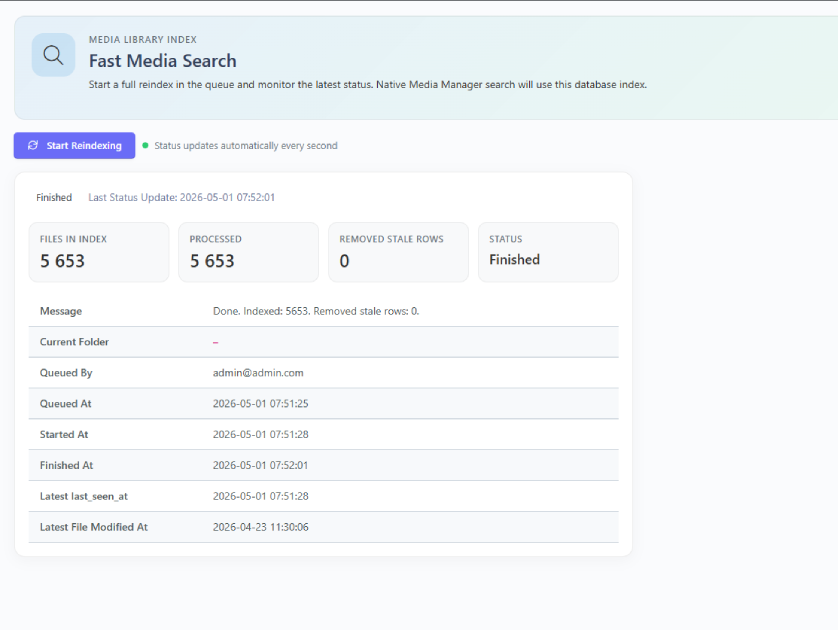
From there, administrators can start a full reindex in the background queue and monitor the current status.
The status panel shows:
- Current rebuild state
- Number of indexed files
- Number of processed files
- Number of removed stale records
- Current folder being processed
- Start and finish timestamps
- Error details if the job fails
Automatic index updates
After the first full reindex, Fast Media Search keeps the index up to date automatically.
The index is updated when files are:
- Uploaded
- Deleted
- Renamed
- Moved
Folder operations are also handled, including folder delete, rename, and move actions.
Requirements
| Requirement | Version |
|---|---|
| October CMS | 4.x |
| PHP | 8.2 or higher |
| Database | MySQL or compatible database |
| Queue worker | Recommended for background reindexing |
When should you use it?
Fast Media Search is useful when:
- The Media Library contains many files
- Search in the Media Manager feels slow
- Media files are stored on remote storage
- Editors frequently search for documents, images, videos, or other uploaded files
- You want to keep the native October CMS Media Manager UX
- You need a background reindexing workflow
Troubleshooting
Search returns no results
Run the first full reindex from:
Settings > Media > Fast Media Search
Also make sure the backend user has the required plugin permissions.
Reindex is stuck in queued state
Check that a queue worker is running:
php artisan queue:work --queue=default --timeout=0
Also check your queue connection in the application environment configuration.
Reindex fails
Open the Fast Media Search settings page and check the error message in the status panel.
You can also check the failed jobs table and application logs.
The settings page is not visible
Make sure the backend user has permission to manage the media index.
Notes
Fast Media Search indexes file information used for searching. It does not move, modify, or replace your media files.
The plugin keeps using October CMS Media Library for file URLs, thumbnails, file actions, and native Media Manager behavior.
Installation via Command Line
php artisan plugin:install Ormid.FastMediaSearch
Installation
Install the plugin from the October CMS Marketplace, then run migrations:
php artisan october:migrate
After installation, open:
Settings > Media > Fast Media Search
Then click:
Start Reindex
Queue worker
For large media libraries, reindexing should be processed by a queue worker.
Example:
php artisan queue:work --queue=default --timeout=0
If the queue connection is set to sync, the rebuild job may run inside the HTTP request. For production websites, use a real queue driver and a supervisor process.
Console command
Developers can also rebuild the index from the command line:
php artisan media-index:rebuild
This is useful for deployments, scheduled maintenance, and server-side automation.
Permissions
The plugin adds backend permissions for controlling access to search and index management.
Administrators can grant users access to the search interface and the reindex management page from the backend user permissions screen.
-
This plugin has not been reviewed yet.
-
| 1.1.0 |
First version of Fast Media Search May 01, 2026 |
|---|