

Overview
Redmine is a full-featured integration plugin that connects your October CMS website with a Redmine project management instance. It provides a customer support desk for your frontend users and a complete API wrapper for developers.
Support Desk
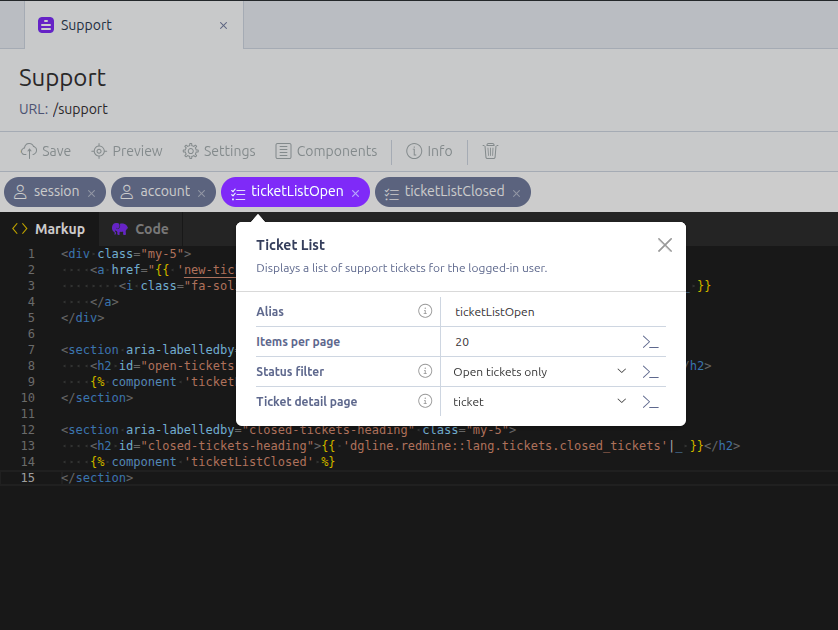
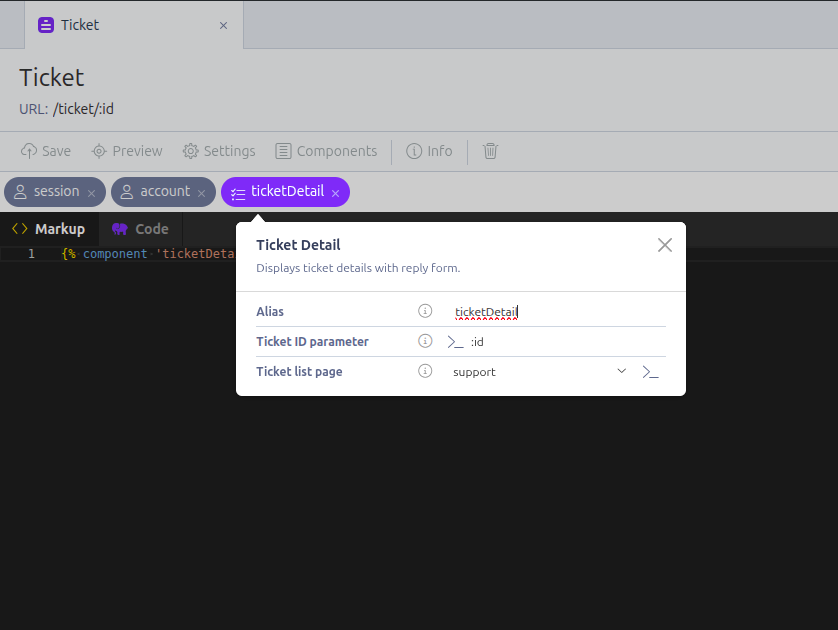
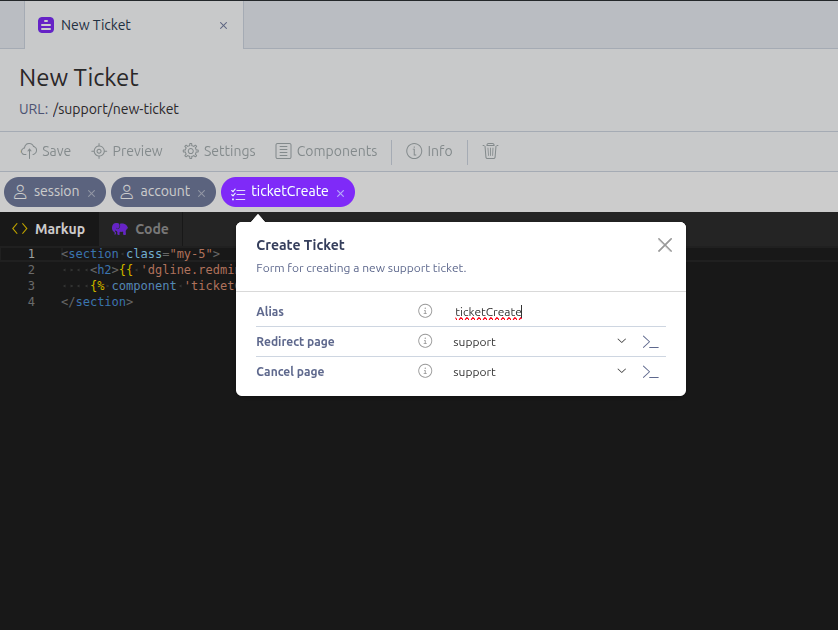
The plugin includes three ready-to-use components for building a support portal:
- Ticket List — Displays all tickets submitted by the logged-in user, with pagination, search by subject, and status filtering (open, closed, or all).
- Ticket Detail — Shows a single ticket with its full conversation history (journals) and attachments. Users can reply and attach files directly from the frontend.
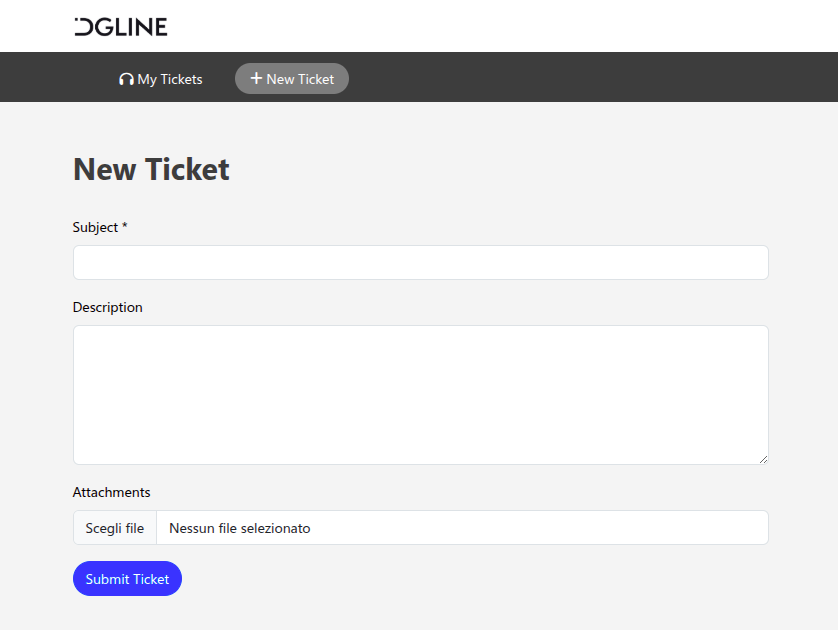
- Ticket Create — A form for submitting new support tickets with subject, description, and file attachments.
Each component is fully configurable from the CMS editor: choose which pages to link together (detail page, list page, cancel page, redirect after creation), set items per page, and select status filters — all without writing code.
How It Works
Frontend users are mapped to Redmine accounts through an automatic user mapping system. When a user submits or views a ticket, the plugin impersonates them on the Redmine side using the X-Redmine-Switch-User header. This means tickets are created and visible under the correct Redmine user, while your admin API key handles authentication.
Requires RainLab.User for frontend authentication.
Configuration
- Go to Settings > Redmine in the backend.
- Enter your Redmine URL and API key (must have admin privileges for impersonation).
- Optionally set a default Project ID, Tracker ID, and Priority ID for new tickets created from the support desk.
SSL verification options can be configured via environment variables (REDMINE_VERIFY_HOST, REDMINE_VERIFY_PEER).
API Wrapper for Developers
Beyond the support desk, the plugin exposes 22 typed API endpoints through a fluent PHP interface and static facades:
Issues, Projects, Users, Uploads, Attachments, Time Entries, Memberships, Versions, Wiki Pages, News, Issue Statuses, Issue Relations, Issue Categories, Trackers, Enumerations, Queries, Roles, Groups, Custom Fields, Search, Files, and My Account.
All endpoints support named parameters, filtering, pagination, and includes. Example:
use Redmine\Facades\Issues;

$issues = Issues::all(projectId: 1, statusId: 'open', sort: 'updated_on:desc');
$issue = Issues::find(123, include: ['journals', 'attachments']);
Supported Languages
The plugin is fully translated in: English, Italian, German, French, Spanish, Portuguese, Russian, Arabic, Hindi, Japanese, and Chinese.
Requirements
- October CMS 3.x or higher
- PHP 8.0 or higher
- Redmine 4.0 or higher
- A Redmine API key with admin privileges (required for user impersonation)
The following plugin is required

Installation via Command Line
php artisan plugin:install DGline.Redmine
Documentation
Configuration
Go to Settings > Redmine in the October CMS backend and fill in:
| Field | Description |
|---|---|
| Host | Your Redmine instance URL (e.g., https://redmine.example.com) |
| API Key | A Redmine API key with admin privileges (required for user impersonation) |
| Project ID | Default project ID for new tickets (optional) |
| Default Tracker ID | Tracker ID assigned to tickets created from the support desk (optional) |
| Default Priority ID | Priority ID assigned to tickets created from the support desk (optional) |
Environment Variables
SSL verification can be configured via environment variables:
REDMINE_VERIFY_HOST=true
REDMINE_VERIFY_PEER=true
User Mapping
The plugin maps October CMS frontend users to Redmine accounts through the dgline_redmine_user_map database table. Each record links an October CMS user_id to a redmine_user_id and redmine_login.
When a frontend user accesses a component, the plugin resolves the mapping automatically and impersonates the Redmine user via the X-Redmine-Switch-User header. If no mapping exists for a user, it is created automatically by looking up the user's email in Redmine.
This requires the RainLab.User plugin.
Components
TicketList
Displays a paginated list of support tickets authored by the logged-in user.
Properties
| Property | Type | Default | Description |
|---|---|---|---|
itemsPerPage |
string | 20 |
Number of tickets per page |
statusFilter |
dropdown | * |
Filter by status: * (all), open, closed |
ticketPage |
dropdown | — | CMS page used to display ticket details |
Page Variables
| Variable | Type | Description |
|---|---|---|
__SELF__.tickets |
array | Ticket data for the current page (see structure below) |
__SELF__.detailPage |
string | The configured ticket detail page name |
__SELF__.perPageOptions |
array | Available page size options: [10, 20, 50, 100] |
The tickets variable has the following structure:
tickets.items     - Array of Redmine issue objects
tickets.total     - Total number of matching tickets
tickets.page      - Current page number
tickets.lastPage  - Last page number
tickets.limit     - Current page size
tickets.search    - Current search query
AJAX Handlers
onChangePage — Reloads the ticket list with new pagination, search, or page size.
POST parameters:
page(int) — Page number (default: 1)limit(int) — Items per page (default: value ofitemsPerPageproperty)search(string) — Search query to filter by subject
Example
url = "/tickets"

[ticketList]
itemsPerPage = 20
statusFilter = "open"
ticketPage = "ticket-detail"
==
{% component 'ticketList' %}
TicketDetail
Displays a single ticket with its journals (conversation history) and attachments. Users can reply to the ticket and attach files.
Only tickets authored by the logged-in user are accessible. If the ticket does not exist or belongs to another user, a 404 page is returned.
Properties
| Property | Type | Default | Description |
|---|---|---|---|
slug |
string | {{ :id }} |
URL parameter for the ticket ID |
listPage |
dropdown | — | CMS page for the "back to list" link |
Page Variables
| Variable | Type | Description |
|---|---|---|
ticket |
array|null | The Redmine issue object with journals and attachments included |
listPage |
string | The configured ticket list page name |
The ticket variable contains the full Redmine issue data, including:
ticket.id              - Issue ID
ticket.subject         - Issue subject
ticket.description     - Issue description
ticket.status.name     - Status name
ticket.status.is_closed - Whether the status is closed
ticket.author.name     - Author display name
ticket.created_on      - Creation date (ISO 8601)
ticket.updated_on      - Last update date (ISO 8601)
ticket.journals[]      - Array of journal entries (replies)
ticket.attachments[]   - Array of file attachments
AJAX Handlers
onReply — Submits a reply to the ticket with optional file attachments.
POST parameters:
notes(string, required) — Reply textattachments[](files, optional) — File attachments
On success, a flash message is displayed and the ticket data is reloaded.
Example
url = "/tickets/:id"

[ticketDetail]
slug = "{{ :id }}"
listPage = "tickets"
==
{% component 'ticketDetail' %}
TicketCreate
Form for creating new support tickets with subject, description, and file attachments.
Properties
| Property | Type | Default | Description |
|---|---|---|---|
redirectPage |
dropdown | — | CMS page to redirect to after ticket creation (receives the new ticket id as URL parameter) |
cancelPage |
dropdown | — | CMS page for the cancel button |
Page Variables
| Variable | Type | Description |
|---|---|---|
cancelPage |
string | The configured cancel page name |
AJAX Handlers
onSubmit — Creates a new ticket in Redmine.
POST parameters:
subject(string, required) — Ticket subjectdescription(string, optional) — Ticket descriptionattachments[](files, optional) — File attachments
The ticket is created under the configured project with the default tracker and priority (if set in backend settings). On success, a flash message is displayed and the user is redirected to redirectPage if configured.
Example
url = "/tickets/new"

[ticketCreate]
redirectPage = "ticket-detail"
cancelPage = "tickets"
==
{% component 'ticketCreate' %}
API Usage
Static Facades
The plugin provides static facades under the Redmine\Facades namespace for quick access to all endpoints:
use Redmine\Facades\Issues;
use Redmine\Facades\Projects;
use Redmine\Facades\Users;

// List open issues
$issues = Issues::all(statusId: 'open', projectId: 1, sort: 'updated_on:desc');

// Get single issue with journals
$issue = Issues::find(123, include: ['journals', 'attachments']);

// Create issue
$newIssue = Issues::create(
    projectId: 1,
    subject: 'Bug report',
    description: 'Steps to reproduce...',
    trackerId: 1,
    priorityId: 2,
);

// Update issue
Issues::update(id: 123, statusId: 2, notes: 'Fixed in v1.2');

// Delete issue
Issues::destroy(123);
Direct Client Usage
For impersonation or more control, use the Client class directly:
use DGline\Redmine\Classes\Api\Client;

$client = new Client();

// Impersonate a user (sets X-Redmine-Switch-User header)
$client->impersonate('johndoe');
$issues = $client->issues()->all(authorId: 'me');
$client->uploads()->upload($fileContent, 'document.pdf');

// Clear impersonation
$client->impersonate(null);
Available Endpoints
All endpoints are accessible via $client->methodName() or their corresponding facade:
| Client Method | Facade | Description |
|---|---|---|
issues() |
Issues |
CRUD, watchers |
projects() |
Projects |
CRUD, archive/unarchive |
users() |
Users |
CRUD, current user |
uploads() |
Uploads |
File upload |
attachments() |
Attachments |
Download, delete |
timeEntries() |
TimeEntries |
CRUD |
memberships() |
Memberships |
CRUD |
versions() |
Versions |
CRUD |
wikiPages() |
WikiPages |
CRUD |
news() |
News |
CRUD |
issueStatuses() |
IssueStatuses |
List |
issueRelations() |
IssueRelations |
CRUD |
issueCategories() |
IssueCategories |
CRUD |
trackers() |
Trackers |
List |
enumerations() |
Enumerations |
Priorities, activities, categories |
queries() |
Queries |
List |
roles() |
Roles |
List, find |
groups() |
Groups |
CRUD, members |
customFields() |
CustomFields |
List |
search() |
Search |
Full-text search |
files() |
Files |
List, upload |
myAccount() |
MyAccount |
Current user account |
Issues API Reference
Filters
| Parameter | Description |
|---|---|
offset |
Skip N issues (pagination) |
limit |
Number of issues per page (max: 100) |
sort |
Sort column (e.g., priority:desc, updated_on) |
include |
Associated data: attachments, relations, journals, watchers |
projectId |
Filter by project ID |
statusId |
Filter by status: open, closed, *, or numeric ID |
assignedToId |
Filter by assignee (me for current user) |
authorId |
Filter by author ID |
trackerId |
Filter by tracker ID |
priorityId |
Filter by priority ID |
createdOn |
Filter by creation date (e.g., >=2024-01-01) |
updatedOn |
Filter by update date |
customFields |
Array of custom field filters (e.g., ['cf_1' => 'value']) |
Watchers
Issues::addWatcher(issueId: 123, userId: 5);
Issues::removeWatcher(issueId: 123, userId: 5);
Projects API Reference
Include Options
trackers— Project trackersissue_categories— Issue categoriesenabled_modules— Enabled modulestime_entry_activities— Time entry activities (Redmine 3.4+)issue_custom_fields— Issue custom fields (Redmine 4.2+)
Archive/Unarchive (Redmine 5.0+)
Projects::archive('my-project');
Projects::unarchive('my-project');
Users API Reference
Status Constants
use Redmine\Facades\Users;

Users::STATUS_ACTIVE     // 1 - Can login
Users::STATUS_REGISTERED // 2 - Email not confirmed
Users::STATUS_LOCKED     // 3 - Cannot login
Error Handling
All API errors throw ApplicationException with translated messages:
use ApplicationException;

try {
    $issue = Issues::find(99999);
} catch (ApplicationException $e) {
    // "Redmine API Error: 404 - Not Found"
    Log::error($e->getMessage());
}
Console Commands
Test API Connection
php artisan redmine:test
Tests the API connection and displays issues assigned to the current user, projects, and current user information.
-
This plugin has not been reviewed yet.
-
| 2.0.0 |
Add client impersonation support and typed endpoint usage in components Feb 17, 2026 |
|---|---|
| 1.1.0 |
Add user-Redmine mapping table for support desk Feb 17, 2026 |
| 1.0.1 |
Initialize plugin Feb 17, 2026 |