
eCommerce for October CMS v4.2 is here!
Posted in Announcements on Mar 20, 2026
Hello everyone! We're excited to announce October CMS version 4.2, and this one is special. Alongside a major modernization of the frontend architecture, we're launching Meloncart, a full eCommerce platform built natively on October CMS.
Let's dive in.
Meloncart: eCommerce Made for Developers
Meet Meloncart, an eCommerce platform built from the ground up for October CMS. It gives you a complete online store (products, orders, payments, shipping, customers, and a full admin panel) without giving up creative control over your storefront.

If you've ever wrestled with a SaaS platform's rigid templates or tried to bend a WordPress shop plugin into something custom, Meloncart is the alternative you've been waiting for. Every line of your storefront's HTML, CSS, and JavaScript is yours to write. File-based Twig templates live on disk, editable in your IDE, trackable with Git, and deployable with your existing workflow. No locked-in editors, no vendor lock-in, no platform fees.
Out of the box you get a full product catalog with variants, options, tier pricing, reviews, and multi-image galleries. Orders are managed through configurable status workflows with refunds, packing slips, email notifications, and digital download fulfillment. Payments ship with Stripe, PayPal, and offline gateways, plus a clean driver API for building your own. Shipping supports table rates and real-time carrier rates from UPS, FedEx, USPS, DHL, and more, with tracking and label printing built in.
There's also a complete customer system with accounts, groups, address books, wishlists, and two-factor authentication. A promotion engine handles coupon codes, cart and catalog price rules with a visual condition builder. And for agencies managing multiple brands, Meloncart supports multiple storefronts, languages, and currencies from a single installation.
It's built on the same tools you already know: Laravel, Eloquent, Composer, Twig, and the October CMS component system. Over 50 event hooks let you extend any part of the commerce pipeline without touching core code. And because it's an October CMS plugin, you can add it to your project and start building immediately.
Head to the Meloncart documentation to learn more and get started.
Vue 3 is Here
The backend administration panel now runs on Vue 3. This isn't just a version bump, it's a complete overhaul of the Vue layer that powers the editor, dashboard, and interactive components throughout the admin.
Vue 3 brings improved performance, better TypeScript support, and a more flexible component model. If your plugins include custom Vue components, you'll want to review the v4.2 Release Notes for migration details.
No More Build Tools
This is where things get interesting. October CMS v4.2 delivers JavaScript using native browser ES Modules. No Webpack. No Laravel Mix. No bundling step.
Write modern JavaScript with clean imports:
import { createApp } from 'vue';
import Sortable from 'sortablejs';
And it just works. The browser handles module resolution natively using an import map that ships with the backend. Your code runs without transpilation, and debugging happens against your actual source files, no source maps needed.
For plugin developers, this simplifies things considerably. Write ES module syntax, and you're done. No build configuration to maintain, no node_modules to wrestle with. We've removed Webpack, Laravel Mix, and all the legacy build configuration entirely. A lightweight esbuild script handles vendor builds when needed.
Build tools solved real problems when browsers didn't support modules natively. But that was years ago. Today, every major browser supports ES Modules, and HTTP/2 makes loading multiple small files efficient. We're betting on the platform, and for best performance, we recommend HTTP/2, which most modern hosting environments already support.
A Better Data Table
The Data Table form widget has been completely rebuilt with a modern, spreadsheet-like editing experience. If you've used the datatable field type before, you'll notice a big difference. It now feels like editing a real spreadsheet, complete with clipboard support for copying and pasting directly to and from Google Sheets and Excel.
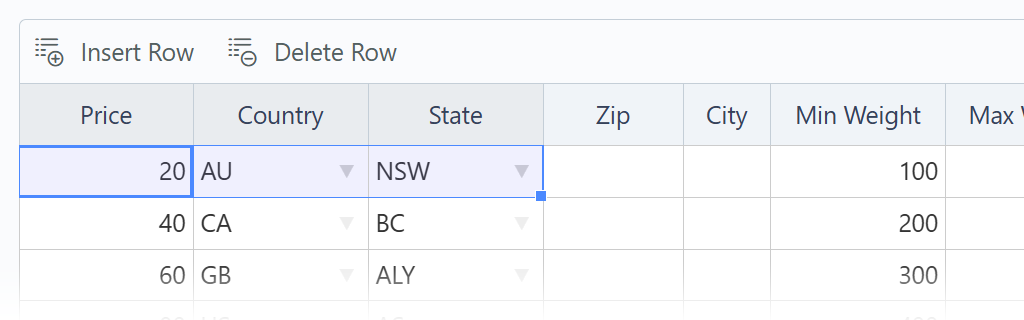
New column types include numeric, autocomplete, date, and time alongside the existing string, checkbox, and dropdown. Columns can depend on each other, so a "State" dropdown can automatically refresh its options when the "Country" changes. You also get right-click context menus, search filtering, manual column resizing, row reordering, and undo/redo, all built in.
The previous implementation is still available for backwards compatibility, but we recommend migrating to the new version. See the Data Table documentation for the full details.
Quick Create for Relations
Ever been filling out a form, reached a relation dropdown, and realized the record you need doesn't exist yet? Now you don't have to leave the page. The Relation widget supports a new quickCreate property that adds a "Create New" option directly in the dropdown. Select it, a popup form appears, and once saved the dropdown refreshes with the new record selected.
manufacturer:
    label: Manufacturer
    type: relation
    nameFrom: title
    quickCreate: $/acme/shop/models/manufacturer/fields.yaml
It's a small addition that removes a common friction point. You can customize the popup title, size, and more. See the Relation widget documentation for the full details.
Quick Translation for Form Fields
If you used October CMS v1 with the Translate plugin, you'll remember the convenience of translating fields directly on the form. That workflow is back, and it's built into the core.
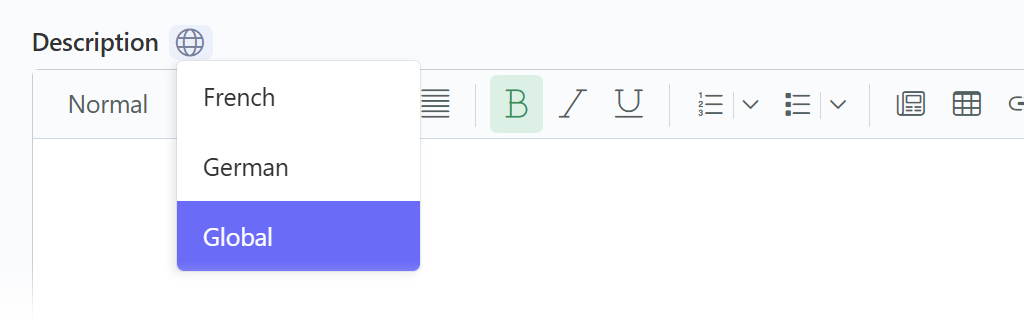
Any form field can now be marked as translatable. When it is, a globe icon appears next to the field label. Click it, pick a locale, and a popup opens where you can view and edit that locale's translation right there on the page, without navigating away.
This works with every field type: text inputs, textareas, rich editors, repeaters, anything the Form widget can render. It's compatible with both Multisite and RainLab.Translate, detecting which approach your model uses and handling the save logic accordingly.
Built-in Model Translations
Translation support is now built into the core. No plugins required, no dependencies to manage. Just add a trait to your model and your attributes are translatable.
use \October\Rain\Database\Traits\Translatable;

public $translatable = ['name', 'description', 'slug'];
That's it. The trait handles everything: reading translated values based on the active site locale, falling back to the default when a translation doesn't exist, and storing translations efficiently. For single-locale installs, it's invisible with zero extra queries and zero overhead. When multiple locales are active, you get eager loading, query scopes for filtering and sorting by translated values, and full control over locale context.
This doesn't replace the RainLab.Translate plugin. The two systems are completely independent with separate tables, separate APIs, and no interference. The core trait is simply a new option for plugin authors who want translation support with zero dependencies. For the full API reference and migration guide, see the Translatable documentation.
Updated Docker Toolkit

We've rebuilt our Docker offering from the ground up. There are now two ways to run October CMS with Docker, both living in a single repository.
Pull and run a pre-built image to try October CMS instantly:
docker run -d -p 8080:80 octobercms/october:latestOpen http://localhost:8080 and you have a working October CMS installation with PHP 8.4, Apache, and MariaDB, all in one container. Great for evaluation, demos, and quick experiments.
For real projects, the new CLI toolkit gives you a persistent, multi-container environment with Xdebug, Redis, and proper service isolation:
git clone https://github.com/octobercms/docker.git
cd docker
./october-setup myapp
./launcher start myapp
The launcher script manages the full lifecycle: start, stop, enter a shell, view logs, open VS Code attached to the container, and more. Run multiple sites side by side, each with isolated containers and data. On Windows, the toolkit runs inside WSL 2 and can mount your sites as a Windows drive via Samba for seamless access with native tools.
Both the demo image and the CLI toolkit use MariaDB 10.11 (pinned to prevent version drift) and PHP 8.4. See the Docker page for setup instructions.
Security Improvements
This release includes security hardening for editor content and the event log mail preview. The rich editor and code editor settings now include secure defaults for HTML tag and attribute allowlists.
Other Improvements
We've highlighted the standout features in this release, but there's more to discover. Be sure to read the v4.2 Release Notes to learn about all the changes, including migration details and compatibility notes.
To upgrade, run:
composer update
php artisan october:migrate
If you encounter plugin compatibility issues, you can pin to v4.1:
"require": {
    "october/all": "4.1.*",
    "october/rain": "4.1.*"
}
We hope you enjoy this release and we can't wait to see what you build with Meloncart! Your feedback is invaluable to us, so please don't hesitate to share your thoughts.
- v4.2 Release Notes - Read the technical notes
- October CMS Discord - Join our community chat
- October CMS Forum - Discuss and get support