


Manage Content Security Policy headers, security headers, and automatic nonce injection for inline scripts — all from the October CMS backend.
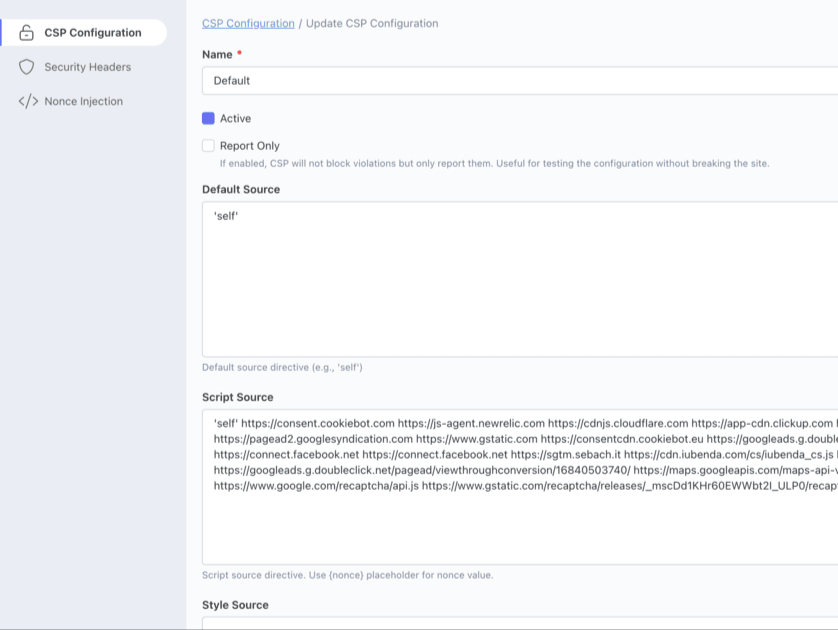
| CSP Directives | Configure script-src, style-src, img-src, connect-src, and more |
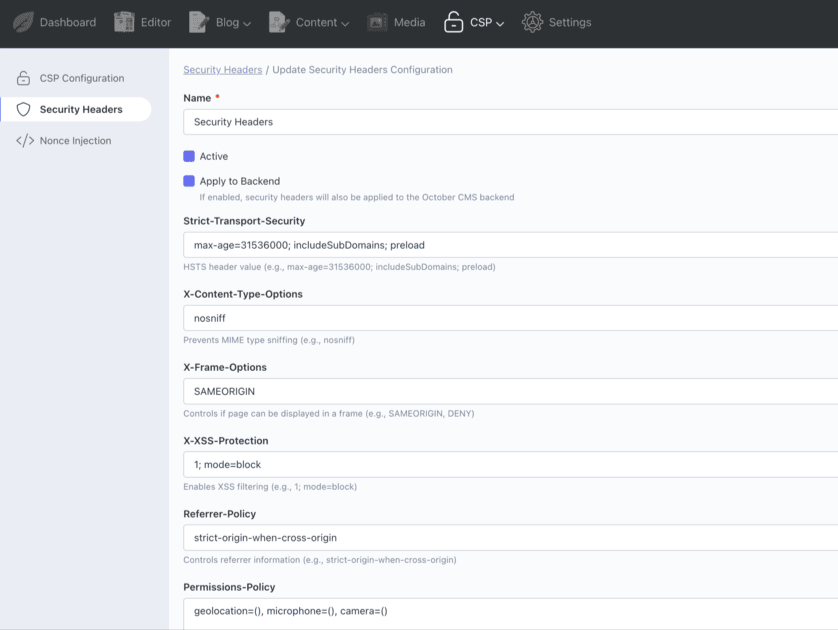
| Security Headers | HSTS, X-Frame-Options, X-Content-Type-Options, Referrer-Policy |
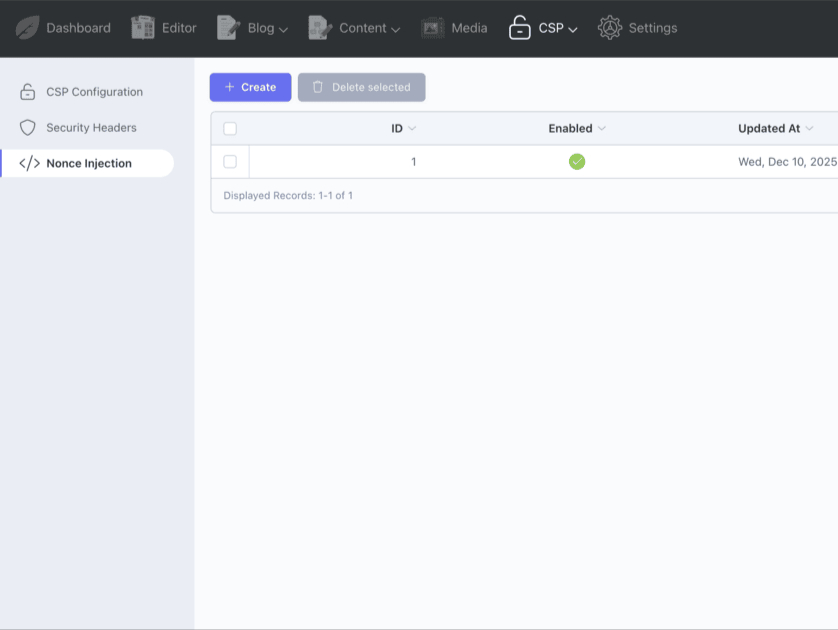
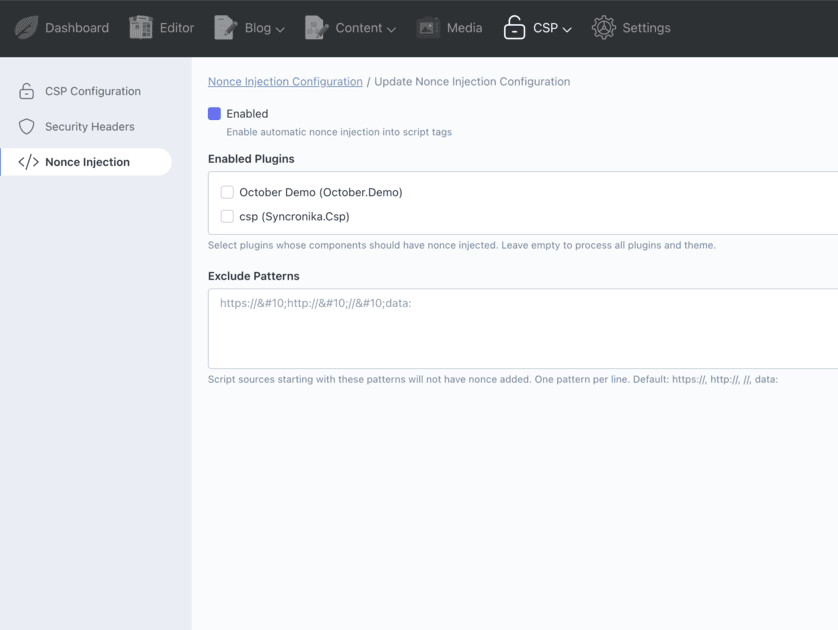
| Nonce Injection | Automatic nonce insertion for inline scripts |
| Report-Only Mode | Test your CSP safely before enforcing it |
| Violation Reports | Built-in /csp-report endpoint with logging |
Fully compatible with October CMS 3.x and 4.x, PHP 8.0+.
Available in 7 languages: English, Italian, German, French, Spanish, Portuguese, Russian.
Installation via Command Line
php artisan plugin:install Syncronika.Csp
A comprehensive Content Security Policy (CSP) management plugin for October CMS. Configure CSP directives, security headers, and automatic nonce injection for inline scripts — all from the backend.
Features
| CSP Header Builder | Configure all CSP directives via an intuitive GUI |
| Automatic Nonce Injection | Injects nonces into inline <script> tags automatically |
| Security Headers | Manage HSTS, X-Frame-Options, X-Content-Type-Options, Referrer-Policy, Permissions-Policy |
| Report-Only Mode | Test your CSP without breaking your site |
| CSP Violation Reports | Built-in endpoint to receive and log CSP violations |
| Multi-language | English, Italian, German, French, Spanish, Portuguese, Russian |
Configuration
CSP Configuration
Navigate to Backend → CSP → CSP Configuration to configure your Content Security Policy directives:
default-src |
Fallback for other directives |
script-src |
Valid sources for JavaScript |
style-src |
Valid sources for stylesheets |
img-src |
Valid sources for images |
connect-src |
Valid sources for fetch, XHR, WebSocket |
font-src |
Valid sources for fonts |
frame-src |
Valid sources for iframes |
media-src |
Valid sources for audio/video |
object-src |
Valid sources for plugins |
report-uri |
Endpoint for violation reports |
Enable Report-Only mode first to test your policy without breaking functionality.
Security Headers
Navigate to Backend → CSP → Security Headers to configure additional security headers:
Strict-Transport-Security |
HSTS - Forces HTTPS connections |
X-Frame-Options |
Prevents clickjacking attacks |
X-Content-Type-Options |
Prevents MIME type sniffing |
X-XSS-Protection |
Enables browser XSS filter |
Referrer-Policy |
Controls referrer information |
Permissions-Policy |
Controls browser features (camera, microphone, etc.) |
Nonce Injection
Navigate to Backend → CSP → Nonce Injection to enable automatic nonce injection. The plugin will automatically add nonces to inline <script> tags.
You can configure exclusion patterns to skip external scripts (e.g., https://, http://, //, data:).
Usage in Templates
The plugin exposes a cspNonce variable to all views:
<script nonce="{{ cspNonce }}">
console.log('This script has a valid nonce!');
</script>
For dynamically created scripts (e.g., Google Tag Manager), expose the nonce globally:
<script nonce="{{ cspNonce }}">
window.cspNonce = '{{ cspNonce }}';
</script>
Then use it when creating scripts dynamically:
var script = document.createElement('script');
script.nonce = window.cspNonce;
script.src = 'https://example.com/script.js';
document.head.appendChild(script);
CSP Violation Reports
The plugin creates an endpoint at /csp-report to receive CSP violation reports. Violations are logged to storage/logs/csp.log.
To enable reporting, set in your CSP configuration:
report-uri: /csp-report
Requirements
| October CMS 3.x | ✓ Fully tested |
| October CMS 4.x | ✓ Fully tested |
| PHP | 8.0 or higher |
Support
For support, feature requests, or bug reports, please contact us at syncronika.it.
-
This plugin has not been reviewed yet.
-
| 1.1.1 |
Fix nonce injection behavior in NonceInjector May 06, 2026 |
|---|---|
| 1.1.0 |
Add frame-ancestors CSP directive (OWASP recommendation) Feb 20, 2026 |
| 1.0.9 |
Updated logging policies for CSP violations and errors Jan 29, 2026 |
| 1.0.8 |
Update version history Dec 18, 2025 |
| 1.0.7 |
Fix plugin installation path in composer.json Dec 18, 2025 |
| 1.0.6 |
Add PSR-4 autoload configuration for OctoberCMS marketplace Dec 18, 2025 |
| 1.0.5 |
Add report_only flag to CSP Config Dec 10, 2025 |
| 1.0.4 |
Add Nonce Injection Configuration Dec 10, 2025 |
| 1.0.3 |
Add apply_to_backend flag to Security Headers Dec 10, 2025 |
| 1.0.2 |
First version of Security Headers Dec 10, 2025 |
| 1.0.1 |
First version of CSP Config Dec 10, 2025 |
Upgrading to 1.0.x
This is the initial release. No upgrade steps required.
General Upgrade Steps
- Go to Settings → Updates & Plugins
- Click Check for updates
- Apply the plugin update
- Clear the application cache:
php artisan cache:clear
Your existing CSP configurations will be preserved during updates.