

Auth0 Integration for RainLab.User
This plugin extends the RainLab.User plugin to support Auth0 as an identity provider, allowing users to login using their Auth0 accounts.
Features
- Single Sign-On (SSO): Users can login using their Auth0 accounts
- Auto User Creation: Automatically create user accounts on first Auth0 login
- Profile Sync: Sync user profile data from Auth0
- Flexible Authentication: Support both traditional login and Auth0 login
- User Group Assignment: Automatically assign new users to a default group
- Backend Configuration: Easy configuration through October CMS backend
The following plugin is required

Installation via Command Line
php artisan plugin:install Albrightlabs.Auth0
Auth0 Integration for RainLab.User
This plugin extends the RainLab.User plugin to support Auth0 as an identity provider, allowing users to login using their Auth0 accounts.
Features
- Single Sign-On (SSO): Users can login using their Auth0 accounts
- Auto User Creation: Automatically create user accounts on first Auth0 login
- Profile Sync: Sync user profile data from Auth0
- Flexible Authentication: Support both traditional login and Auth0 login
- User Group Assignment: Automatically assign new users to a default group
- Backend Configuration: Easy configuration through October CMS backend
Installation
- The plugin has been created in
/plugins/albrightlabs/auth0/ - The required packages (Laravel Socialite and Auth0 provider) have been installed via Composer
Database Migration
Run the following command to create the necessary database fields:
php artisan october:migrate
This will add the following fields to the users table:
auth0_id- Unique Auth0 user identifierauth0_access_token- For API calls to Auth0auth0_refresh_token- For refreshing tokenssocial_avatar- User's profile picture from Auth0
Configuration
1. Auth0 Application Setup
- Log in to your Auth0 Dashboard
- Create a new Application (Regular Web Application)
- Configure the following settings:
- Allowed Callback URLs:
https://yoursite.com/auth0/callback - Allowed Logout URLs:
https://yoursite.com/ - Allowed Web Origins:
https://yoursite.com/
- Allowed Callback URLs:
2. Plugin Configuration
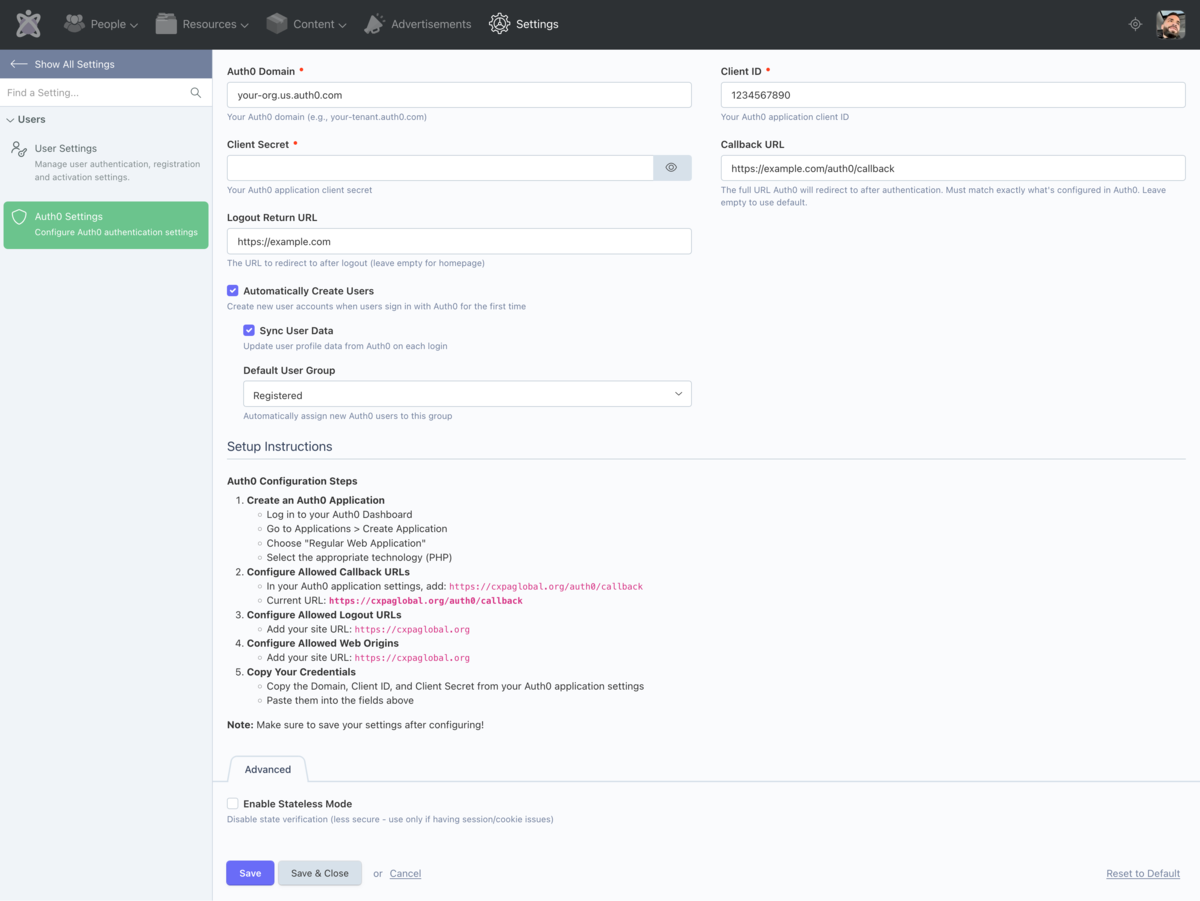
- Go to Settings > Users > Auth0 Settings in the October CMS backend
- Enter your Auth0 credentials:
- Domain: Your Auth0 domain (e.g.,
your-tenant.auth0.com) - Client ID: From your Auth0 application
- Client Secret: From your Auth0 application
- Domain: Your Auth0 domain (e.g.,
- Configure additional options:
- Automatically Create Users: Enable to create new users on first login
- Sync User Data: Update user profiles from Auth0 on each login
- Default User Group: Assign new users to a specific group
Usage
Adding Auth0 Login to Your Pages
Method 1: Using the Auth0Login Component
Add the auth0Login component to your page:
{% component 'auth0Login' %}
Component properties:
showTraditionalLogin- Show/hide traditional login formredirectAfterLogin- Page to redirect after successful loginbuttonText- Custom text for the Auth0 login buttonbuttonClass- CSS classes for the button
Method 2: Integrating with RainLab.User Authentication Component
If you're already using the RainLab.User authentication component, you can add the Auth0 button:
<!-- After your existing login form -->
{% partial '@auth0_button'
    buttonText="Login with Auth0"
    buttonClass="btn btn-primary btn-block"
%}
Method 3: Direct Links
You can also create direct links to Auth0:
- Login:
/auth0/login - Logout:
/auth0/logout
Example Page
title = "Login"
url = "/login"

[authentication]
[auth0Login]
redirectAfterLogin = "/account"
showTraditionalLogin = true
==
<div class="container">
    <div class="row">
        <div class="col-md-6 col-md-offset-3">
            <h2>Login</h2>

            <!-- Traditional login form -->
            {% component 'authentication' %}

            <!-- Auth0 login button -->
            {% component 'auth0Login' %}
        </div>
    </div>
</div>
How It Works
- User clicks "Login with Auth0": Redirected to Auth0 login page
- User authenticates: Auth0 validates credentials
- Auth0 redirects back: To
/auth0/callbackwith user data - Plugin processes callback:
- Finds existing user by Auth0 ID or email
- Creates new user if enabled and user doesn't exist
- Updates user profile data if sync is enabled
- Logs the user into October CMS
- User is redirected: To the intended page or configured redirect
Events
The plugin integrates with RainLab.User events:
rainlab.user.beforeAuthenticate- Intercepts Auth0 login attemptsrainlab.user.login- Fired after successful Auth0 login
Security Considerations
- Auth0 handles authentication security
- Access tokens are stored encrypted in the database
- CSRF protection is enabled for all Auth0 routes
- Users authenticated via Auth0 are marked as verified
Troubleshooting
Plugin not working after installation
- Clear application cache:
php artisan cache:clear - Ensure migrations have run:
php artisan october:migrate - Check Auth0 configuration in backend settings
Users can't login
- Verify Auth0 credentials are correct
- Check callback URL matches Auth0 application settings
- Ensure Auth0 domain includes protocol (https://)
- Check browser console for JavaScript errors
Profile data not syncing
- Enable "Sync User Data" in plugin settings
- Ensure Auth0 is returning user profile data
- Check user permissions in Auth0
Troubleshooting
Plugin not working after installation
- Clear application cache:
php artisan cache:clear - Ensure migrations have run:
php artisan october:migrate - Check Auth0 configuration in backend settings
Users can't login
- Verify Auth0 credentials are correct
- Check callback URL matches Auth0 application settings
- Ensure Auth0 domain includes protocol (https://)
- Check browser console for JavaScript errors
Profile data not syncing
- Enable "Sync User Data" in plugin settings
- Ensure Auth0 is returning user profile data
- Check user permissions in Auth0
Support
For issues or questions:
- Check Auth0 logs in your Auth0 Dashboard
- Review October CMS system logs
- Enable debug mode for detailed error messages
-
This plugin has not been reviewed yet.
-
| 1.1.0 |
Refactor plugin to be generic and reusable Aug 20, 2025 |
|---|---|
| 1.0.9 |
Increase social_avatar column length to handle long OAuth URLs Aug 20, 2025 |
| 1.0.8 |
Add Rhythm Membership and Certifications data fields Aug 20, 2025 |
| 1.0.7 |
Add Auth0 user info fields Aug 20, 2025 |
| 1.0.6 |
Add Rhythm contact ID field Aug 20, 2025 |
| 1.0.5 |
Add ID token field for Rhythm API authentication Aug 20, 2025 |
| 1.0.4 |
Add status column for Rhythm user status Aug 20, 2025 |
| 1.0.3 |
Add Rhythm API profile fields to users table Aug 20, 2025 |
| 1.0.2 |
Create default Members user group Aug 20, 2025 |
| 1.0.1 |
First version of Auth0 Integration Aug 20, 2025 |