


BlogPhotos for October CMS
Adds a Gallery tab to RainLab Blog posts and a frontend component for displaying the uploaded images.
Requirements
October CMS 4.2 RainLab Blog Installation Copy this plugin to:
plugins/nitro9net/blogphotos
Then refresh October CMS plugins from the backend or run:
php artisan october:migrate
Usage
Open a RainLab Blog post in the backend.
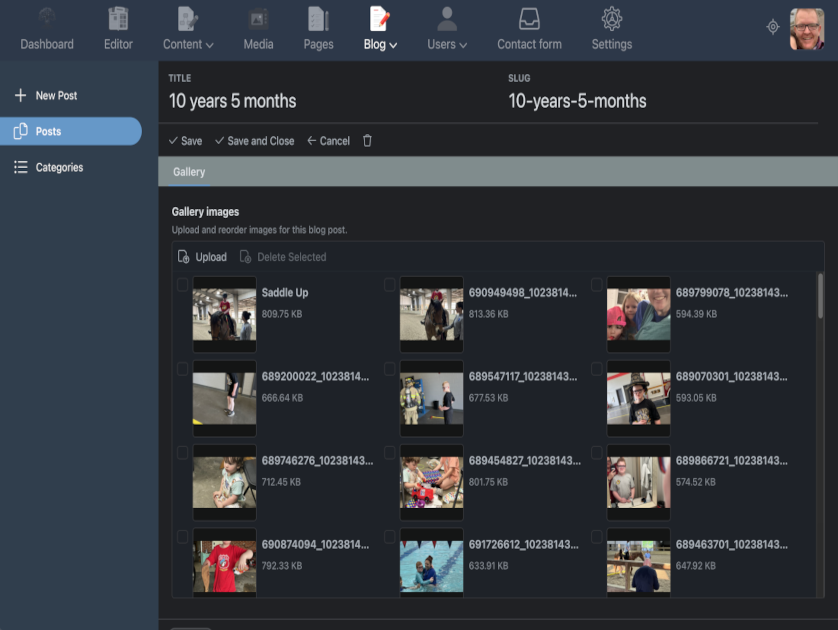
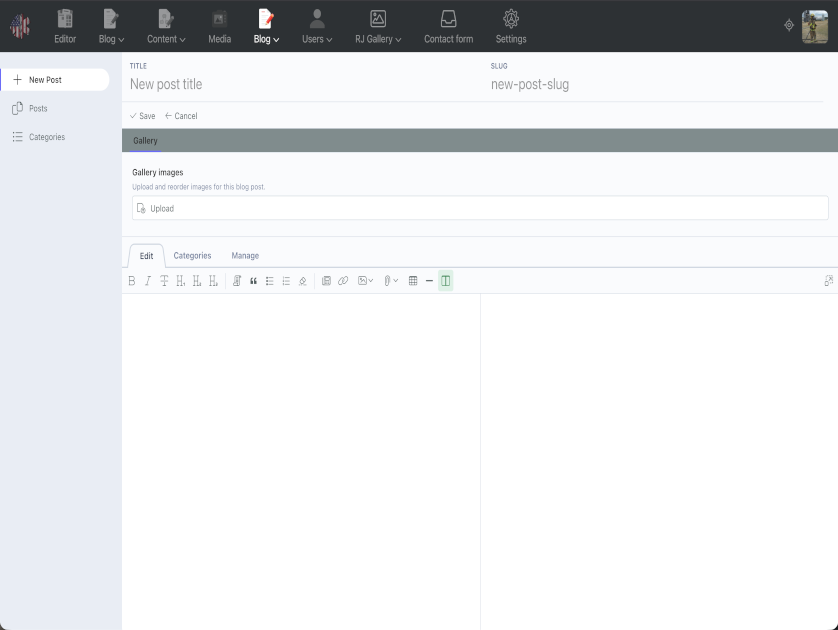
Use the Gallery tab to upload and reorder images.
Add the component to your blog post page after the blogPost component.
[blogPost]
slug = "{{ :slug }}"

[blogGallery]
slug = "{{ :slug }}"
postVariable = "post"
thumbWidth = 480
thumbHeight = 320
thumbMode = "crop"
includeCss = true
includeJs = true
{% component 'blogPost' %}
{% component 'blogGallery' %}
The component exposes galleryPost and galleryImages to the page if you want to build your own markup.
The default component markup shows equal-size smart-cropped thumbnails. Clicking a thumbnail opens a JavaScript lightbox with previous, next, and close controls. Keyboard users can use Escape, Left Arrow, and Right Arrow inside the lightbox.
Random photo
Use the randomBlogPhoto component to show one smart-cropped random image from any published blog post that has gallery images.
[randomBlogPhoto]
thumbWidth = 480
thumbHeight = 320
linkTo = "image"
postPage = "blog/post"
includeCss = true
{% component 'randomBlogPhoto' %}
Set linkTo to image, post, or none. When linking to a post, set postPage to the CMS page used for blog post details.
The component exposes galleryRandom to the page if you want to build your own markup. It includes photo, post, path, thumb, postUrl, caption, and alt.
Custom partial An example October CMS partial is included at:
plugins/nitro9net/blogphotos/examples/partials/random-blog-photo.htm
Copy it to your active theme's partials directory, then use it on a page where the randomBlogPhoto component is attached:
{% partial 'random-blog-photo' %}
The following plugin is required

Installation via Command Line
php artisan plugin:install Nitro9net.BlogPhotos
BlogPhotos for October CMS
Adds a Gallery tab to RainLab Blog posts and a frontend component for displaying the uploaded images.
Requirements
October CMS 4.2 RainLab Blog Installation Copy this plugin to:
plugins/nitro9net/blogphotos
Then refresh October CMS plugins from the backend or run:
php artisan october:migrate Usage
Open a RainLab Blog post in the backend.
Use the Gallery tab to upload and reorder images.
Add the component to your blog post page after the blogPost component.
[blogPost]
slug = "{{ :slug }}"

[blogGallery]
slug = "{{ :slug }}"
postVariable = "post"
thumbWidth = 480
thumbHeight = 320
thumbMode = "crop"
includeCss = true
includeJs = true
{% component 'blogPost' %}
{% component 'blogGallery' %}
The component exposes galleryPost and galleryImages to the page if you want to build your own markup.
The default component markup shows equal-size smart-cropped thumbnails. Clicking a thumbnail opens a JavaScript lightbox with previous, next, and close controls. Keyboard users can use Escape, Left Arrow, and Right Arrow inside the lightbox.
Random photo
Use the randomBlogPhoto component to show one smart-cropped random image from any published blog post that has gallery images.
[randomBlogPhoto]
thumbWidth = 480
thumbHeight = 320
linkTo = "image"
postPage = "blog/post"
includeCss = true

{% component 'randomBlogPhoto' %}
Set linkTo to image, post, or none. When linking to a post, set postPage to the CMS page used for blog post details.
The component exposes galleryRandom to the page if you want to build your own markup. It includes photo, post, path, thumb, postUrl, caption, and alt.
Custom partial An example October CMS partial is included at:
plugins/nitro9net/blogphotos/examples/partials/random-blog-photo.htm
Copy it to your active theme's partials directory, then use it on a page where the randomBlogPhoto component is attached:
{% partial 'random-blog-photo' %}
-
This plugin has not been reviewed yet.
-
| 1.1.0 |
Added randomBlogPhoto component for displaying one random gallery image from published blog posts. May 26, 2026 |
|---|---|
| 1.0.0 |
First version of BlogPhotos. May 26, 2026 |