

PUB Menu Creating & Managing
Daily and permanent menu management for a restaurant, pub or bar, with EU allergen declarations and a dish catalog that fills itself in.
PUB Menu Creating & Managing
Daily and permanent menu management for a restaurant, pub or bar, with EU allergen declarations and a dish catalog that fills itself in.
Pub Menu
Daily and permanent menu management for a restaurant, pub or bar.
The plugin is built around one idea: a kitchen should describe a dish once. You write the day's menu in the backend, and everything the dish needs — its price, its description, its allergens, whether it is vegan — is remembered for the next time you serve it.
Prepared for translation, backend included. English and Czech translations already created - Kompletně přeloženo do češtiny
Requirements
- October CMS 4.0 or above
- PHP 8.2 or above
ext-intl(optional) for correct Czech alphabetical ordering in the dish catalog. Without it the catalog still sorts, just by a simpler rule.
Installation
php artisan plugin:install WebBook.PubMenu
Installing seeds a working example: around forty dishes with real allergen declarations, a fortnight of daily menus centred on today, a drinks list and two weeks of "product of the week". Delete it once you have your own data in — nothing in the plugin depends on it.
How the pieces fit together
There are three things to manage, and they live on three backend pages.
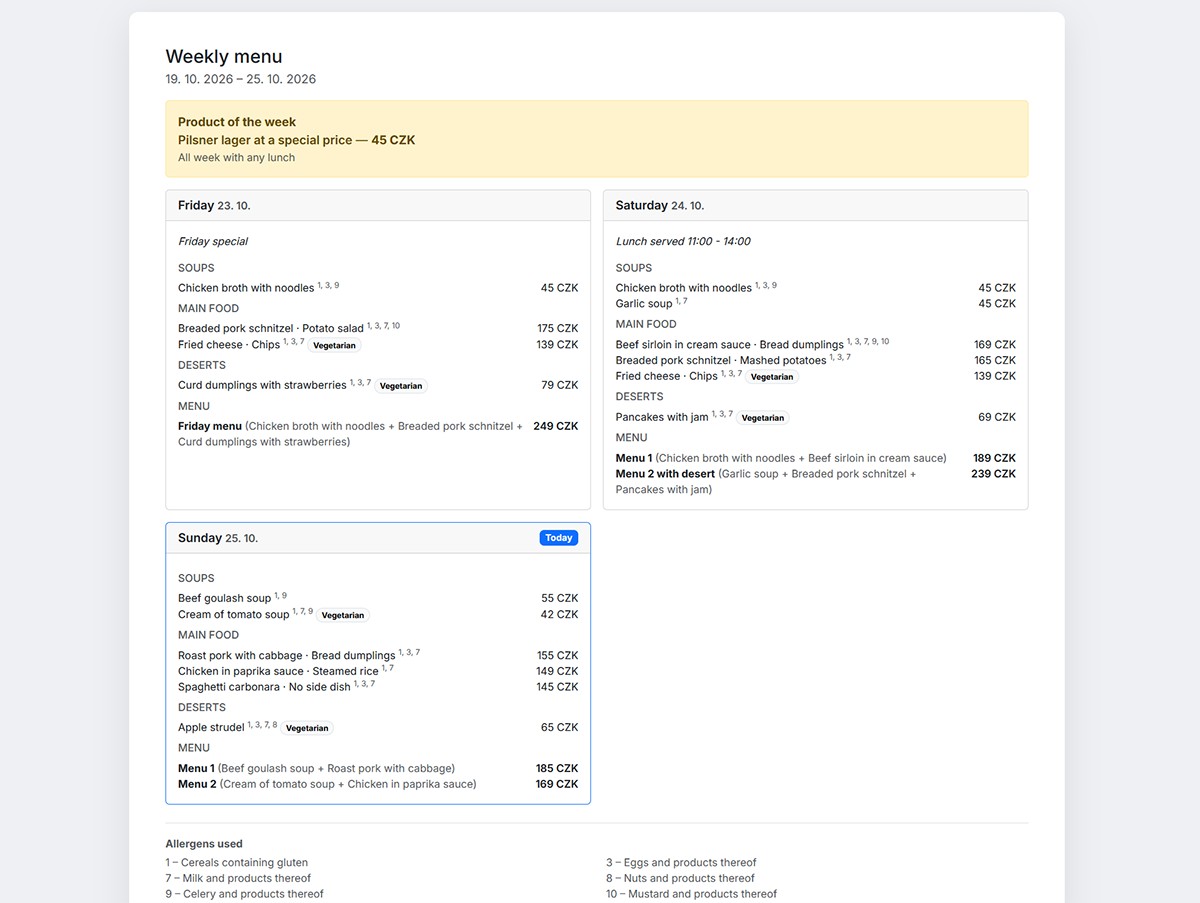
The daily menu is what changes every day: soups, main courses, deserts, and menus that combine them at a set price. You edit one day at a time.
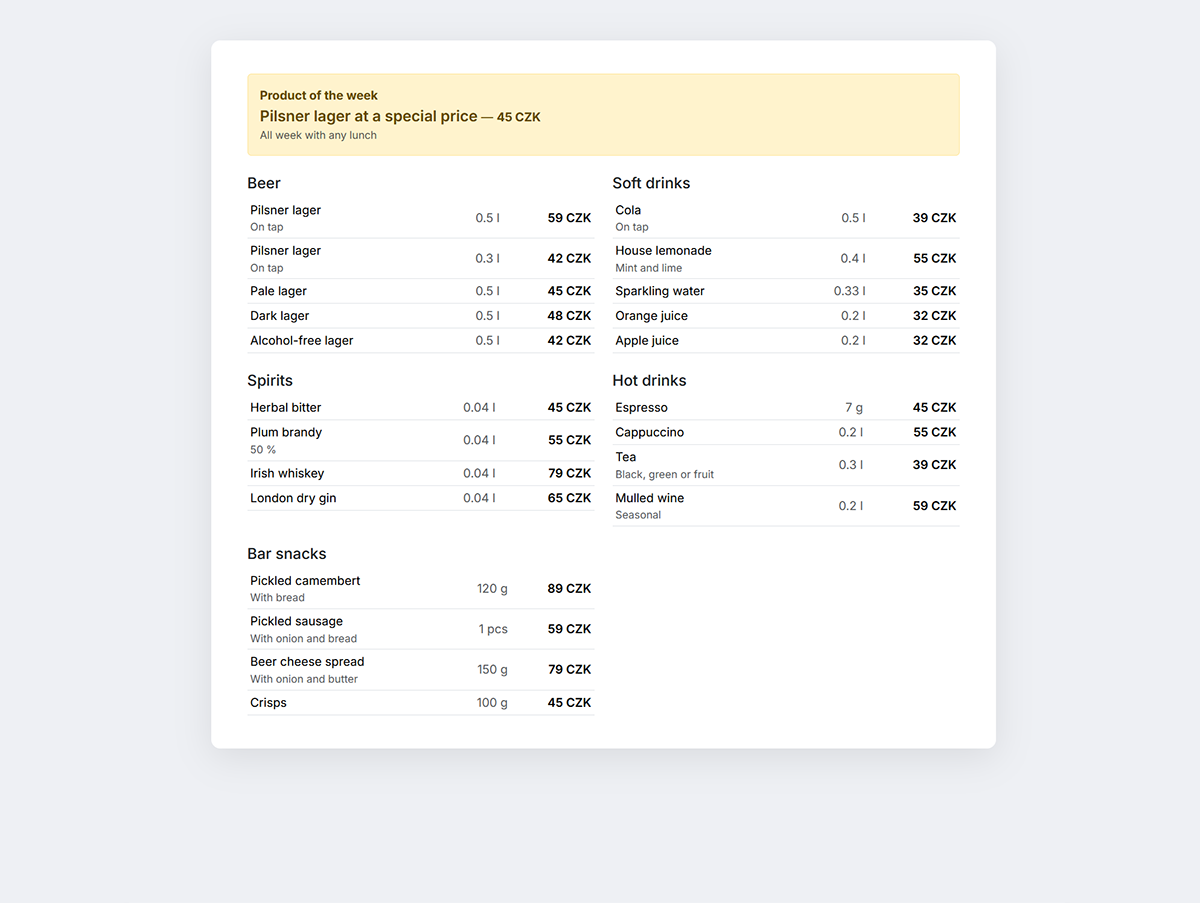
The stable menu is what does not change: the drinks list, the snacks, and the product of the week that runs Monday to Sunday.
The dish catalog is not something you manage directly at all, most of the time. It fills itself from the daily menus and feeds the autocomplete. The Saved items page exists for the occasions when you need to correct it.
Putting a menu on the website
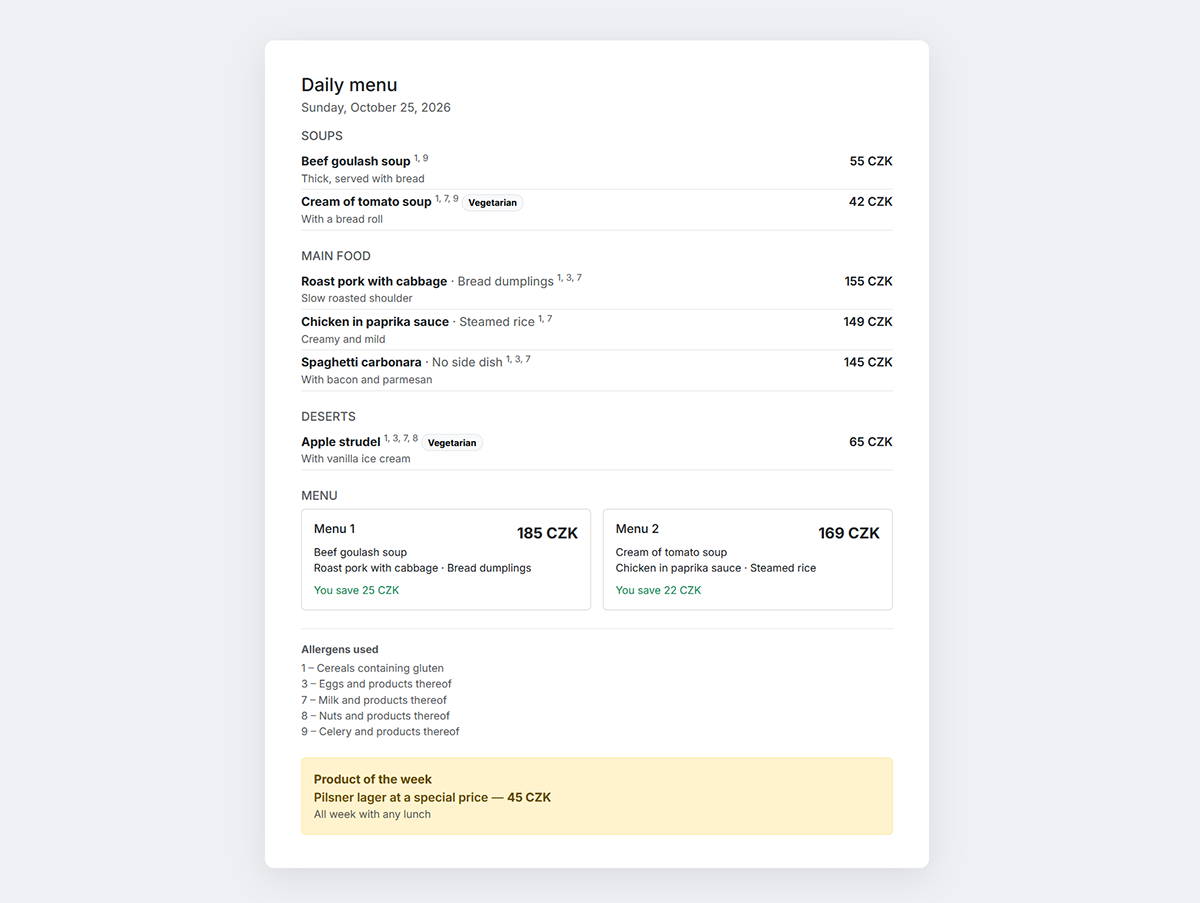
Add the dayMenu component to a page to show today's menu, or weekMenu to show a
whole week. Both render complete markup out of the box, including allergen numbers,
dietary badges and a legend:
[dayMenu]
showWeeklyProduct = 1
switchTime = "14:30"
==
{% component 'dayMenu' %}
Everything the components expose is also available for your own markup if the default rendering does not suit your theme. See Documentation.
Data
The plugin creates four tables:
| Table | Holds |
|---|---|
webbook_pubmenu_dishes |
The dish catalog: soups, main courses, sides and deserts, told apart by a type column |
webbook_pubmenu_days |
One row per date, with its dishes stored as JSON |
webbook_pubmenu_weekly_products |
The product of the week, one row per ISO year and week |
webbook_pubmenu_stable_menus |
The permanent list, as categories of products |
A day stores its own copy of every dish, rather than pointing at the catalog. That is deliberate: correcting a dish in the catalog changes what gets suggested from now on, and does not silently rewrite a menu that was already served. Menus are a record of what you actually sold.
Further reading
- Components — the two frontend components and their properties
- Working in the backend — the three backend pages
- Allergens and dietary flags — the declaration model and how a dish and its side dish combine
Daily MENU
Installation via Command Line
php artisan plugin:install WebBook.PubMenu
Working in the backend
The plugin adds a Pub menu section with three pages.
Permissions
| Permission | Grants |
|---|---|
webbook.pubmenu.daily_menu |
Writing the daily menu |
webbook.pubmenu.stable_menu |
The product of the week and the permanent list |
webbook.pubmenu.saved_items |
Editing the remembered dish catalog |
The third is separate on purpose. Writing today's lunch affects one day; correcting a dish in the catalog changes what every future menu suggests. Those are different levels of responsibility, so a cook can have the first without the third.
Daily menu
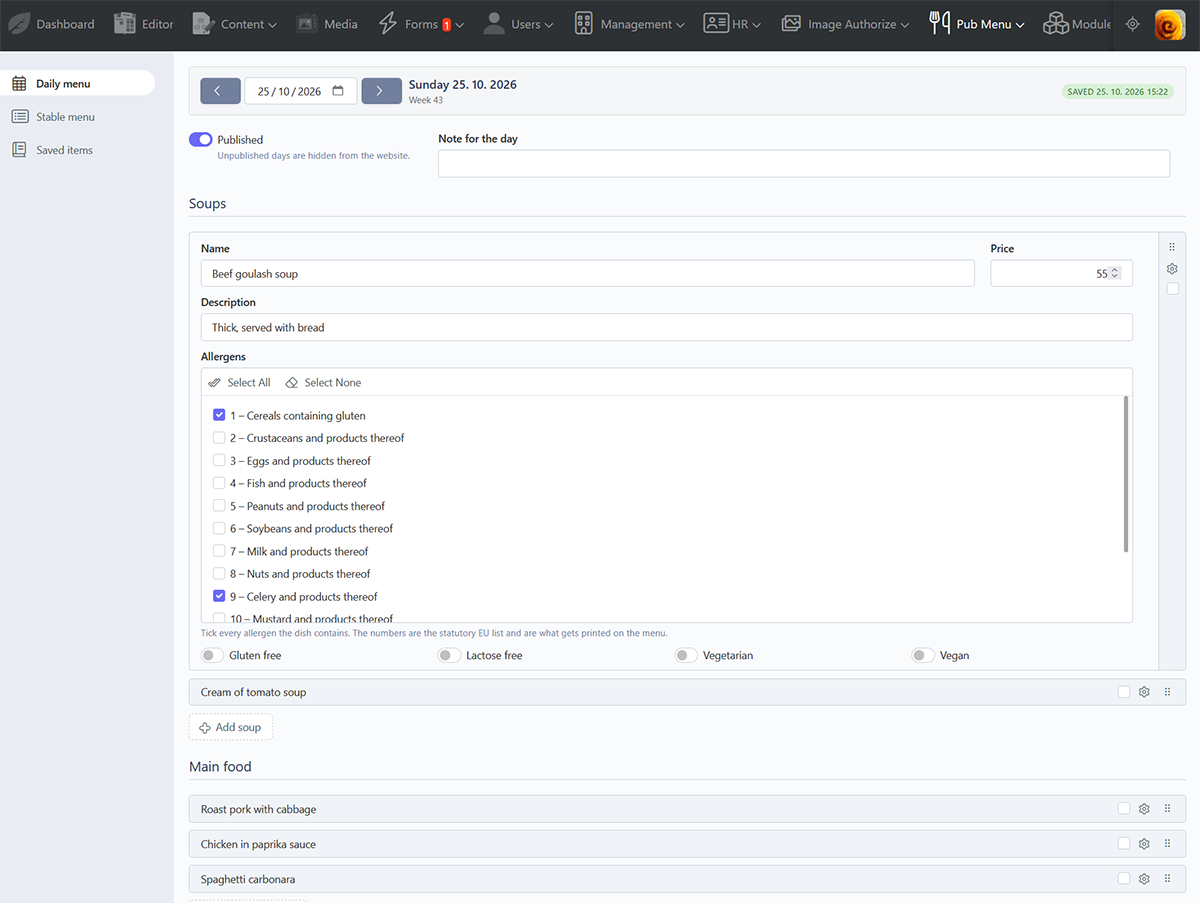
One day on screen at a time, with arrows to step to the previous or next day, a date field to jump anywhere, and a Today button that appears when you are not on today.
Four repeaters hold the day: Soups, Main food, Deserts and Menu. All of them start collapsed, showing each dish by name, so a full day fits on one screen.
The autocomplete
Start typing a dish name and previously used dishes are suggested, most used first. Choosing one fills in the rest of the row:
- Price and description are filled only when still empty, so anything you typed by hand survives.
- Allergens and dietary flags are replaced outright, because they describe the dish itself. Pointing a row at a different dish must not leave the previous dish's declaration behind — that would claim something untrue about the food.
A main course has a second autocomplete for its side dish, with its own allergen declaration underneath.
Menus
A menu combines two or three parts at its own price. The part pickers list everything in the three repeaters above, including dishes you have only just typed and not yet saved.
As you choose parts, the row shows what they would cost separately and the saving against the menu price — in green for a saving, red for a surcharge, and amber when only one part is selected. A menu with fewer than two parts is refused on save.
Leaving with unsaved changes
Stepping to another day with unsaved edits opens a prompt offering Save and continue, Continue without saving or Cancel. Closing the browser tab raises the usual warning.
Stable menu
Two things on one page, saved together.
The product of the week is navigated with arrows, one ISO week at a time, with a Current week button when you are elsewhere. Each week has its own entry, so you can prepare weeks ahead.
The permanent list below it is a set of categories, each holding its own products with a title, volume, unit, price and description. It is global — it does not change from week to week — but it sits in the same form, so one Save button stores both.
Saved items
The dish catalog, as one searchable table.
Search matches names and descriptions and ignores diacritics, so typing polevka
finds polévka. Four switches filter by course; with none on, every course is
shown, which is why none start selected.
The catalog sorts alphabetically by Czech rules, which put ch between h and
i — Chléb falls after Hranolky, not under C. This needs ext-intl; without
it the sort falls back to a simpler comparison.
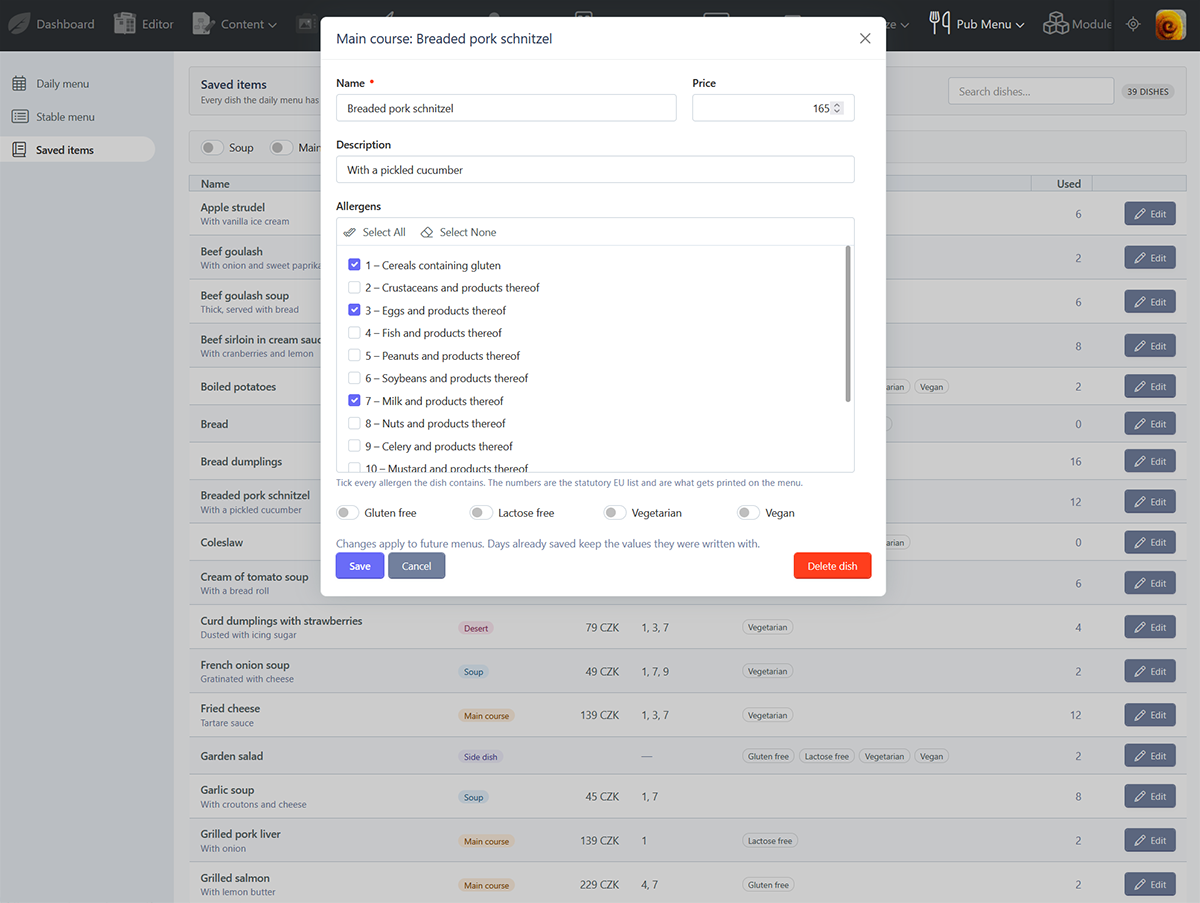
Clicking Edit opens the dish in a popup with its price, description, allergens and dietary flags. Saving refreshes the row in place and keeps your search and filter.
Deleting a dish
Delete dish removes it from the catalog and from the autocomplete. The row is soft deleted, so it stays in the database with its allergen declaration, but there is no way back through the backend — only directly in the database.
Menus already written keep the dish, because each day stores its own copy. And if you later put the dish back on a menu by typing its name again, the original row is revived rather than duplicated, bringing its declaration and usage history with it.
-
This plugin has not been reviewed yet.
-

| 1.0.1 |
First version of the pub menu plugin Oct 26, 2026 |
|---|