


Protect your forms from spam and bots without irritating your users with complex CAPTCHA puzzles. The Cloudflare Turnstile plugin seamlessly integrates Cloudflare's privacy-friendly, smart anti-bot challenge into October CMS.
Why Cloudflare Turnstile?
Cloudflare Turnstile is a free, privacy-focused replacement for reCAPTCHA. It automatically verifies real human visitors with non-interactive challenges, eliminating the need for users to solve annoying image selection tests or solve puzzle tiles.
Key Features
- Zero-friction Protection: Provides smart, privacy-first bot protection without harassing legitimate visitors.
- Automatic Renatio FormBuilder Integration: Seamlessly embeds into FormBuilder forms and verifies input prior to email dispatch.
- Flexible Custom Component: Easily drop the
[turnstile]component into any layout or page form. - PHP / AJAX Validation Rule: Offers a native
turnstilevalidation rule for custom AJAX handlers and controllers ('cf-turnstile-response' => 'required|turnstile'). - AJAX Auto-Reset: Automatically resets expired or failed tokens on October CMS AJAX framework validation errors (
ajaxInvalid,ajaxError). - Backend Admin Bypass: Skip verification for logged-in backend administrators to speed up form testing.
- IP Whitelisting: Bypass verification for specified IP addresses or CIDR ranges.
- Custom Error Messages: Customize the user-facing validation error message directly in the backend settings.
- Detailed Cloudflare Logging: Automatically logs Cloudflare API error codes to system logs for quick developer troubleshooting.
Installation via Command Line
php artisan plugin:install Stheme.Turnstile
Cloudflare Turnstile Documentation
1. Cloudflare Setup
- Log into your Cloudflare Dashboard and navigate to Turnstile.
- Click Add Site, enter your domain name, and choose your preferred widget mode (Managed, Non-interactive, or Invisible).
- Copy your Site Key (Public Key) and Secret Key (Private Key).
2. Backend Configuration
In your October CMS Backend, navigate to: Settings -> CMS -> Cloudflare Turnstile
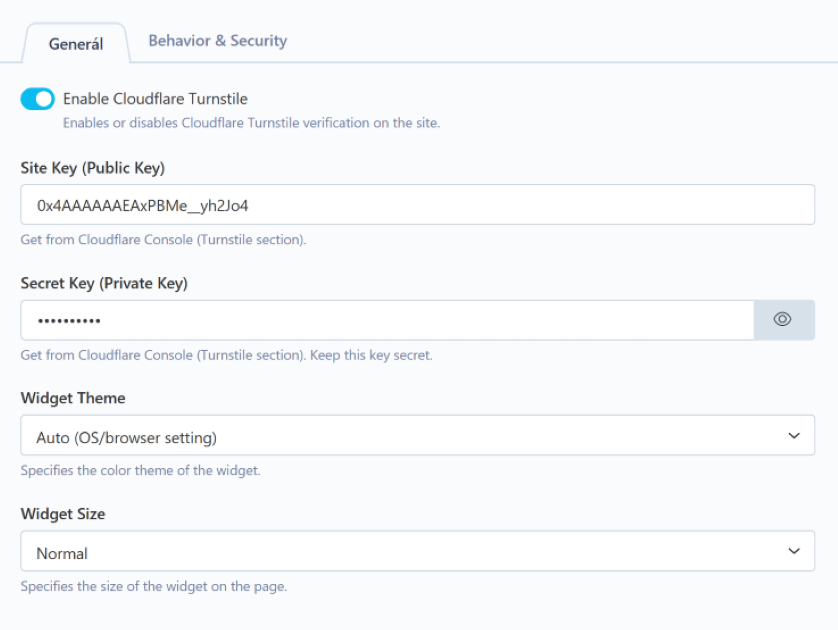
General Settings
- Enable Cloudflare Turnstile: Enable or disable protection globally.
- Site Key: Enter your public Site Key from Cloudflare.
- Secret Key: Enter your private Secret Key from Cloudflare.
- Widget Theme: Choose between
Auto(matches OS/browser dark mode),Light, orDark. - Widget Size: Choose between
Normal,Compact, orFlexible.
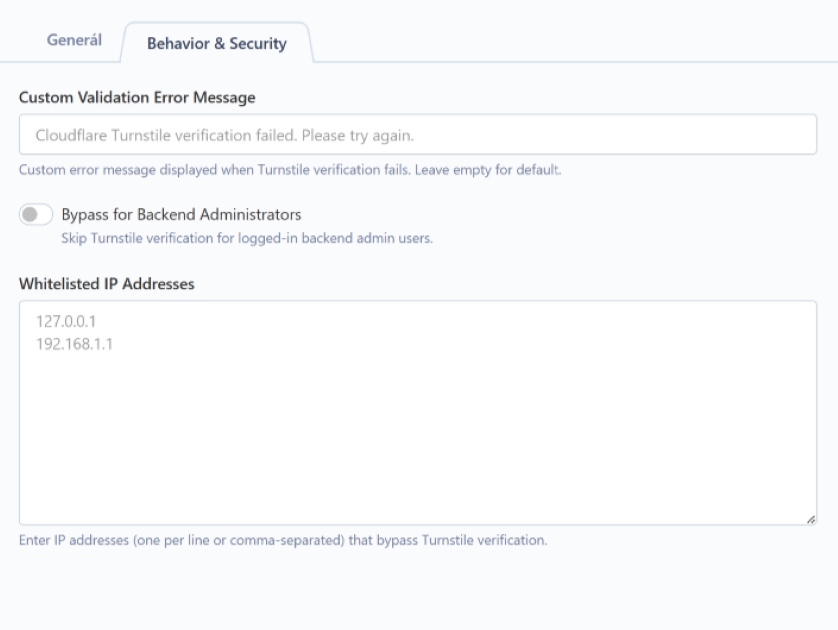
Behavior & Security Settings
- Custom Validation Error Message: Override default error text shown when Turnstile validation fails.
- Bypass for Backend Administrators: Enable to skip verification for logged-in backend admins.
- Whitelisted IP Addresses: Enter IP addresses (one per line) that bypass verification.
3. Usage Options
Option A: Renatio FormBuilder (Automatic)
No code required! When the plugin is enabled and keys are configured, Turnstile automatically injects into FormBuilder forms before submission and verifies the token prior to sending emails.
Option B: CMS Component ([turnstile])
- Attach the
[turnstile]component to your page or layout. - Render the component inside your HTML
<form>tag:{% component 'turnstile' %}
-
This plugin has not been reviewed yet.
-
| 1.0.3 |
Fix event execution priority to block form submission and email sending when Turnstile verification fails Aug 06, 2026 |
|---|---|
| 1.0.2 |
Fix duplicate loading of the Cloudflare Turnstile script and improve frontend initialization Jul 30, 2026 |
| 1.0.1 |
Initial release of Cloudflare Turnstile plugin for October CMS Jul 29, 2026 |
Version 1.0.1
- Initial public release of Cloudflare Turnstile for October CMS.
- Fully compatible with October CMS v3.x and v4.x.
- No breaking changes or upgrading steps required.