

Webhooks & API
Signed webhooks and a token-secured REST API for records in any plugin or Tailor section, with retries, a delivery log and a dashboard.
Webhooks & API
Signed webhooks and a token-secured REST API for records in any plugin or Tailor section, with retries, a delivery log and a dashboard.
Webhooks & API connects your October CMS site to everything else. It sends a signed JSON request to the address you choose when a record is created, changed or deleted, so tools such as Zapier, Make, n8n, Slack or your own application can react straight away. It also serves a secure REST API, so other apps can read and write those same records with a token. You set it all up in the back end, with no code.
Webhooks
Watch any plugin or Tailor section. The endpoint form lists the models of every plugin you have installed, grouped by plugin, every Tailor section, and back-end users. Tick the ones you want and choose whether to send when they are created, updated or deleted. Nothing needs to be changed in the other plugins. For Tailor, only published entries are sent, so drafts never cause noise.
Know what changed. Update events include the new record and the old and new value of every field that changed. Passwords, secrets and tokens are never sent, and each endpoint can also leave out fields you name.
Trust every request. Each request is signed with a secret that belongs to the endpoint, and carries a timestamp, so the receiver can check who sent it and reject old or copied requests. The documentation shows how to check the signature in PHP, JavaScript and Python.
Keep going when a receiver is down. A failed delivery is tried again after 1, 5, 30 and 120 minutes, then every 12 hours, up to the number of attempts you set. An endpoint that keeps failing is switched off automatically and the people who manage endpoints are emailed, so a dead receiver does not pile up failures.
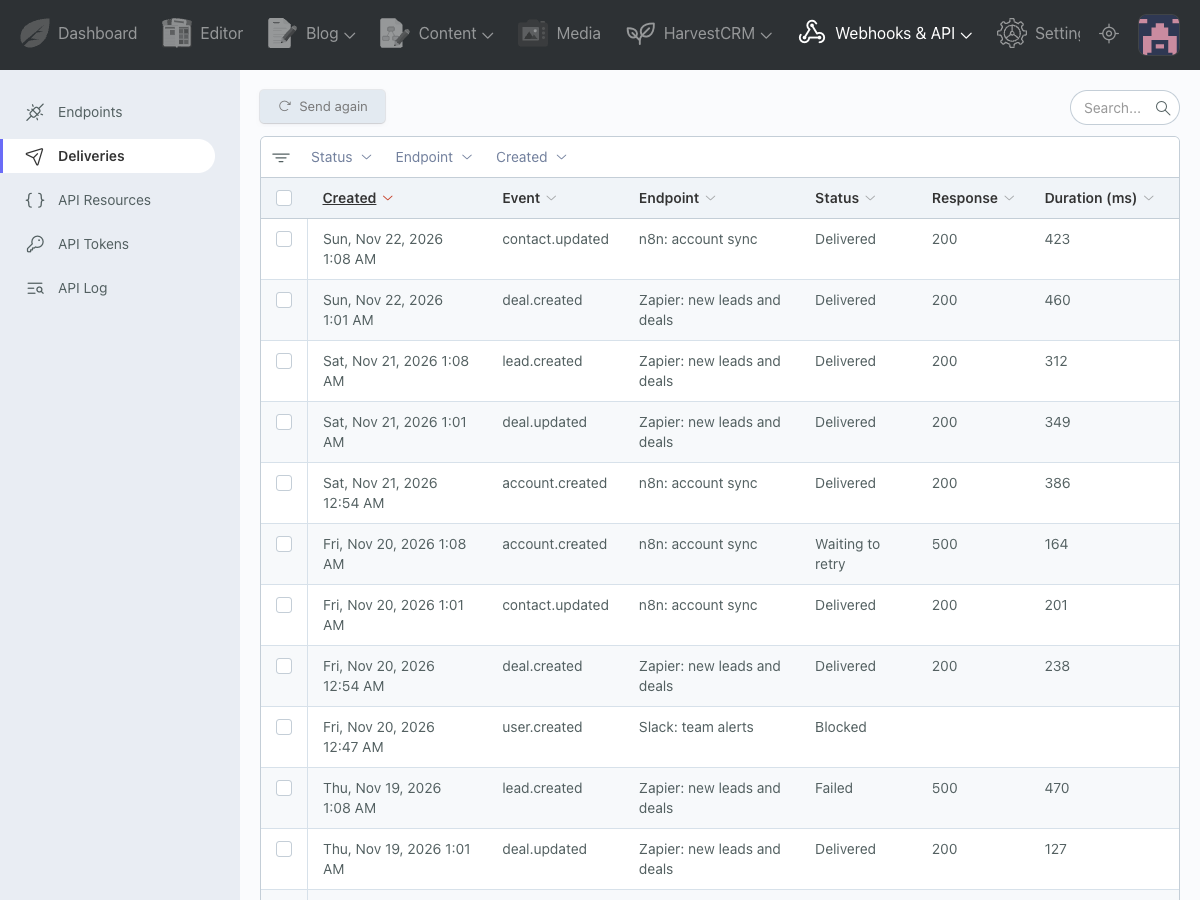
See everything that was sent. The delivery log shows every request with its status, the receiver's response, how long it took and the exact payload. Filter by status, endpoint or date, and send one delivery or many again with a click. Send a test event from any endpoint to check it before real records are involved, and regenerate its signing secret in one click if it ever leaks.
Stay safe. Requests to addresses inside your own network, including localhost and cloud metadata addresses, are blocked, redirects are not followed, and only http and https are used. Custom headers, such as an API key for the receiver, are stored encrypted.
REST API
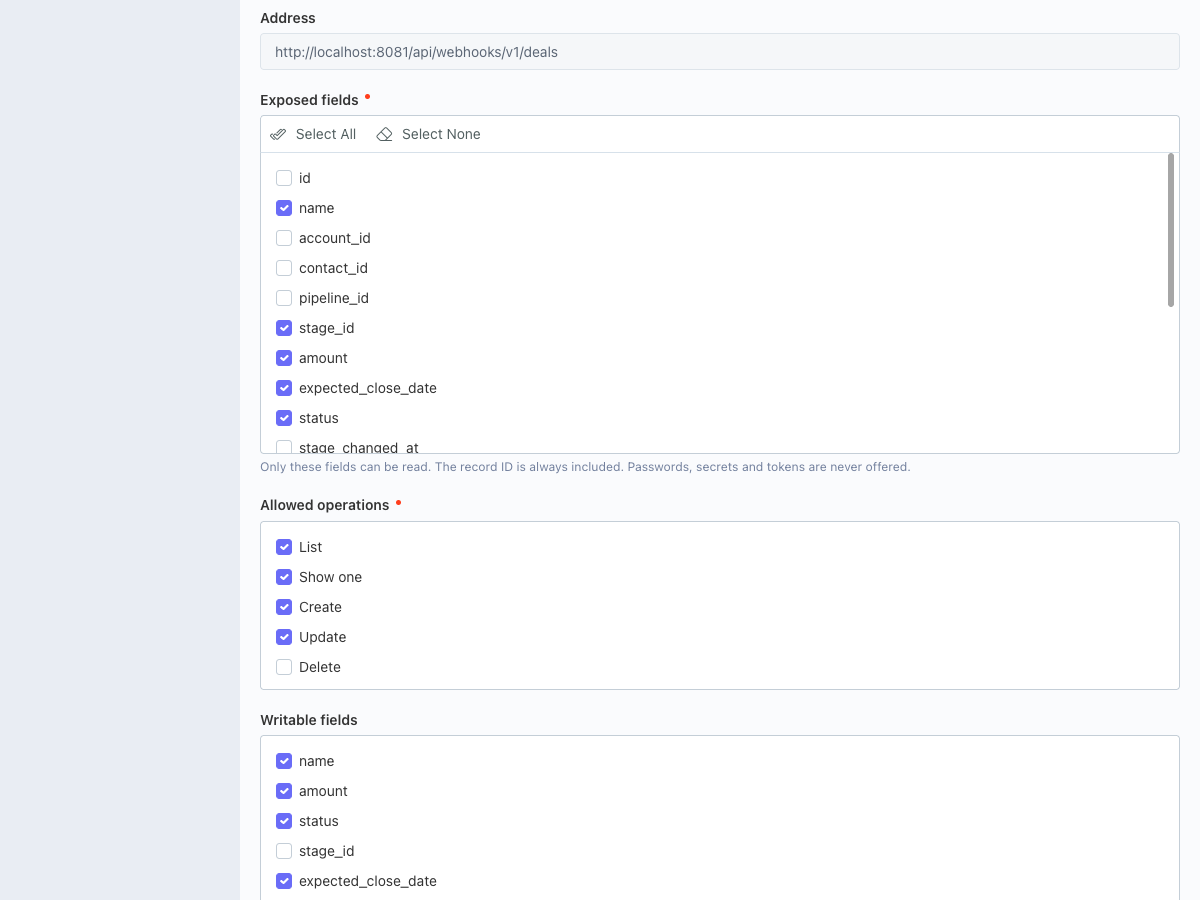
Choose exactly what is exposed. An API resource is a model or a Tailor section with the fields you pick, the operations you allow (list, show, create, update, delete) and the fields clients may filter on. Passwords, secrets and tokens are never offered, and back-end users cannot be exposed.
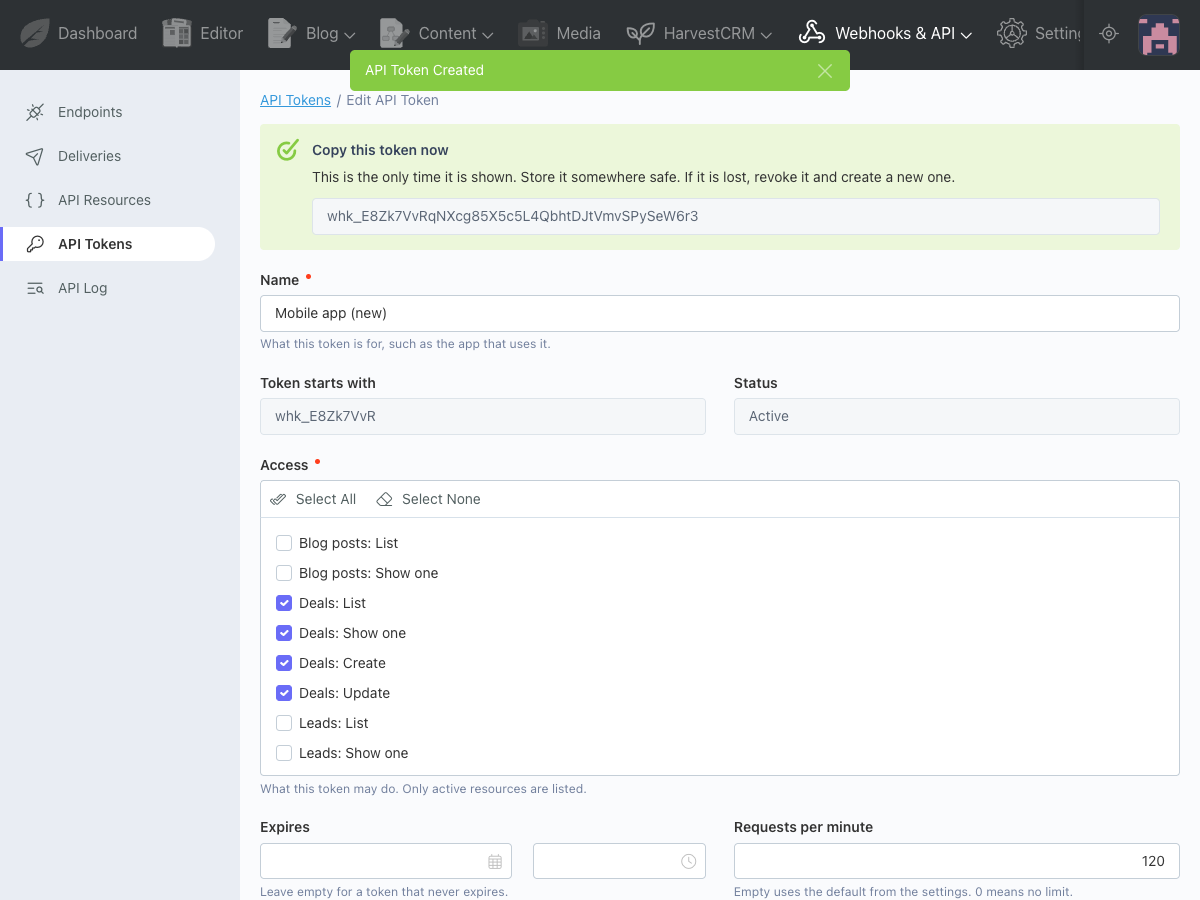
A token for every client. Create a token per app and give it only the access it needs, such as reading deals but not deleting them. Tokens can expire, can be limited to certain IP addresses or ranges, and can be revoked in one click. A token is shown once when it is created and only a hash is stored, so a copy of your database cannot leak working tokens.
Read and write. Lists have paging, filtering and sorting on the fields you allow. Creating and updating only accept the fields you marked writable, and a request that sets anything else is refused. The model's own validation rules apply, and a refused write comes back as a clear error naming each field.
Built for real use. Every token has a requests-per-minute budget, wrong tokens from one address are limited, and browsers can call the API from the websites you list. Errors are always JSON with a code and a message. An optional request log records the method, path, status and time of each call, and never the data or the token.
One system. Changes made through the API go through the model, so they trigger your webhooks and show up in the delivery log like any other change.
And the rest
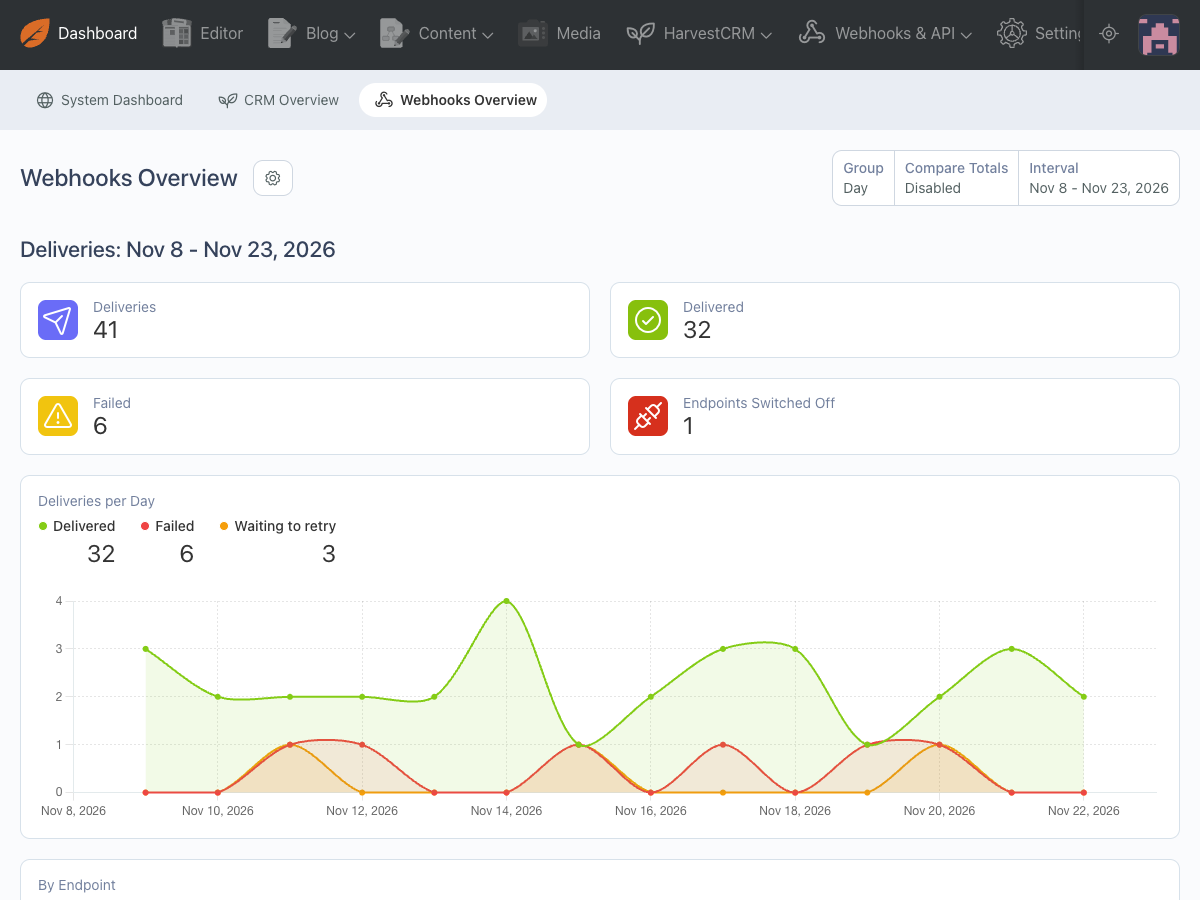
Watch the numbers. A ready-made Webhooks Overview dashboard shows deliveries, successes, failures, success rate, average response time and endpoints that were switched off. The data sources can be used in your own dashboard widgets.
Built for plugin authors too. Other plugins can describe their models with friendlier names and fields to leave out, and can send their own named events, such as an order being paid, with one line of code. The documentation shows how.
Requirements
- October CMS 4.4 or newer, on PHP 8.2 or newer.
- For production use, October's scheduler (the usual cron entry) and a queue worker, so retries and clean-up run on time and a slow receiver never delays a save.
- No other plugins are needed, and Webhooks & API uses no third-party libraries.
Good to know
- Webhook events come from model events. Changes made with bulk query builder updates or raw SQL do not trigger them.
- API clients are not subject to record visibility rules that a plugin applies to signed-in back-end users. What a token can reach is decided by the resource and its access list, so expose only what you mean to.
- Tailor sections are read only in the API.
- The interface is in English. All text is kept in a language file, so other languages can be added.
Licensing
Webhooks & API is commercial software with the source code included. Any use needs a license for each installation or site, and development, test and staging copies of a licensed installation are covered. The full terms are in the LICENSE file that comes with the plugin.
Installation via Command Line
php artisan plugin:install Ndcisiv.Webhooks
Requirements and setup
Webhooks & API needs October CMS 4.4 or newer and PHP 8.2 or newer. It needs no other plugins and no third-party libraries.
Install the plugin from the Marketplace. October runs its migrations, which create the tables. If migrations are ever pending, run php artisan october:migrate.
Webhooks are sent through October's queue, and retries and clean-up run from October's scheduler. For production, set up both:
- The scheduler: a cron entry that runs
php artisan schedule:runevery minute. - A queue worker:
php artisan queue:work, kept running by your process manager. With the defaultsyncqueue, deliveries are sent while the page that caused them is still loading, which is fine for development but slows saves if a receiver is slow.
Permissions
Give users the permissions they need on their role, under the Webhooks & API tab. Superusers can do everything.
| Permission | Allows |
|---|---|
| Manage webhook endpoints | Create, change and delete endpoints, and send test events |
| View and resend webhook deliveries | See the delivery log and payloads, and send deliveries again |
| Change webhook settings | Open Settings, Webhooks & API |
| Manage API resources | Choose what the REST API exposes and which operations it allows |
| Manage API tokens | Create, change and revoke API tokens |
| View the API request log | Open Webhooks & API, API Log |
Anyone who can view deliveries can see the record data that was sent, so give that permission with the same care as access to the records themselves. Anyone who can manage API resources decides what data the API can reach, and anyone who can manage API tokens decides who can reach it, so give those two to administrators only.
Create an endpoint
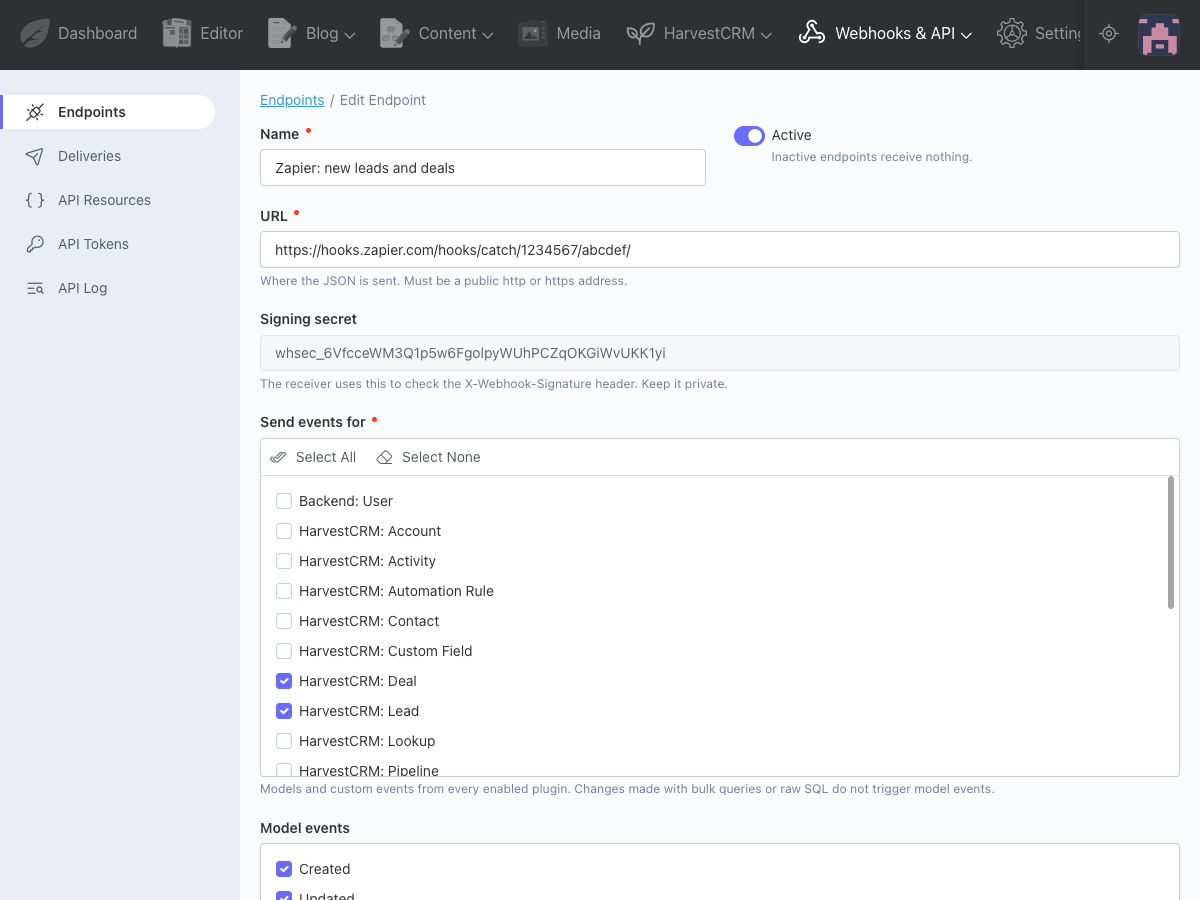
- Open Webhooks & API, Endpoints and choose New endpoint.
- Enter a name and the URL that should receive the requests. It must be a public http or https address.
- Under Send events for, tick the models you want. The list shows back-end users, the models of every enabled plugin grouped by plugin, and every Tailor section under Tailor.
- Under Model events, choose created, updated and deleted as you need.
- Optionally list fields that should never be sent, one per line, and any custom headers.
- Save. The signing secret is generated and shown on the endpoint's page. Copy it into the receiving application.
Choose Send test event on the endpoint's page to check the address and your signature check. A test event is sent even while the endpoint is switched off.
Change the signing secret
If a secret may have leaked, or a person who knew it has left, open the endpoint and choose Regenerate secret. A new secret replaces the old one straight away and is shown on the page. Copy it into the receiving application.
- The old secret stops working at once, so requests signed with it no longer verify. Update the receiver first if you can, or expect a short gap.
- Deliveries that were waiting to retry are signed with the new secret when they are sent.
- Nothing else about the endpoint changes.
| Field | Meaning |
|---|---|
| Active | Inactive endpoints receive nothing |
| Signing secret | Used to sign every request. Keep it private |
| Never send these fields | Field names removed from every payload for this endpoint |
| Custom headers | Extra headers sent with every request, one Name: value per line, at most 10, stored encrypted |
| Timeout | How long to wait for an answer, 1 to 30 seconds |
Custom headers cannot replace Content-Type, Host, User-Agent or any header starting with X-Webhook-.
What is sent
Each event is a POST with a JSON body:
{
    "id": "3f9c2a6e-5d0b-4c8e-9a41-0d7a1b2c3d4e",
    "event": "deal.updated",
    "source": "Acme\\Crm\\Models\\Deal",
    "data": { "id": 17, "name": "Renewal", "amount": 18500 },
    "changes": { "amount": { "old": 15000, "new": 18500 } },
    "occurred_at": "2026-11-21T16:03:00+00:00"
}
idis unique to the delivery. Use it to ignore duplicates. A delivery keeps the sameidwhen it is retried or sent again.eventis the model name in lower case with an underscore between words, then the action:lead.created,deal.updated,user.deleted. For a Tailor section it is the section handle in the same style, such asblog_post.created. A plugin can choose its own prefix.datais the record. Hidden attributes of the model, and anything named like a password, secret or token, are never included.changesappears on updates only and lists the old and new value of each changed field.
Headers on every request:
| Header | Value |
|---|---|
X-Webhook-Id |
The delivery ID |
X-Webhook-Event |
The event name |
X-Webhook-Timestamp |
Unix time the request was signed |
X-Webhook-Signature |
sha256= and the signature |
Return any 2xx status to confirm receipt. Anything else, or no answer within the timeout, counts as a failure and is retried.
Check the signature
The signature is the HMAC-SHA256 of the timestamp, a full stop and the raw request body, using the endpoint's secret, written as sha256= followed by hex. Use the raw body exactly as received, before any JSON parsing. Reject requests whose timestamp is more than a few minutes old, and compare signatures in constant time.
PHP:
$timestamp = $_SERVER['HTTP_X_WEBHOOK_TIMESTAMP'];
$signature = $_SERVER['HTTP_X_WEBHOOK_SIGNATURE'];
$body = file_get_contents('php://input');

$expected = 'sha256='.hash_hmac('sha256', $timestamp.'.'.$body, $secret);
$valid = hash_equals($expected, $signature) && abs(time() - (int) $timestamp) < 300;
JavaScript (Node):
const crypto = require('crypto');

function isValid(secret, timestamp, rawBody, signature) {
    const expected = 'sha256=' + crypto.createHmac('sha256', secret)
        .update(timestamp + '.' + rawBody).digest('hex');
    const a = Buffer.from(expected), b = Buffer.from(signature);

    return a.length === b.length
        && crypto.timingSafeEqual(a, b)
        && Math.abs(Date.now() / 1000 - Number(timestamp)) < 300;
}
Python:
import hashlib, hmac, time

def is_valid(secret, timestamp, raw_body, signature):
    expected = 'sha256=' + hmac.new(
        secret.encode(), (timestamp + '.').encode() + raw_body, hashlib.sha256
    ).hexdigest()
    return hmac.compare_digest(expected, signature) and abs(time.time() - int(timestamp)) < 300
Tailor sections
Every blueprint section in your Tailor setup (entries, streams, structures, singles and form submissions) is listed under Tailor in the endpoint form, labelled with the section's name. source in the payload is tailor: followed by the section handle with a slash, for example tailor:Blog/Post.
- Only published records are sent. Drafts, and the unsaved copies Tailor keeps while an entry is being edited, never trigger an event.
- A new entry is created as a draft and published by a later save. Publishing it sends
created, notupdated. - When a draft of an existing entry is published, the published entry sends
updatedwith the changed fields. - New sections appear in the list as soon as their blueprint exists.
Retries and switching off
- A delivery that does not get a 2xx answer is tried again after 1 minute, 5 minutes, 30 minutes, 2 hours and then every 12 hours, up to the Attempts per delivery setting (default 5). While it waits, the log shows it as Waiting to retry.
- A delivery that runs out of attempts, or is blocked, is Failed and counts against its endpoint. A success resets that count.
- After the Switch an endpoint off after number of failed deliveries in a row (default 10), the endpoint is switched off and everyone who can manage endpoints is emailed. Set it to 0 to never switch endpoints off. Fix the receiver, switch the endpoint on again and the count starts again.
- Test events are never retried and never count against an endpoint.
The delivery log
Open Webhooks & API, Deliveries to see every delivery. Filter by status, endpoint or date range. Choose a row to see the exact payload that was sent, the response, the number of attempts and the time taken.
Choose Send again on a delivery, or tick several in the list, to send them again now. Deliveries that are still waiting, and deliveries for an endpoint that is switched off or deleted, cannot be sent again.
Finished deliveries older than the Keep deliveries for setting (default 30 days) are deleted every night. Deliveries still waiting are never deleted.
Settings
Open Settings, Webhooks & API.
| Setting | Default | Meaning |
|---|---|---|
| Attempts per delivery | 5 | Total tries including the first, 1 to 10 |
| Switch an endpoint off after | 10 | Failed deliveries in a row, 0 for never |
| Email when an endpoint is switched off | On | Sent to everyone who can manage endpoints |
| Keep deliveries for (days) | 30 | Finished deliveries older than this are deleted |
| API requests per minute | 60 | The default budget for each API token, 0 for no limit |
| Allowed browser origins | none | Websites allowed to call the API from a browser, one per line, or * for any |
| Keep an API request log | Off | Records the method, path, status and time of each API request |
| Keep API log for (days) | 14 | Older log entries are deleted every night |
Dashboard
The Webhooks Overview dashboard appears on the Dashboard page for users who can view deliveries. It shows deliveries, delivered, failed and endpoints switched off, a daily chart, and tables by endpoint and by event with success rate and average response time. Test events are not counted. Success rate counts only deliveries that have finished, so ones still waiting to retry do not lower it.
The two data sources, Webhook deliveries and Webhook endpoints, can also be used in your own dashboard widgets.
REST API
The REST API lets other applications read and write records over HTTP, secured by tokens. It is built from two things you set up in the back end: resources, which say what is exposed, and tokens, which say who may use it.
Create a resource
- Open Webhooks & API, API Resources and choose New resource.
- Enter a name and a path name. The path name becomes part of the address, so
ordersis served at/api/webhooks/v1/orders. The full address is shown once the resource is saved. - Choose the model. The list shows the models of every enabled plugin and every Tailor section. Back-end users are never offered.
- Tick the exposed fields. Only these can be read. The record ID is always included. Fields that look like passwords, secrets or tokens are never offered.
- Tick the allowed operations: List, Show one, Create, Update, Delete.
- For Create and Update, tick the writable fields. A request that sets any other field is refused. Writable fields must be exposed fields, and never the ID.
- Optionally tick the filterable fields, set a default sort such as
-created_at(a minus sorts descending) and a default page size.
Tailor sections are read only, so only List and Show one are available for them, and only published entries are returned.
Create a token
- Open Webhooks & API, API Tokens and choose New token.
- Give it a name, such as the app that will use it.
- Under Access, tick what it may do, for example
Orders: ListandOrders: Update. Only active resources and the operations they allow are listed. - Optionally set an expiry, a list of allowed IP addresses or ranges (one per line, like
203.0.113.7or10.0.0.0/8) and a requests-per-minute limit of its own. - Save. The token is shown once, at the top of the page. Copy it now. Only a hash is stored, so it cannot be shown again. If it is lost, revoke it and create a new one.
Open a token to see when and from where it was last used. Revoke stops it working immediately.
Call the API
Send the token in the Authorization header. A token in the address is refused, because addresses end up in logs.
curl -H "Authorization: Bearer whk_..." https://example.com/api/webhooks/v1/orders
| Request | Does | Answers |
|---|---|---|
GET /orders |
Lists records | 200 with data and meta |
GET /orders/17 |
Shows one record | 200 with data |
POST /orders |
Creates a record | 201 with data and a Location header |
PATCH /orders/17 or PUT /orders/17 |
Changes the fields sent | 200 with data |
DELETE /orders/17 |
Deletes the record | 204 with no body |
PUT and PATCH behave the same: only the fields in the body change. The body of a write must be a JSON object and the request must have the header Content-Type: application/json.
curl -X POST -H "Authorization: Bearer whk_..." -H "Content-Type: application/json" \
     -d '{"customer": "Acme", "total": 120}' https://example.com/api/webhooks/v1/orders
Reading records
A list answers like this:
{
    "data": [
        { "id": 17, "customer": "Acme", "status": "paid", "total": 120 }
    ],
    "meta": { "page": 1, "per_page": 25, "total": 1, "last_page": 1 }
}
| Parameter | Example | Meaning |
|---|---|---|
page |
page=2 |
Which page, from 1 |
per_page |
per_page=50 |
Page size, at most 100 |
filter[field] |
filter[status]=paid |
Records where the field equals the value. Use commas for several values (paid,shipped) and null for empty. Only the resource's filterable fields work |
sort |
sort=-created_at,customer |
Sort by exposed fields, with a minus for descending. The ID can always be used |
Records are always returned in a stable order, so paging never repeats or skips a record.
Writing records
Creating and updating only accept the resource's writable fields. A request that includes anything else is refused, not quietly ignored, so a typo or an attempt to set a protected field is never missed.
The model's own validation rules apply. If a write is not accepted, the answer is 422 with a message for each field:
{
    "error": {
        "code": "validation_failed",
        "message": "The data was not accepted.",
        "details": { "customer": ["The customer field is required."] }
    }
}
Writes go through the model, so they fire the same events as changes made in the back end. If you have webhook endpoints watching the model, an API create, update or delete sends them an event and appears in the delivery log.
Some models guard their own deletion. If a model refuses, the answer is 422 with its message.
Errors
Every error is JSON in the same shape, with a code you can test for and a readable message.
| Status | Code | When |
|---|---|---|
| 400 | invalid_filter, invalid_sort, invalid_pagination, invalid_json |
The request itself is wrong |
| 401 | unauthorized |
No token, an unknown token, or one that is revoked or expired. The WWW-Authenticate header is sent |
| 403 | forbidden, ip_not_allowed |
The token lacks access for this operation, or is used from an address it does not allow |
| 404 | not_found |
No such resource or record, or the resource is switched off |
| 405 | method_not_allowed |
The resource does not offer this operation. The Allow header lists what it does |
| 415 | unsupported_media_type |
A write was not sent as JSON |
| 422 | validation_failed, rejected, invalid_data |
The data was not accepted. details names the fields |
| 429 | rate_limited |
Too many requests. See Retry-After |
Rate limits
Each token has a budget of requests per minute: 60 by default, or its own limit if you set one, and 0 means no limit. Every answer to a request with a valid token includes X-RateLimit-Limit and X-RateLimit-Remaining. Over the limit, the answer is 429 with a Retry-After header giving the seconds to wait. Requests with wrong or missing tokens are also limited per address, so guessing tokens is not practical.
Calling from a browser
A website calling the API from a visitor's browser needs permission first. In Settings, Webhooks & API, list the websites allowed to do this under Allowed browser origins, one per line, such as https://app.example.com. Use * to allow any site. Until an origin is listed, no browser site is allowed. Cookies are never used, so the token has to be sent in the header by your own code. Keep tokens out of public pages: a token in a browser can be read by whoever uses that page.
Request log
Switch on Keep an API request log in the settings to record each request in API Log: when, the method, the path, the status, how long it took, the address and the first characters of the token. The query string, the data sent and the token itself are never stored. Filter by method, errors or time. Entries older than the retention setting are deleted every night.
Keeping the API safe
- Expose the fewest fields you can, and make only the fields clients truly need to set writable.
- Give each client its own token with only the access it needs, and revoke tokens you no longer use.
- Use the allowed addresses and expiry for tokens used by servers you control.
- API clients are not subject to the record visibility rules a plugin may apply to people signed in to the back end, for example a CRM that shows each person only their own records. What a token can reach is decided by the resource and the token's access, so expose a model through the API only when everyone holding the token should see all of it.
- Serve your site over HTTPS, so tokens are never sent in the clear.
For plugin authors
Other plugins work with Webhooks & API without any changes, because models are found automatically. You can improve how your plugin appears and send your own events.
Describe your models
Add a registerWebhookSources method to your Plugin.php:
public function registerWebhookSources()
{
    return [
        \Acme\Shop\Models\Order::class => [
            'label' => 'Order',           // shown in the endpoint form
            'group' => 'Acme Shop',       // defaults to your plugin name
            'name' => 'order',            // event prefix, so order.created
            'blocked' => ['card_note'],   // fields never sent for this model
        ],
    ];
}
All keys are optional. This is also how to offer a model that lives outside your plugin's models folder.
Send your own events
Declare the event so it appears in the endpoint form, and then send it:
// Plugin.php
public function registerWebhookEvents()
{
    return [
        'shop.order_paid' => 'Order paid',
    ];
}
use Ndcisiv\Webhooks\Classes\Webhooks;

if (class_exists(Webhooks::class)) {
    Webhooks::dispatch('shop.order_paid', ['order_id' => $order->id, 'total' => $order->total]);
}
dispatch returns how many deliveries were queued. Endpoints receive a custom event once an admin has ticked it, whatever the model event settings are. The payload has the same id, event and occurred_at as other events, with your array under data, and the endpoint's blocked fields applied.
Limits and notes
- Events come from model events. Bulk updates and deletes made through the query builder, and raw SQL, do not trigger them.
- Redirects are not followed.
- Addresses on private or reserved networks, including localhost, are blocked. On a development machine you can allow them by setting
allow_private_hoststotruein the plugin's configuration. - The log keeps the first 2,000 characters of each response.
- The REST API cannot write to Tailor sections, and does not offer related records or nested data.
- The prefix of the API address (
api/webhooks/v1) and the largest page size (100) are set in the plugin's configuration asapi_prefixandapi_max_per_page.
Troubleshooting
| Symptom | Check |
|---|---|
| Nothing is sent | Is the endpoint active, is the model ticked, and did the change go through a model save rather than raw SQL? Look in Deliveries for a Blocked or Cancelled entry |
| Status Blocked | The address resolves to a private or reserved network. Use a public address |
| Deliveries stay Pending | A queue worker is not running |
| Deliveries stay Waiting to retry | The scheduler is not running |
| The receiver says the signature is wrong | Use the raw body, the exact secret from the endpoint page and the timestamp header, and make sure no proxy rewrites the body |
| The API answers 401 | The token is missing, wrong, revoked or expired. Send it as Authorization: Bearer YOUR_TOKEN, not in the address |
| The API answers 403 | The token lacks access for that operation on that resource, or the request comes from an address the token does not allow |
| The API answers 405 | The resource does not offer that operation. Check its allowed operations. The Allow header lists what is offered |
| The API answers 422 | Read error.details. A field may not be writable, or the model's own validation refused the value |
| The API answers 429 | The token is over its per-minute limit. Wait for Retry-After, or raise the limit |
| A browser blocks the API call | Add the website's origin under Allowed browser origins in the settings |
| An endpoint switched itself off | Check its recent deliveries for the cause, fix the receiver and switch it on again |
-
This plugin has not been reviewed yet.
-

| 1.1.4 |
Regenerate an endpoint's signing secret from its page Nov 25, 2026 |
|---|---|
| 1.1.3 |
Fix the version file so October can read it Nov 25, 2026 |
| 1.1.2 |
Documentation fixes, the README now describes the REST API and no longer says it is planned Nov 25, 2026 |
| 1.1.1 |
API writes (create, update, delete), rate limits, CORS and the request log Nov 25, 2026 |
| 1.1.0 |
REST API resources, API tokens and the read-only list and show endpoints Nov 25, 2026 |
| 1.0.3 |
Webhooks dashboard, Tailor sections as sources, extension API for other plugins and permission tests Nov 25, 2026 |
| 1.0.2 |
Retries, redeliver, test ping, auto-disable, pruning, custom headers and settings Nov 25, 2026 |
| 1.0.1 |
Endpoints and deliveries Nov 25, 2026 |