

PageTree
Visual block pages for October CMS
PageTree
Visual block pages for October CMS
Early Access Period
Early access: 50% off PageTree with code EARLYACCESS, until November 30 included.
Please share all your feedback, suggestions, and ideas here - they’ll help shape future updates!
PageTree — Visual block pages for October CMS
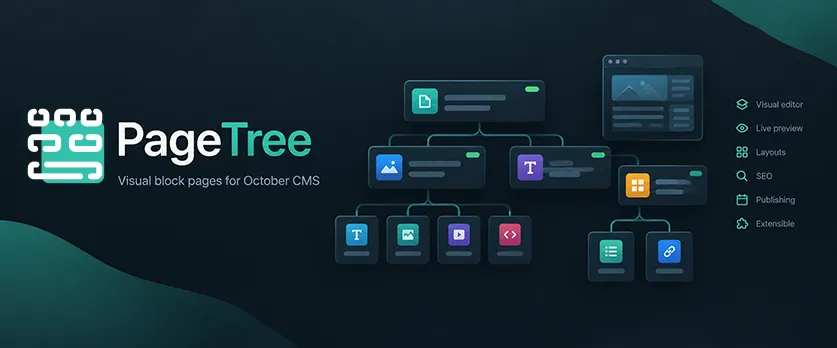
PageTree is a visual page builder for October CMS that lets content editors create complete pages from reusable content blocks — without creating or managing CMS page files.
Build pages visually, preview them directly inside your site's theme, organize content into flexible layouts, and publish pages with built-in SEO and scheduling tools.
Why PageTree?
PageTree gives content editors a familiar visual editing experience while keeping developers in control of the frontend.
NEW! FRONT INLINE EDITION
Visual page editor
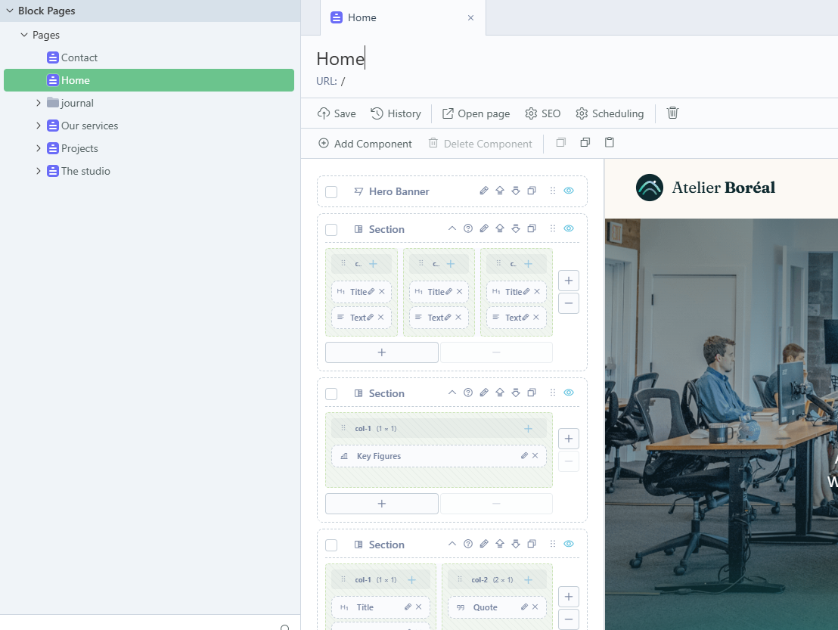
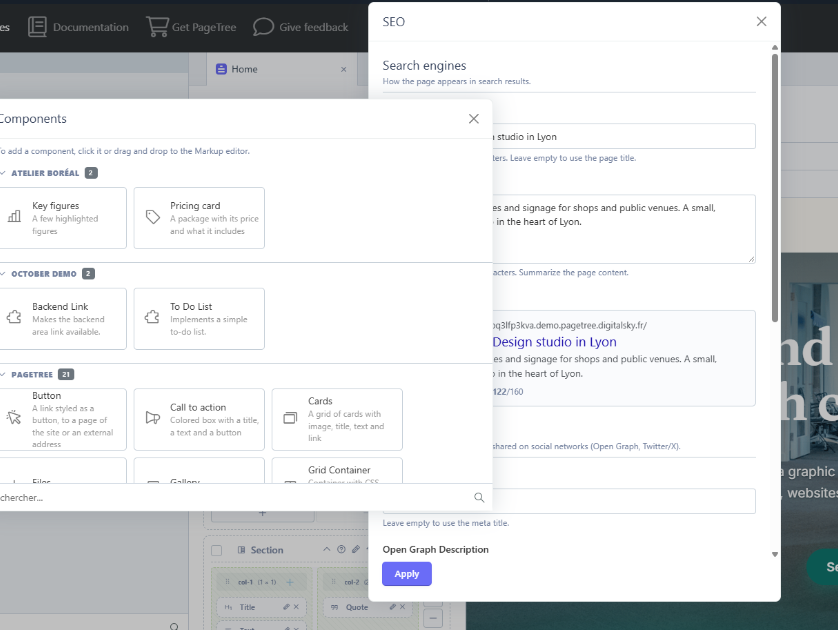
Create pages by adding blocks from a searchable library and arranging them with drag and drop.
Editors can:
- Add and reorder blocks
- Duplicate blocks
- Copy and paste blocks between pages
- Hide individual blocks without deleting them
- Organize content into columns and CSS Grid layouts
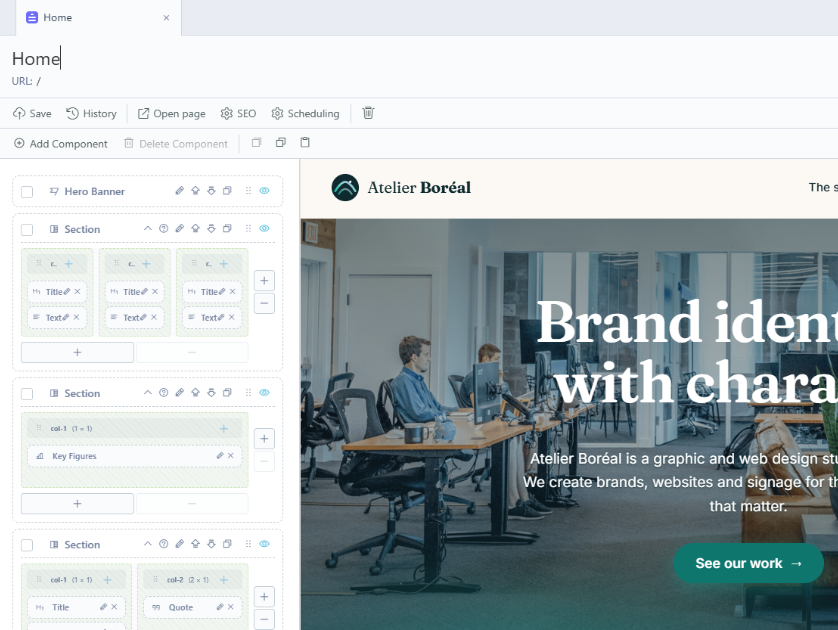
- Preview pages using the actual site layout
Live preview
Preview a page directly inside your selected October CMS theme layout.
The preview supports desktop, tablet and mobile widths and can also be opened in a separate window.
Flexible layouts
Build complex page structures without writing HTML:
- Sections with 1 to 4 columns
- Flexible CSS Grid containers
- Nested blocks
- Background and spacing options
Ready-to-use content blocks
PageTree includes a complete library of common website components:
- Titles and rich text
- Images and galleries
- Videos
- Quotes
- Questions & answers
- Files and downloads
- Buttons
- Call-to-action sections
- Hero banners
- Image and text layouts
- Cards
- Spacers
- Sections
- CSS Grid containers
Use your existing October CMS components
Frontend components registered by installed October CMS plugins can also be used as PageTree blocks.
Their properties are exposed to editors through a form, while the component continues to operate normally on the frontend.
This makes PageTree extensible without requiring developers to rebuild existing functionality.
Custom blocks
Superusers can create their own blocks directly from the October CMS backend.
Custom blocks can contain:
- Custom form fields
- Data sources from Tailor or plugin models
- Twig templates
- Custom block-specific logic
Developers can also create reusable blocks directly in their plugins and register them with PageTree.
Built-in SEO
Each page includes a dedicated SEO configuration with:
- Meta title and description
- Search engine preview
- Open Graph metadata
- Canonical URL
- Robots directives
- Sitemap exclusion
- hreflang support
- JSON-LD structured data
- Configurable SEO defaults
Publishing workflow
Control exactly when a page becomes publicly available with:
- Active / inactive status
- Published / unpublished status
- Scheduled publication date
Pages that are inactive, unpublished or not yet scheduled return a 404.
Translations
When RainLab.Translate is installed, PageTree supports translated:
- Page titles
- Slugs
- Blocks
- SEO information
October CMS multisite can also be used for multilingual and multi-site configurations.
No CMS page files
PageTree pages are resolved automatically from their URL.
You don't need to create a CMS page file for every content page, keeping the CMS page tree clean while allowing editors to manage content independently.
Compatibility
| PageTree | October CMS |
|---|---|
| 2.x | 4.2 and later |
| 1.x | 3.7 through 4.1.x |
PageTree 2.x requires October CMS 4.2 or later and PHP 8.2+.
For October CMS 3.7 through 4.1.x, use the 1.0.7 release.
Installation
Install the plugin through the October CMS Marketplace or Composer, then run:
php artisan october:migrate
After installation, give your editors the Manage block pages permission and open Block Pages from the backend navigation.
Installation via Command Line
php artisan plugin:install LucasPalomba.PageTree
PageTree Documentation
Requirements
PageTree 2.x requires:
- October CMS 4.2 or later
- PHP 8.2 or later
Optional integrations:
- RainLab.Translate for translated pages and slugs
- October CMS multisite
For October CMS 3.7 through 4.1.x, use PageTree 1.0.7.
Installation
Install the plugin in:
plugins/lucaspalomba/pagetree
Run the database migrations:
php artisan october:migrate
Then give your editors the:
Settings → Administrators → Roles → Manage block pages
permission.
The Block Pages section will then be available in the backend.
Creating a page
Go to:
Block Pages → New Page
Enter the page title and slug.
For example:
Title: About us
Slug: about-us
The page will be available at:
https://example.com/about-us
Select a layout from your active theme.
The selected layout is used both for the frontend page and for the live preview.
Adding blocks
Open the Components tab and select Add Component.
Blocks can be:
- Added from the block library
- Reordered using drag and drop
- Edited by double-clicking them
- Duplicated
- Copied and pasted
- Hidden without deleting them
Multiple blocks can be selected using Ctrl + click.
Every block contains an Is displayed? switch.
Page visibility
A PageTree page is publicly accessible only when:
- The page is active
- The page is published
- Its publication date has been reached
Otherwise the page returns a 404 response.
Theme integration
PageTree pages automatically use the layout selected on the page.
No additional integration is required.
Your layout should contain the standard October CMS asset tags:
{% styles %}
{% scripts %}
These are required for assets provided by October CMS components used as PageTree blocks.
SEO
The SEO tab provides configuration for search engines and social networks.
Available values include:
meta_title
meta_description
meta_image
meta_type
meta_robots
They are also available through:
this.page.apiBag.pagetree_seo
PageTree fills the native October CMS page properties, allowing existing themes to use:
<title>{{ this.page.meta_title }}</title>
<meta name="description" content="{{ this.page.meta_description }}">
For complete SEO output, add the pageTreeSeo component to your layout:
[pageTreeSeo]
==
Then render it inside <head>:
{% component 'pageTreeSeo' %}
The component can generate:
- Title
- Description
- Robots
- Canonical URL
- hreflang alternates
- Open Graph metadata
- Twitter cards
- JSON-LD WebPage data
- JSON-LD BreadcrumbList data
October CMS components as blocks
PageTree automatically exposes frontend components registered by installed plugins in the block library.
Component properties are converted into editable backend fields.
Supported property types include:
- Text
- Textarea
- Checkbox
- Dropdown
- String lists
Dropdown options provided through get{Property}Options() and optionsMethod are supported.
The component continues to operate as a normal October CMS component on the frontend.
Its:
init()onRun()- AJAX handlers
- Component partials
- Assets
continue to work normally.
The generated component alias follows this format:
pagetreeComponent_<blockId>
To override its partials from a theme:
partials/pagetreeComponent_<blockId>/
Properties of type set, dictionary, object and objectList are not currently editable and use their default values.
URL parameters such as:
{{ :slug }}
are not available on PageTree pages.
Custom blocks
Superusers can create custom blocks directly from:
Editor → Block Pages → Custom blocks
A custom block consists of:
Fields
A backend form definition using standard October CMS fields.
Data
Optional data sources such as:
- Tailor entries
- Plugin models
Data sources can define sorting and limits.
Template
The block frontend markup is written in Twig.
Form values are available through:
data
Data source variables are also available to the template.
Custom blocks are only manageable by superusers because their Twig templates are compiled in the CMS Twig environment.
Creating a developer block
A block can be scaffolded with:
php artisan create:block Acme.Blog Testimonial
This creates:
blocks/Testimonial.php
blocks/testimonial/config_fields.yaml
blocks/testimonial/default.php
Register the block in the plugin:
public function registerBlocks()
{
    return [
        'blog.testimonial' => \Acme\Blog\Blocks\Testimonial::class,
    ];
}
The block then appears in the PageTree block library under the plugin name.
Block class
A basic block can extend PageTree's component base:
<?php namespace Acme\Blog\Blocks;

use LucasPalomba\PageTree\Classes\ComponentBase;

class Testimonial extends ComponentBase
{
    public $config_fields = 'config_fields.yaml';

    public $uniqueKey = 'blog.testimonial';

    public function componentDetails()
    {
        return [
            'label' => 'Testimonial',
            'description' => 'Customer quote with author',
            'icon' => 'ph ph-quotes',
        ];
    }
}
Blocks can define additional options and variables through their class methods.
Block form
The form is defined in config_fields.yaml.
Example:
fields:
    quote:
        label: Quote
        type: textarea

    author:
        label: Author
        type: text
        span: left

    style:
        label: Style
        type: dropdown
        span: right
An Is displayed? field is automatically added to every block.
Its field name is:
isActive
Define it manually only if you need to customize its label or position.
Block template
Block templates use Twig.
Form values are available through data:
<blockquote class="testimonial testimonial--{{ data.style|default('light') }}">
    <p>{{ data.quote }}</p>
    <footer>{{ data.author }}</footer>
</blockquote>
Content entered by editors is not evaluated as Twig on the website.
Rendering PageTree blocks from a CMS page
PageTree blocks can also be rendered inside a regular October CMS page using:
{% pagecomponent block %}
The PageTree page can be loaded from the model and its components passed to the template.
This allows PageTree content to be reused inside custom CMS pages and layouts.
Page Finder
PageTree pages are available through the October CMS page finder.
They appear under the:
Block Pages
type.
This allows PageTree pages to be selected from menus, links and other October CMS features using the standard page finder.
Styling built-in blocks
Built-in blocks load their styles from:
assets/css/blocks/
Their CSS uses low-specificity selectors, allowing the active theme to override the styles.
The main CSS variables include:
:root {
    --ptb-primary: #0f766e;
    --ptb-primary-contrast: #fff;
    --ptb-secondary: #475569;
    --ptb-light: #f3f4f6;
    --ptb-dark: #1f2937;
    --ptb-radius: 0.5rem;
    --ptb-gap: 1.5rem;
    --ptb-space-s: 1rem;
    --ptb-space-m: 2rem;
    --ptb-space-l: 4rem;
    --ptb-space-xl: 6rem;
    --ptb-container: 1200px;
}
Theme styles can target the ptb-* classes directly.
Settings
PageTree settings are available under:
Settings → Block Pages Settings
Available settings include:
- Backend menu label
- Default preview stylesheets
- Default preview scripts
- Site name
- SEO title template
- Default robots directive
- Twitter account
- Default Open Graph image
Permissions
PageTree provides two permissions:
| Permission | Description |
|---|---|
| Manage block pages | Create, edit and delete PageTree pages |
| Manage block pages settings | Manage PageTree settings |
Troubleshooting
A page returns a 404
Check:
- The page is active
- The page is published
- The publication date has been reached
- No CMS page uses the same URL
Component assets are missing
Make sure the selected layout contains:
{% styles %}
{% scripts %}
The live preview is empty
Check that the selected layout renders correctly on its own.
Then inspect:
storage/logs/system.log
Saving a large page returns HTTP 413
Increase the client_max_body_size value in your NGINX configuration.
-
This plugin has not been reviewed yet.
-

| 2.6.1 |
Hide the Access popup of the Editor when no access provider is installed Nov 02, 2026 |
|---|---|
| 2.6.0 |
Restrict pages to groups of users (RainLab.User or another access provider) Oct 31, 2026 |
| 2.5.0 |
Add dynamic pages with URL parameters, filter custom block data sources by them, fill their SEO from the displayed record, translate block pages from the Editor document header, customize the theme template of CMS component blocks, replace the block templates and store the custom blocks in the theme (database storage deprecated), add an SEO check to the page SEO settings, add a setting to disable the PageTree default blocks, split the PageTree settings into tabs, make the blocks and the Editor accessible (decorative images, video captions, keyboard use), fix the page form without template configuration, the preview mode list of the configuration popup and the size of the translate popup of a blocks field Oct 23, 2026 |
| 2.4.0 |
Edit the blocks in place in the Editor preview and on the website, serve the page with the slug / as the home page and preset the URL of new pages from the title Oct 17, 2026 |
| 2.3.0 |
Never compile the preview blocks HTML as Twig, rebuild pages when their custom blocks change, translate the settings screen and fix the create:block command Oct 10, 2026 |
| 2.2.0 |
Add custom blocks created from the back-office in the Editor (fields builder, data sources and Twig template), reserved to superusers Oct 10, 2026 |
| 2.1.0 |
Add SEO fields (canonical URL, robots, Twitter card, sitemap exclusion) and SEO component Oct 10, 2026 |
| 2.0.0 |
Compatibility with October CMS 4.2+ (Vue 3 components), October CMS 3.x and 4.1 stay on PageTree 1.x Oct 10, 2026 |
| 1.0.7 |
Add layout field to pages table Oct 10, 2026 |
| 1.0.6 |
v1.0.6 Oct 10, 2026 |
| 1.0.5 |
v1.0.5 Oct 10, 2026 |
| 1.0.4 |
Fixes Oct 10, 2026 |
| 1.0.3 |
Add Copy/Paste functionality and fix some bugs Oct 10, 2026 |
| 1.0.2 |
Add Model PageTree Oct 10, 2026 |
| 1.0.1 |
First version of PageTree Oct 10, 2026 |