


EU cookie consent for October CMS: cookie registry, server-side blocking, consent banner and tamper-evident records.

Installation via Command Line
php artisan plugin:install Bitpilo.Cookies
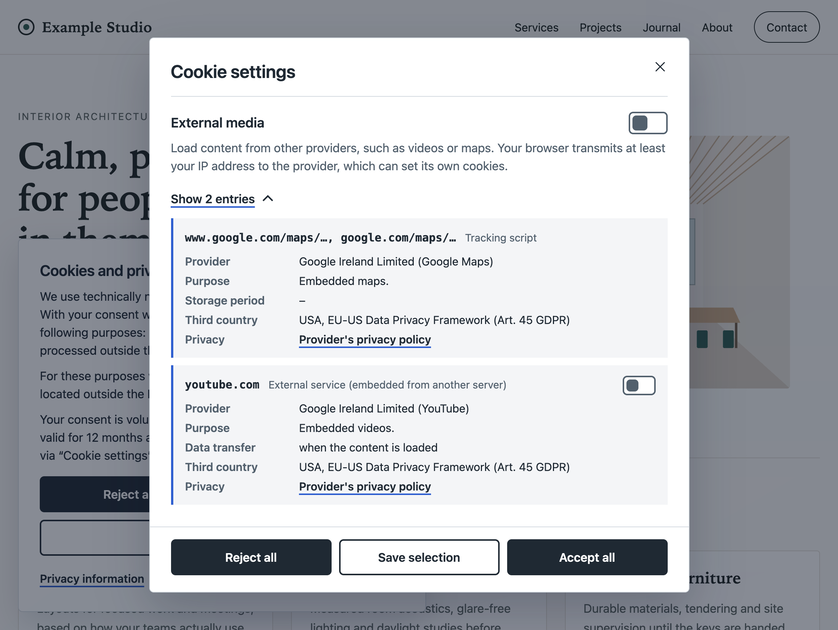
Cookie Consent keeps a registry of the cookies, storage entries and external services your website uses, blocks everything that needs consent on the server until the visitor agrees, shows a consent banner with equal "Reject all" and "Accept all" buttons, and stores tamper-evident records of every choice.
The plugin is a technical tool. It does not provide legal advice, and using it does not by itself make a website compliant. Have the banner texts, the cookie list and your privacy policy reviewed for your jurisdiction.
Why Cookie Consent
- Blocking happens on the server. Cookies and embeds that need consent are removed from the response before the page reaches the browser, also on error pages and in AJAX responses. Any error fails closed.
- Equal choices. "Reject all", "Accept all" and "Settings" have the same weight on the first layer; nothing is preselected.
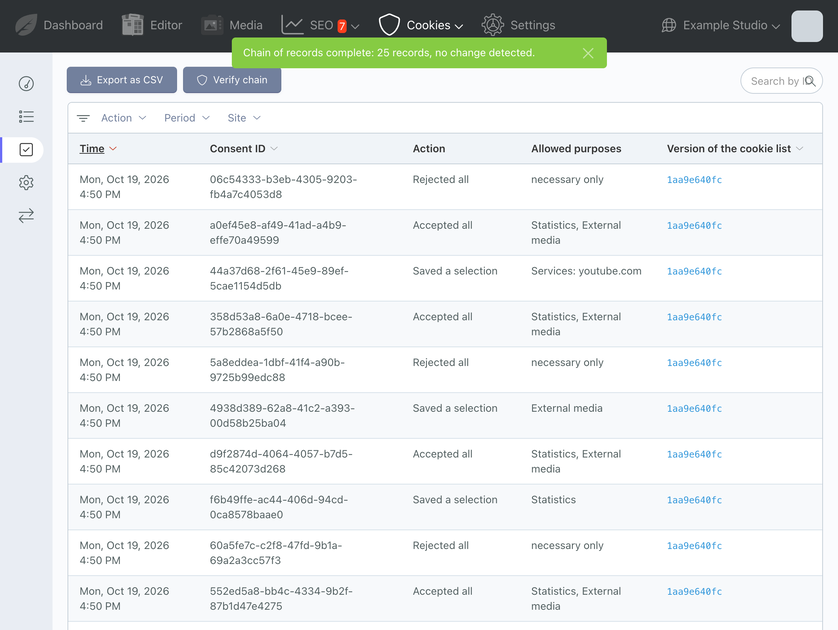
- Proof you can check. Every choice is stored with a snapshot of the information shown and chained by SHA-256 hashes, without IP address or user agent.
- Runs on your server. No third-party dependencies, no external connections, nothing is sent to the vendor.
- Fits your theme. The banner reads only
--bpc-*design tokens with neutral defaults; colours, layout and font can also be set per site in the backend. - Multilingual and multisite. Visitor texts and the details of every registry entry follow the language of the active site. English and German are included.
Features
- Registry with automatic detection: a middleware checks every response (Set-Cookie headers, Cookie header, HTML); a website scan requests all pages with and without consent, on a schedule or on demand; editors can report cookies and storage set by JavaScript. Known names are filled in from a maintained catalog of common services (Google Analytics, Tag Manager, Maps, YouTube, reCAPTCHA, Matomo, Stripe, PayPal, Meta Pixel, Vimeo and others); unknown names stay "not classified" and blocked.
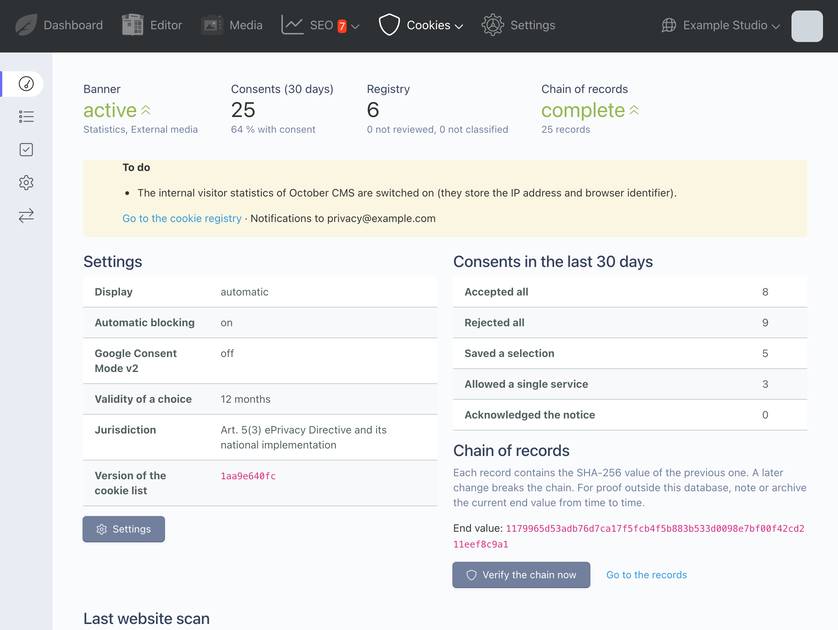
- Setup mode: new installations observe for 14 days without blocking, so you can classify everything before the banner takes effect.
- Server-side blocking of Set-Cookie headers and external embeds (scripts, iframes, images, stylesheets, media, inline loader scripts), script rules for first-party trackers such as self-hosted Matomo, Plausible or Umami.
- Consent per purpose or per service with two-click placeholders for blocked videos and maps.
- Banner and settings dialog with keyboard and screen reader support, provider summary, a floating "Cookie settings" button and four layouts.
- Proof of consent with snapshots and a hash chain, verification in the backend, CSV export with hashes.
- Re-consent after the configured validity, after a separate interval following a rejection, and whenever consent-relevant entries change.
- Google Consent Mode v2 (optional), Global Privacy Control, a JavaScript API and a
dataLayerevent. - Jurisdiction setting: EU (generic), Austria (§ 165 (3) TKG 2021), Germany (§ 25 TDDDG) or a custom statute.
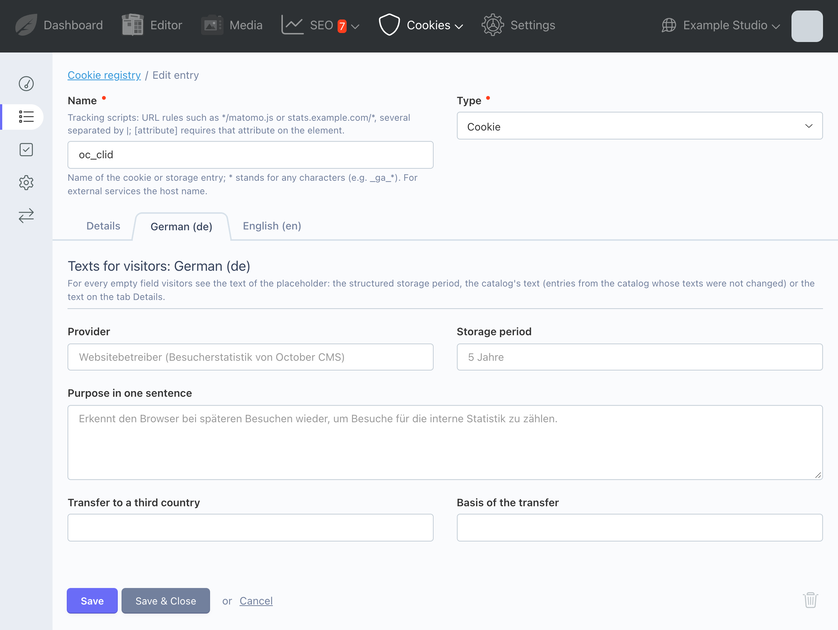
- Backend: Overview, registry with multilingual entries, consent records with site filter, dashboard widget, granular permissions, settings export and import for deployments.
Requirements
- October CMS 3.5 or later, or 4.x (developed and tested with October CMS 4.1)
- PHP 8.2 or later
- Recommended: a cron job for
php artisan schedule:runand the PHP extensionintl
Privacy
The plugin runs entirely on your server. It sends no data to the vendor and loads no external resources. Consent records contain a random ID, the choice, the version of the cookie list, the time, the language, the site and a snapshot of the information shown; no IP address and no user agent. Text blocks for your privacy policy in English and German are included in the documentation (docs/privacy.md).
Documentation
Installation
Install the plugin from the Marketplace with php artisan plugin:install Bitpilo.Cookies, or with Composer:
composer require bitpilo/cookies-plugin
php artisan october:migrate
A new installation starts in setup mode ("observe only", 14 days). An update of an existing installation never switches it on.
Quick start
- Add the
cookieBannercomponent to your layout, directly after the skip link. The layout must contain{% styles %}and{% scripts %}. - Optional: add a "Cookie settings" link to the footer (see page variables below).
- Add the
cookieListcomponent to your privacy policy page. - Open Settings > Cookie banner > Legal information: choose the jurisdiction and set the links to the privacy information and the legal notice.
- Open Cookies > Cookie registry, click "Scan website", classify everything that is "not classified" and mark the entries as reviewed.
- Click "Review finished: start blocking" in the setup mode callout.
-
Check the result in a private browser window: before a choice no request may go to a foreign host.
[cookieBanner]
<body> <a class="skip-link" href="#main">Skip to content</a> {% component 'cookieBanner' %} ... {% styles %} {% scripts %} </body>
Component: cookieBanner
Renders the banner, the settings dialog, the floating button and the configuration for the browser script. It renders nothing (and loads no CSS or JS) when the banner is not needed. Every property that is left empty uses the setting of the active site.
| Property | Values | Default | Description |
|---|---|---|---|
layout |
empty, box-left, box-right, bar-bottom, center-modal |
empty (setting) | Position of the first layer. center-modal dims the page and keeps the focus in the first layer until a choice. |
floatingButton |
empty, auto, always, never |
empty (setting) | Floating "Cookie settings" button after a choice. auto hides it while the page shows its own visible [data-cookie-settings] element. |
injectAt |
component, body-start |
component |
body-start moves the banner markup right after <body>. |
privacyUrl |
absolute https:// URL or path starting with / |
empty (setting) | Link to the privacy information for this layout or page. |
imprintUrl |
absolute https:// URL or path starting with / |
empty (setting) | Link to the legal notice for this layout or page. |
showImprint |
checkbox | on | Switch off when the legal notice is linked visibly on every page anyway. |
Component: cookieList
Renders all entries by purpose with provider, purpose, storage period (for external services: when data is transferred), third country and privacy policy, followed by the legal bases, withdrawal, validity, Global Privacy Control, joint controllership for embeds and the proof of consent.
| Property | Values | Default | Description |
|---|---|---|---|
headingLevel |
h2, h3, h4 |
h3 |
Level of the purpose headings. |
showLegalFacts |
checkbox | on | Legal bases, withdrawal, validity, GPC and proof below the list. |
showSettingsButton |
checkbox | on | Button below the list that opens the cookie settings (only while the banner is active). |
Page variables
| Variable | Set by | Meaning |
|---|---|---|
cookieSettingsAvailable |
cookieBanner |
true while the banner is active; use it to show a "Cookie settings" link in the footer. |
cookieBanner, cookieList |
October | The component objects, for example {{ cookieBanner.layout }} or {{ cookieBanner.summary.providers }} in template overrides. |
{% if cookieSettingsAvailable %}
    <button type="button" data-cookie-settings hidden>{{ 'Cookie settings'|trans }}</button>
{% endif %}
Templates can be overridden in the theme: partials/cookieBanner/default.htm, partials/cookieList/default.htm, and the entries as partials/cookieBanner/entries.htm or partials/cookieList/entries.htm.
Twig function
{% if cookie_consent('statistics') %} … {% endif %} outputs content only with consent for the purpose. The response is then marked as private.
Blocking content by hand
| Attribute | Meaning |
|---|---|
data-consent="<purpose>" |
Element needs consent for the purpose (functional, statistics, marketing, external). |
type="text/plain" with data-src or inline code |
Script that is inserted after consent; data-type sets the final type. |
data-src, data-srcset, data-href, data-poster, data-data, data-consent-style |
Attributes restored after consent. |
data-consent-service="<host or id>" |
The element belongs to one service and is also released when only that service is allowed. |
data-consent-placeholder="<purpose>" |
Hidden after consent. |
data-consent-accept="<purpose>" |
Button that gives consent for a whole purpose. |
data-consent-accept-service="<host or id>" |
Button that gives consent for one service. |
data-cookie-settings |
Opens the settings dialog (keep the hidden attribute). |
data-consent-ignore |
The automatic blocking skips this element. |
JavaScript API
window.BitpiloCookies.open();                     // open the settings dialog
window.BitpiloCookies.get();                      // { id, categories, services, time } or null
const off = window.BitpiloCookies.on("change", (state) => { ... });
window.BitpiloCookies.off("change", listener);
await window.BitpiloCookies.accept("statistics"); // consent to one purpose
window.BitpiloCookies.version;                    // plugin version
window.addEventListener("bitpilo:consent", (event) => { /* event.detail */ });
With Google Consent Mode enabled, the script pushes { event: "cookie_consent_update", consent: { ... } } to window.dataLayer after each choice.
Design
The stylesheet reads only --bpc-* tokens with neutral defaults (--bpc-bg, --bpc-surface, --bpc-ink, --bpc-muted, --bpc-line, --bpc-accent, --bpc-action, --bpc-on-action, --bpc-danger, --bpc-focus, --bpc-font, --bpc-font-heading, --bpc-radius, --bpc-width, --bpc-z and more). Map them in your theme's CSS or use the Design tab of the settings, which takes precedence. The backend warns when a colour pair has a contrast below WCAG 2.2.
Settings (Settings > Cookie banner, per site)
- Banner: display mode (automatic, always, off), optional title and introduction, provider summary, automatic blocking, floating button, Google Consent Mode v2 (basic or advanced, regions, ads data redaction, URL passthrough).
- Design: layout, colour scheme (light, dark, automatic), colours with contrast check, font, corner radius, marker, z-index, corner and distance of the floating button.
- Legal information: jurisdiction (EU generic, Austria, Germany, custom statute), links to the privacy information and the legal notice (CMS page or URL).
- Consent: validity of a choice (1 to 13 months), re-prompt interval after a rejection (6 to 24 months), revision.
- Records: retention of consent records (12 to 120 months, default 36).
- Blocking: additional own hosts, subdomain handling, allowed inline scripts (
sha256-…hashes or distinctive lines), cookie domain, setup mode and its duration (1 to 90 days). - Scan: schedule (off, daily, weekly, monthly), scan address, page limit, notification email, ignored names of the browser report.
Banner texts, links, jurisdiction and design are set per site; the registry, the blocking, the consent records and their settings are shared by all sites. Optional application configuration in config/bitpilo.php: rate limits of the consent endpoint and private scan addresses.
Permissions
| Permission | Grants |
|---|---|
bitpilo.cookies.registry |
Cookie registry: entries, import and export, browser report of editors |
bitpilo.cookies.scan |
Running the website scan |
bitpilo.cookies.settings |
Settings of the cookie banner, export and import of the settings |
bitpilo.cookies.consents |
Viewing and exporting consent records |
Console commands
php artisan bitpilo:cookies-scan
php artisan bitpilo:cookies-settings export storage/app/cookie-settings.json [--registry] [--force]
php artisan bitpilo:cookies-settings import storage/app/cookie-settings.json [--registry] [--dry-run]
The settings export contains the settings of all sites (optionally the registry), without consent records, internal state and the scan address.
Scheduler
With php artisan schedule:run every minute, the plugin deletes records after the retention period and ends an expired setup mode (daily), reports new findings by email (daily at 07:00) and scans the website according to the settings (default weekly).
Caching
Responses whose HTML depends on the visitor's choice are sent with Cache-Control: no-store, private and Vary: Cookie. Full-page caches and CDNs must respect these headers.
Troubleshooting
- No banner: display mode "Automatic" shows the banner only when the registry contains active entries that require consent. Check that the component is in the layout and that the layout contains
{% styles %}and{% scripts %}. - Login, cart or language switch broken: cookies of other plugins are "not classified" and removed. Classify them in the registry (usually "Necessary").
- Nothing is blocked: setup mode is active. Finish it with "Review finished: start blocking".
- An inline script is blocked: allow it by its hash from the scan result in the cookie registry, or mark it with
data-consent-ignoreif it loads nothing that needs consent.
The complete documentation is included with the plugin in README.md and the docs/ folder.
-
This plugin has not been reviewed yet.
-
| 2.0.5 |
Fixes, no database changes: settings missing from the stored settings (added by a later version, or taken over as empty by a site record created later) are shown in the settings form with their default instead of off, so saving the form unchanged no longer switches the provider summary or the automatic blocking off; the provider summary names transfers to third countries instead of providers "located outside the EU/EEA" (Google Ireland Limited is an EU company); the consent cookie and browser report entries get the texts of the site the visitor was on; no storage period for external services and script rules in the entry form and the settings dialog; the daily findings mail job is no longer logged as failed on days with nothing to send; scheduled jobs named; screenshots retaken. Oct 19, 2026 |
|---|---|
| 2.0.4 |
Plugin icon, screenshots and documentation. No database changes. Oct 19, 2026 |
| 2.0.3 |
Multilingual registry (Art. 12 GDPR): provider, purpose, storage period, third country and transfer basis of every entry in the visitor's language, from translations per site language, the storage period as data or the catalog texts of that language (edited texts are never replaced); stable catalog keys; language tabs in the entry form; snapshots with the texts in the language shown; translations in registry export, import and settings transfer; CSV export of the registry; Overview warning for missing translations. Existing texts and the version of the cookie list stay unchanged. Also: Google Maps embed code recognised by the catalog, cookies removed for lack of consent logged once per name and day, tests included in the package. Oct 19, 2026 |
| 2.0.2 |
Fixes from a concurrency, accessibility and security review, no database changes: hash chain head created outside the locking transaction and appending retried on deadlocks, consent requests marked same-origin by the browser accepted without session token, one placeholder for video and audio elements whose sources are all blocked, one-click approval of blocked inline scripts by hash, labelled purpose switches, inert page behind the centred banner, uninstall on SQLite. Oct 19, 2026 |
| 2.0.1 |
Multisite settings (banner texts, links, jurisdiction and design per site; registry, blocking and records shared), granular permissions (registry, scan, settings, consents; replaces manage), setup mode for new installations, design settings, scan schedule and queued scan, settings export and import, dashboard widget, extended catalog in data/catalog.json. Oct 19, 2026 |
| 2.0.0 |
Security and EU-law hardening: signed consent cookie, content-keyed snapshots, hash chain v2 with chain head lock, script rules for first-party trackers, transfer mechanism, floating settings button, Consent Mode v2 settings. Full English/German translation, visitor texts in the site language, jurisdiction setting (EU, AT, DE, custom), configurable privacy and legal notice links, mail template for findings. Major version: reinstall via Composer. Oct 19, 2026 |
| 1.1.1 |
Banner title as a paragraph instead of a heading (correct heading order before the page's H1) Oct 19, 2026 |
| 1.1.0 |
Automatic blocking of external embeds, consent per service, records with snapshot and hash chain, Google Consent Mode, overview, registry export and import Oct 19, 2026 |
| 1.0.0 |
Cookie registry with automatic detection, website scan, consent banner and consent records Oct 19, 2026 |
Upgrade guide (2.x)
From 1.x to 2.0
Version 2.0 is a major version. October does not deploy major versions with regular updates. Update with:
composer require bitpilo/cookies-plugin:^2.0
php artisan october:migrate
- Existing consent records and their hashes are kept unchanged.
- The consent cookie now carries an HMAC signature. Unsigned values from 1.x count as "no choice", so visitors are asked once again.
- Requires October CMS 3.5 or later.
- The stylesheet reads only
--bpc-*tokens. If your theme relied on generic variables such as--bgor--accent, map the tokens in your theme or use the Design tab.
2.0.1
- Existing settings are assigned to the primary site (multisite settings).
- The permission
bitpilo.cookies.manageis replaced in every role and user bybitpilo.cookies.registry,bitpilo.cookies.scanandbitpilo.cookies.settingswith the same value. Viewing consent records needsbitpilo.cookies.consents. - Only a new installation starts in setup mode.
2.0.2
No database changes. Fixes for concurrency, accessibility and security.
2.0.3
Multilingual registry. Existing entries are completed without changing their texts; the version of the cookie list stays the same, so nobody is asked again. Add translations for other site languages on the language tabs of each entry.
2.0.4
Plugin icon, screenshots and documentation. No database changes.