

Notifications — Backend Notification Center
A persistent notification centre for the October backend: bell with unread count, inbox, composer and event rules with role/group/permission targeting.
Notifications — Backend Notification Center
A persistent notification centre for the October backend: bell with unread count, inbox, composer and event rules with role/group/permission targeting.
October has flash messages. This gives the backend a memory.
Every October site eventually reaches the same conversation: the client logs in, sees a clean dashboard, and asks "how do I know when something happens?" Today the answer is a flash message that disappears, an email nobody reads, or a third-party push service that was built for the frontend.
This plugin adds the missing layer: notifications that are addressed to people, stored, counted and readable inside the backend.
The bell
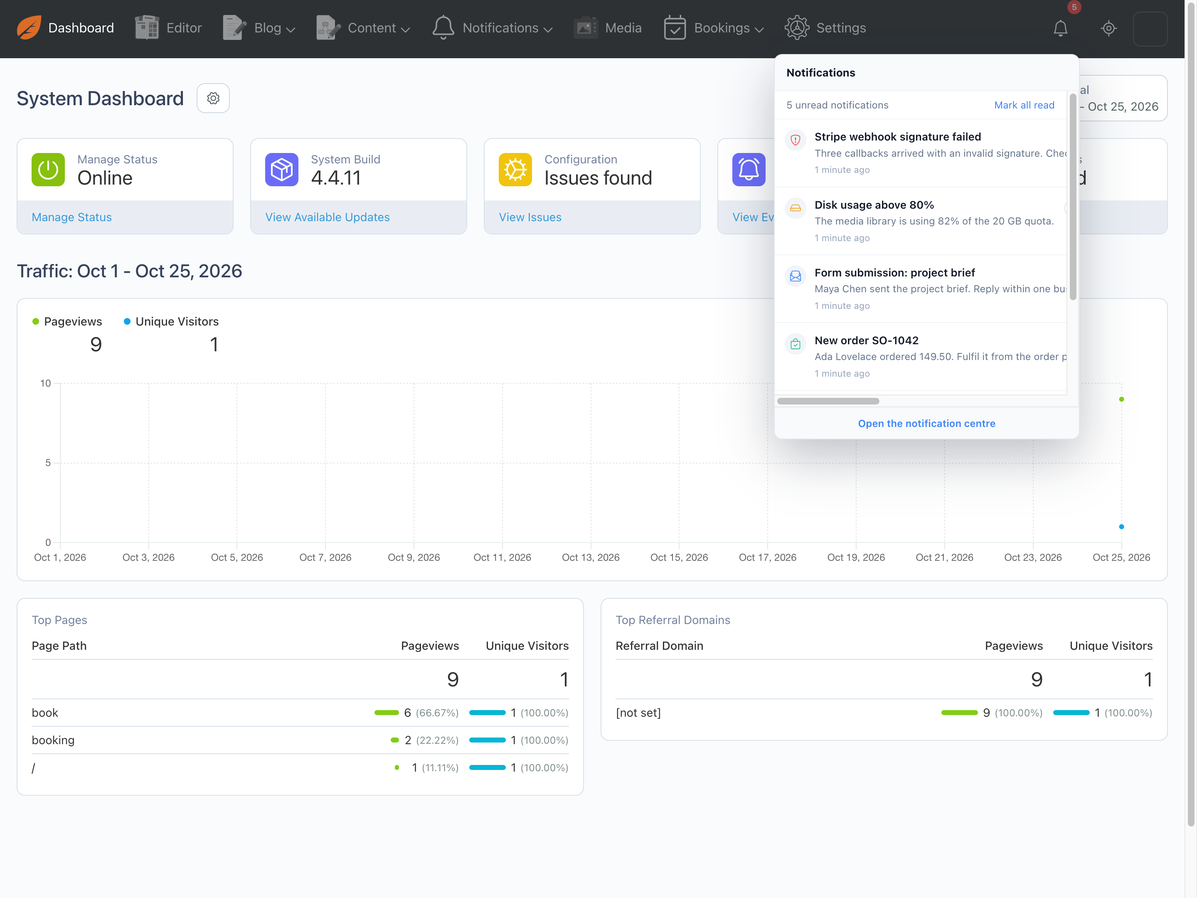
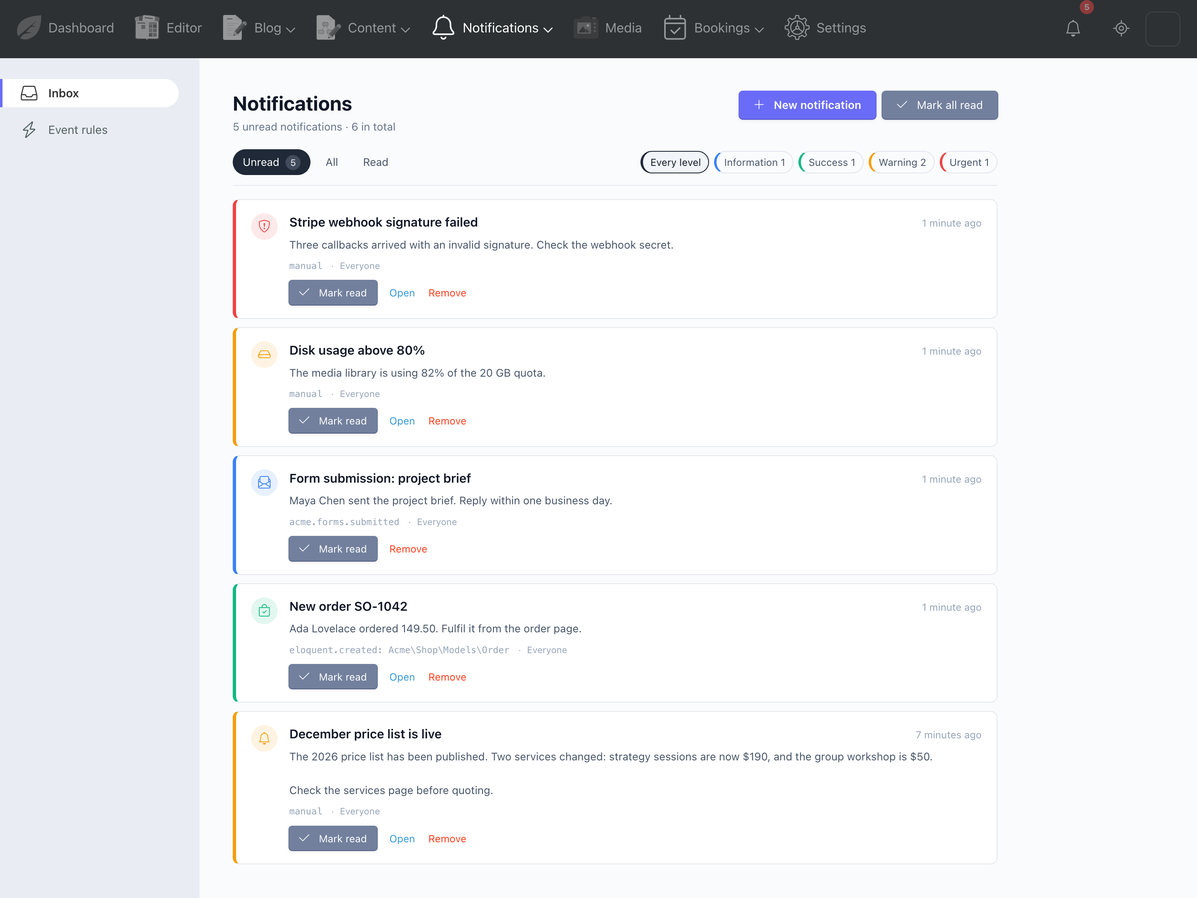
A bell sits in the toolbar with the unread count (capped at 9+ so the menu stays narrow). Click it and the latest notifications open in a flyout — level colour, message, time, one-click mark read, and a link to the full inbox. The count is refreshable while a page stays open; nothing polls when the tab is hidden.
The inbox
Unread / All / Read, level filters (information, success, warning, urgent), pagination, mark read, mark all read, remove. Opening a notification follows its link and clears the unread state. Every user sees only their own deliveries — guessing another user's id returns 404.
The composer
One message to an audience: title, plain-text body, optional link, level. Pick everyone, a backend group, a role, specific people, or anyone holding a permission (wildcards included). Deactivated users are never targeted, and a targeted audience with nothing selected reaches nobody.
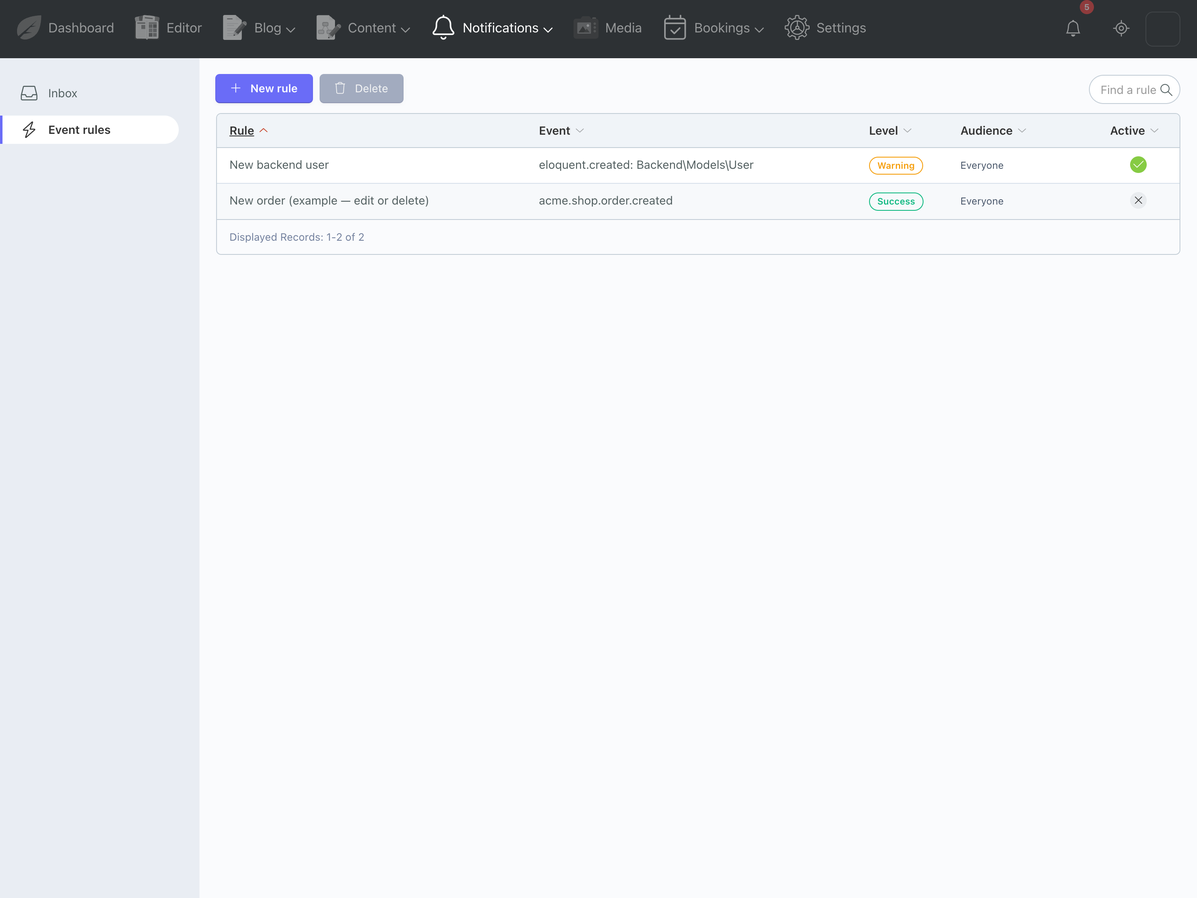
Event rules — the part that removes the busywork
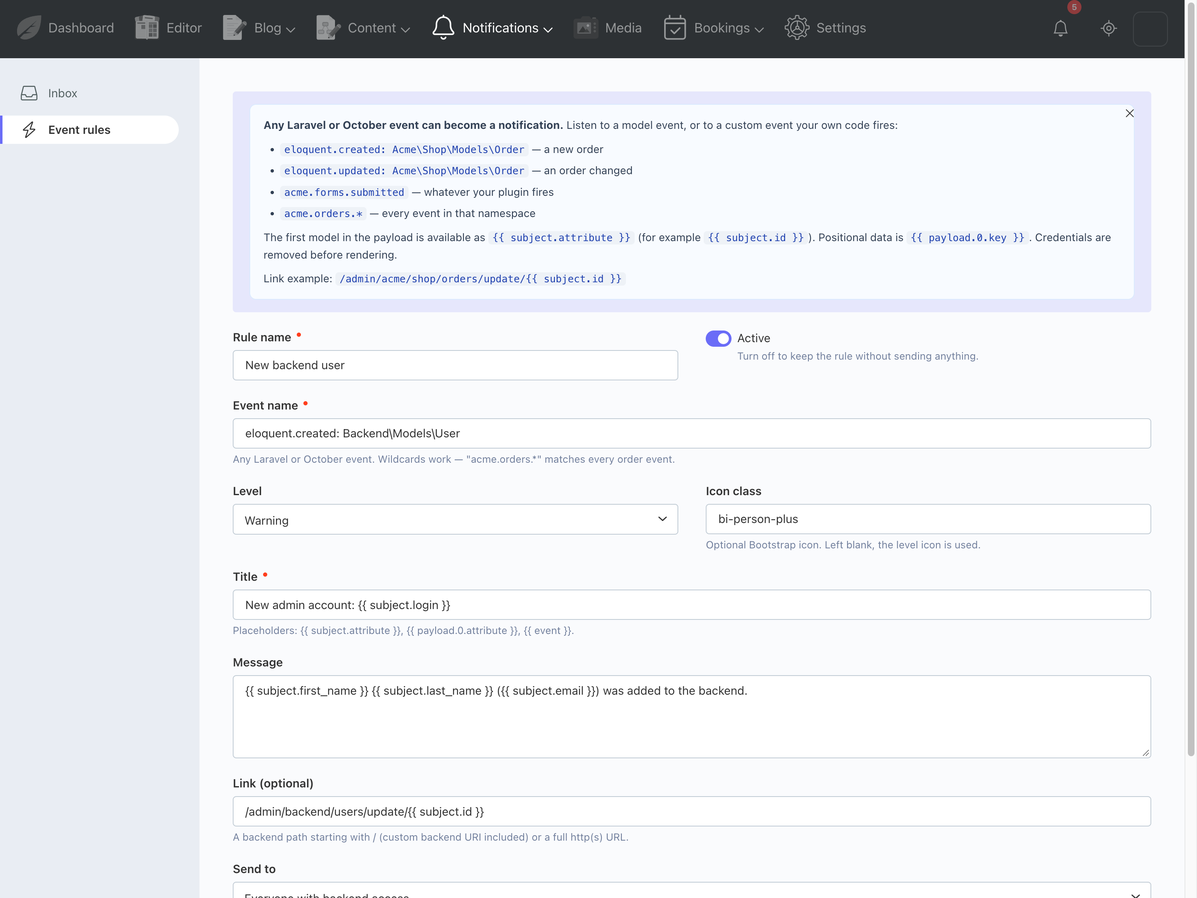
A rule is: when this event fires, send this message to these people.
| You type | You get |
|---|---|
eloquent.created: Acme\Shop\Models\Order |
a notification for every new order |
eloquent.updated: Backend\Models\User |
an alert when an admin account changes |
acme.forms.submitted |
whatever your own plugin fires |
acme.orders.* |
every event in that namespace |
Templates read the payload:
New order {{ subject.reference }}
{{ subject.customer_name }} ordered {{ subject.total }}.
/admin/acme/shop/orders/update/{{ subject.id }}
The first model in the payload becomes {{ subject.attribute }}; positional data is
{{ payload.0.key }}. Passwords, tokens, secrets and hidden model attributes are removed
before rendering. A per-rule cooldown (300 = at most once per five minutes) keeps a
chatty save handler from becoming a notification storm.
The plugin ships with a working example: a new backend account notifies every admin. Change it, disable it, or use it as the template for your own.
Daily digest (optional)
One email per person listing what they have not opened yet. Each item is marked as digested, so nobody gets the same list every morning. It uses October's mail templates and layout, and it is off until you turn it on.
Retention
Old notifications are pruned daily by default after 90 days, together with their read state. No mystery tables growing forever.
Built the October way
- Backend pages use form/list behaviors,
config_form.yamlandconfig_list.yaml. - Three permissions; the inbox itself is personal and needs none.
- No composer packages, no npm build, no external service.
- The audience matcher, template renderer, payload normaliser and cooldown logic have no framework dependencies and ship with a standalone test runner (28 assertions).
- One codebase for October 3.5 and 4.x. On 3.5 the bell is inserted through AJAX because the toolbar view event does not exist there; the UI is identical.
Requirements
- October CMS 3.5.15+ (tested) and 4.4.x (tested)
- PHP 8.1+ (8.2 for October 3.5, 8.4 for October 4)
- MySQL / MariaDB / SQLite / PostgreSQL
- No external account or API key
Honest limitations
No per-notification email or SMS, no Slack/Teams/webhook delivery, no scheduled or recurring campaigns, no per-user mute lists, no frontend widget. This is an admin notification centre; it does that one job properly.
Installation via Command Line
php artisan plugin:install BABA.Notifications
Notifications — Documentation
Developer documentation for Notifications (BABA.Notifications). Written for the
person installing, extending or debugging the plugin.
1. Requirements
| October CMS | 3.5.15+ (tested on 3.5.15) and 4.x (tested on 4.4.11) |
| PHP | 8.1+ (8.2 for October 3.5 / Laravel 9, 8.4 for October 4 / Laravel 12) |
| Database | MySQL / MariaDB (tested) · SQLite · PostgreSQL |
| Dependencies | None. No composer packages, no npm build. |
2. Installation
Marketplace: System → Updates & Plugins → search "Notifications" → Install.
Manual:
# copy the folder to plugins/baba/notifications, then
php artisan october:migrate
php artisan cache:clear
Do not install through a symlink: October's File::checkBaseDir() rejects real paths
outside the project, which makes backend views render blank without an error.
Migrations create three tables, seed the settings row, two example rules (one enabled) and a welcome notification for every activated backend user.
3. Architecture
classes/
  Domain/            pure PHP: Audience, Recipient, Template, Payload, RuleSpec,
                     Level, Badge, Pattern, Url, Cooldown, Retention
  Notifier.php       resolve recipients → write notification + delivery rows
  Recipients.php     audience → real backend users
  EventBridge.php    event listeners → rule matching → Notifier
  Bell.php           data and partials for the toolbar and panel
  Digest.php         unread notifications → one email per person
  BackendUrl.php     path-only backend links for stored templates
controllers/
  Notifications.php  inbox, compose, open, mark read/delete (custom page)
  Rules.php          FormController + ListController
models/              Notification, Delivery, Rule, Settings
partials/            toolbar.php, bell.php, bell_items.php
reportwidgets/       NotificationFeed (dashboard)
console/             test, digest, prune
The domain layer has no October or Laravel dependencies. It is tested by
tests/run.php and can be reused if the storage layer is ever swapped.
4. How the bell is mounted
This is the only version-specific part of the plugin.
October 4.x — Plugin::boot() listens to backend.layout.extendMainMenuToolbar
and returns a <div class="toolbar-item"> containing the bell partial. It is rendered by
the layout on every authenticated page, with the correct unread count on first paint.
October 3.5 — that view event does not exist. bell.js checks for a bell after the
page loads and, if none is present, calls the onBabaBellRender AJAX handler. The handler
returns a prepend patch for ul.mainmenu-extras:
return ['^ul.mainmenu-extras' => Bell::renderBell()];
Both the inline menu and the left-hand copy of the menu exist in the DOM (one is hidden by CSS), so the request is applied to both. This is why the badges and panel bodies use classes, not ids: a selector-keyed AJAX patch updates every match, and duplicate ids would only update the first one.
AJAX handlers on every controller
The bell is present on every backend page, so its handlers must exist on every backend
controller. Plugin::boot() listens to backend.page.beforeDisplay and registers
dynamic methods on the current controller:
| Handler | Returns |
|---|---|
onBabaBellRender |
prepends the bell into ul.mainmenu-extras (3.5 path) |
onBabaBellCount |
updates .baba-bell-badge with the current count |
onBabaBellPanel |
refreshes .baba-bell-panel-body and the badge |
onBabaBellRead |
marks one delivery read, returns panel + badge |
onBabaBellReadAll |
marks all read, returns panel + an empty badge |
backend.page.beforeDisplay fires before execAjaxHandlers(), which is what makes the
dynamic handlers callable for AJAX requests as well as page loads.
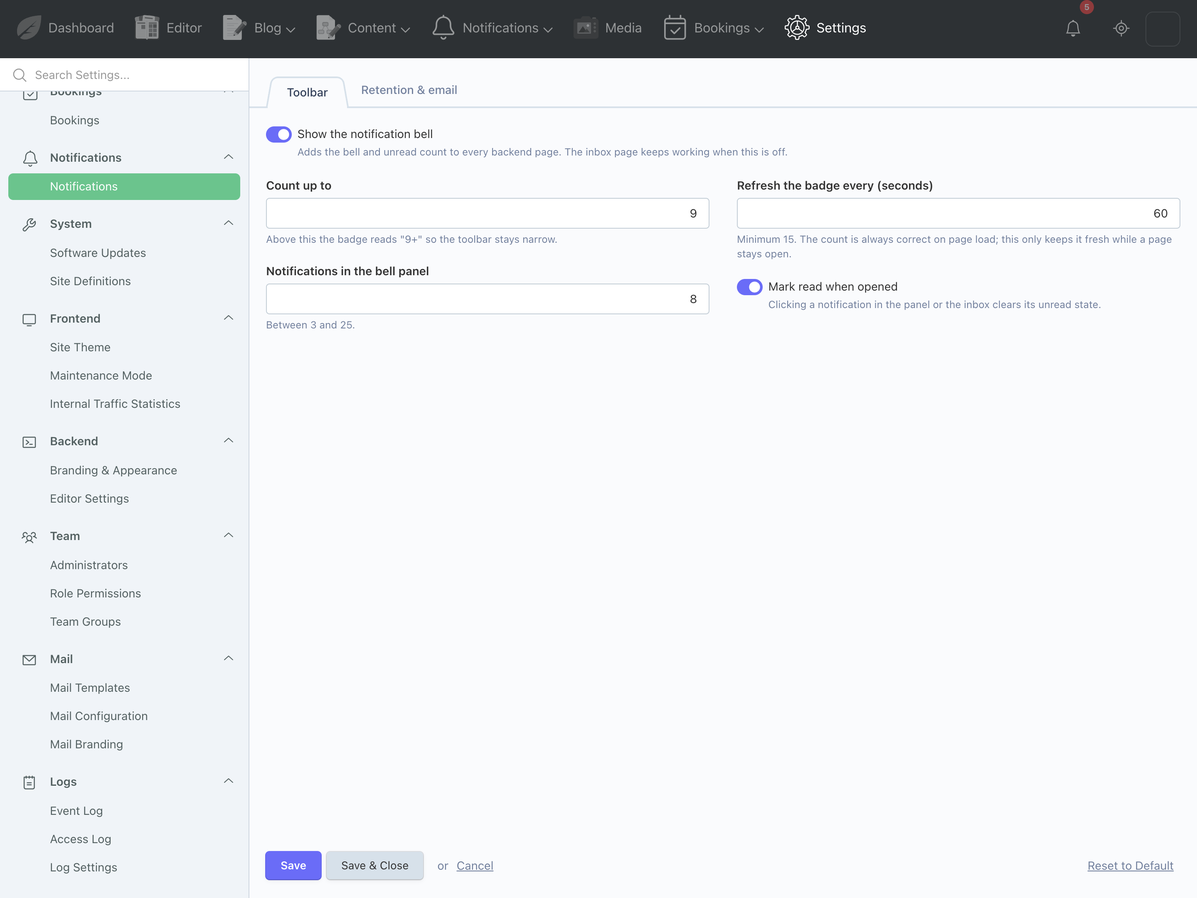
Bell settings: Settings → Notifications → Toolbar (enabled, badge cap, polling seconds, panel size, auto-read).
5. Inbox and composer
The inbox is a custom page at baba/notifications/notifications, not a list behavior.
Query string: filter=unread|all|read, level=info|success|warning|danger, page=N.
- Every query is scoped with
forUser($this->user->id). open/{id}loads the delivery for the current user only (firstOrFail), marks it read when the setting allows, then redirects to the notification's link.- AJAX actions (
onMarkRead,onMarkAllRead,onDelete) return the_listpartial plus the badge patch, so the page updates without a reload. - The composer posts to
onSend, validates the title and the audience, and callsNotifier::send(). It requiresbaba.notifications.broadcast.
The composer is a plain HTML form with a hidden _token. October 3.5 does not attach the
CSRF header to form submissions automatically, so the token is explicit (and harmless on
4.x).
6. The event pipeline
Plugin::boot()callsEventBridge::register().EventBridge::eventNames()reads the distinct event names of enabled rules from the cache (5 minutes). Only those listeners are registered — a busy site does not pay for a wildcard listener on every event.- A listener receives the event, resolves the concrete name (wildcards get the name as
the first argument), and calls
EventBridge::handle(). handle()skips if another dispatch is in progress, skips this plugin's own events and its own models, then loads enabled rules and matches each rule's event pattern.- For every match: cooldown check →
RuleSpec::render($context)→Notifier::send(). Notifierresolves the audience, writes the notification and one delivery row per recipient inside a transaction, then firesbaba.notifications.sent.
Saving or deleting a rule calls EventBridge::flush(), which clears the event cache, so
a new rule starts working on the next request instead of up to five minutes later.
Wildcards use Laravel's wildcard listeners (acme.orders.*). Cooldowns use the
cache with a TTL, so they survive across requests and queue workers.
Failures are caught per rule and logged (Notifications: rule "…" failed). One broken
template never blocks the other rules.
7. Template context
Payload::normalize() builds:
| Key | Content |
|---|---|
event |
the concrete event name |
at |
ISO-8601 UTC timestamp |
subject |
the first model in the payload, as attributes |
payload.0, payload.1, … |
every argument, recursively normalised |
Models are read through getAttributes() only, so templates cannot trigger lazy loads.
getHidden() and a fixed list of sensitive keys (password, remember_token, secret,
api_key, token, stripe_secret_key, …) are removed recursively.
Templates use {{ dotted.path }}. Unknown paths render as an empty string. A title that
renders empty falls back to the event name. Links are restricted to /paths and
http(s):// — javascript:, data: and protocol-relative URLs are dropped.
8. Audience resolution
| Type | Query |
|---|---|
all |
activated users |
groups |
whereHas('groups', code in …) |
roles |
role_id in ids of the selected role codes (only where roles exist) |
users |
id in the selected ids |
permissions |
activated users, filtered through October's own hasAccess() |
Deactivated users are excluded everywhere. A targeted audience with no values returns an
empty collection; Notifier then writes nothing. This is deliberate: a half-configured
rule must not fall back to "everyone".
Permission matching is checked in both directions (a wide grant covers a narrow target
and vice versa); super users (*) match every permission.
9. Database
| Table | Columns that matter |
|---|---|
baba_notifications_notifications |
title, body, url, level, icon, source, rule_id, audience_summary, recipient_count, expires_at |
baba_notifications_deliveries |
notification_id, user_id, read_at, digest_sent_at; unique (notification_id, user_id); index (user_id, read_at) |
baba_notifications_rules |
event_name, title_template, body_template, url_template, audience_type, audience_groups/roles/users (JSON), audience_permissions (text), enabled, cooldown_seconds |
baba_notifications_settings |
serialised settings |
audience_permissions is text, one code per line (or comma separated), because the form
field is a textarea and a JSON array cannot be rendered into one. The other audience
columns are JSON arrays behind checkbox lists.
10. Email digest and scheduler
The digest template is baba.notifications::mail.digest, registered under Mail
Templates. It uses October's markdown + layout format (layout = "system"), which is
the only format that renders reliably on both 3.5 and 4.x: October 3.5 runs raw HTML
templates through its markdown parser, which chokes on a standalone <!DOCTYPE html>.
Data available to the template: user, items (title, body, url, level, color), count,
total, inbox_url, app_name, subject.
Schedule registration:
$schedule->command('notifications:digest')->dailyAt(Settings::digestTime());
$schedule->command('notifications:prune')->dailyAt('03:10');
Add the usual cron entry:
* * * * * php /path/to/artisan schedule:run
Manual runs:
php artisan notifications:digest --force
php artisan notifications:digest --user=admin
php artisan notifications:prune --days=30
Only deliveries with digest_sent_at IS NULL are included; after a successful send the
rows are stamped, so an unread item is emailed once, not every morning.
11. Commands
| Command | Options | Purpose |
|---|---|---|
notifications:test |
--user=, --level=, --title= |
Send one test notification |
notifications:digest |
--user=, --force |
Email unread notifications |
notifications:prune |
--days= |
Delete old notifications and their deliveries |
12. Permissions
| Permission | Grants |
|---|---|
| (none) | Your own inbox and the bell |
baba.notifications.broadcast |
Composer / send to others |
baba.notifications.manage_rules |
Event rules page |
baba.notifications.manage_settings |
Settings page |
The inbox is not permission-gated on purpose: a notification is addressed to a person, and asking an administrator to grant "read your own messages" only produces tickets.
13. Extending
From another plugin (classes):
use BABA\Notifications\Classes\Domain\Audience;
use BABA\Notifications\Classes\Notifier;

Notifier::send([
    'title' => 'Invoice ' . $invoice->number . ' failed',
    'body' => 'The gateway rejected the charge.',
    'url' => '/admin/acme/invoices/update/' . $invoice->id,
    'level' => 'danger',
    'audience' => new Audience(Audience::PERMISSIONS, ['acme.invoices.manage']),
    'source' => 'acme.invoices.failed',
]);
Without a class dependency:
Event::fire('baba.notifications.send', [[
    'title' => 'New signup',
    'body' => $user->email,
    'level' => 'success',
    'audience' => ['type' => 'all', 'values' => []],
]]);
Custom events for rules: fire an event with a model and a name; templates can read it.
Event::fire('acme.forms.submitted', [$submission]);
// rule: acme.forms.submitted, title: New {{ subject.form_name }} submission
Listen after delivery:
Event::listen('baba.notifications.sent', function ($notification) {
    // forward to a webhook, count by level, …
});
14. Troubleshooting
| Symptom | Cause / fix |
|---|---|
| Bell missing on 4.x | Settings → Notifications → Show the notification bell is off, or the layout view event was overridden by a custom backend theme |
| Bell missing on 3.5 | Check that bell.js is in the page source and that $.request exists (October's AJAX framework). Clear the app cache; re-save the plugin files (no symlinks) |
| Rule never fires | Rule disabled; event name typo (backslashes are literal); cooldown active; the audience matches nobody; or the event is not actually fired by the other plugin. Cache::forget('baba.notifications.event_names') is done automatically on save |
| Notification created but no recipient | Deactivated users are excluded; a targeted audience with no values reaches nobody |
| Digest sends nothing | Disabled in settings (use --force once to test), scheduler not running, or every unread row already has digest_sent_at |
| Composer returns 403 | Missing baba.notifications.broadcast, or the session/CSRF token expired (reload the form) |
| Settings page 404 | The URL is /admin/system/settings/update/baba/notifications/notifications (the settings key is notifications, not settings) |
| "Unable to find the specified settings" | The plugin was copied without the models/settings/fields.yaml file, or the manifest is stale — php artisan cache:clear |
| Notifications disappeared | Retention pruning (default 90 days), or the user was deleted (deliveries are not recreated) |
15. Tests
The domain layer ships with a standalone runner in the delivery repository (no framework boot):
php tests/run.php
28 assertions covering levels, badge formatting, wildcard patterns, template rendering (dotted paths, missing keys, scalars, arrays, objects), payload normalisation (models, hidden/sensitive attributes, dates), audience matching (all, groups, roles, users, permissions in both directions, super users, empty targets), URL sanitation, cooldowns, retention cutoffs and rule rendering (whitespace, fallbacks, dangerous icons).
The framework layer is verified by installing the plugin on 3.5.15 and 4.4.11 and walking
the UI — see ../README.md for the matrix.
-
This plugin has not been reviewed yet.
-

| 1.0.0 |
First version of the Notifications plugin Oct 26, 2026 |
|---|
Upgrade guide
Versioning policy
- Major (
2.0.0) — database columns removed/renamed, handler names changed, or a behaviour that existing rules depend on. - Minor (
1.1.0) — new features, new settings, new audience types; existing rules keep working. - Patch (
1.0.1) — fixes only; no schema changes unless a migration is strictly required, in which case it is additive and safe to run on a live site.
Updates arrive through System → Updates & Plugins when the plugin is installed from the
Marketplace, or by replacing the folder and running php artisan october:migrate when
installed from source. Always run php artisan cache:clear after a manual update.
1.0.0 — first release
Nothing to do. A fresh install runs the migrations automatically.
If you are upgrading from a pre-release build that used the same tables, the migrations are idempotent per October's version history and will not run twice.
Template for the next release
## 1.1.0

**New**
- …

**Changed**
- …

**Upgrade steps**
1. `php artisan october:migrate`
2. `php artisan cache:clear`
3. (only if a setting moved) …

**Breaking**
- None.