


The October CMS booking plugin that behaves like a booking business.
Every October site eventually needs a "book an appointment" page. The usual answers are a contact form with a note saying "we'll call you back", or a WordPress plugin that cannot run here. This is the third option: a booking system with an availability engine that understands staff, buffers, capacity and timezones.
What the customer sees
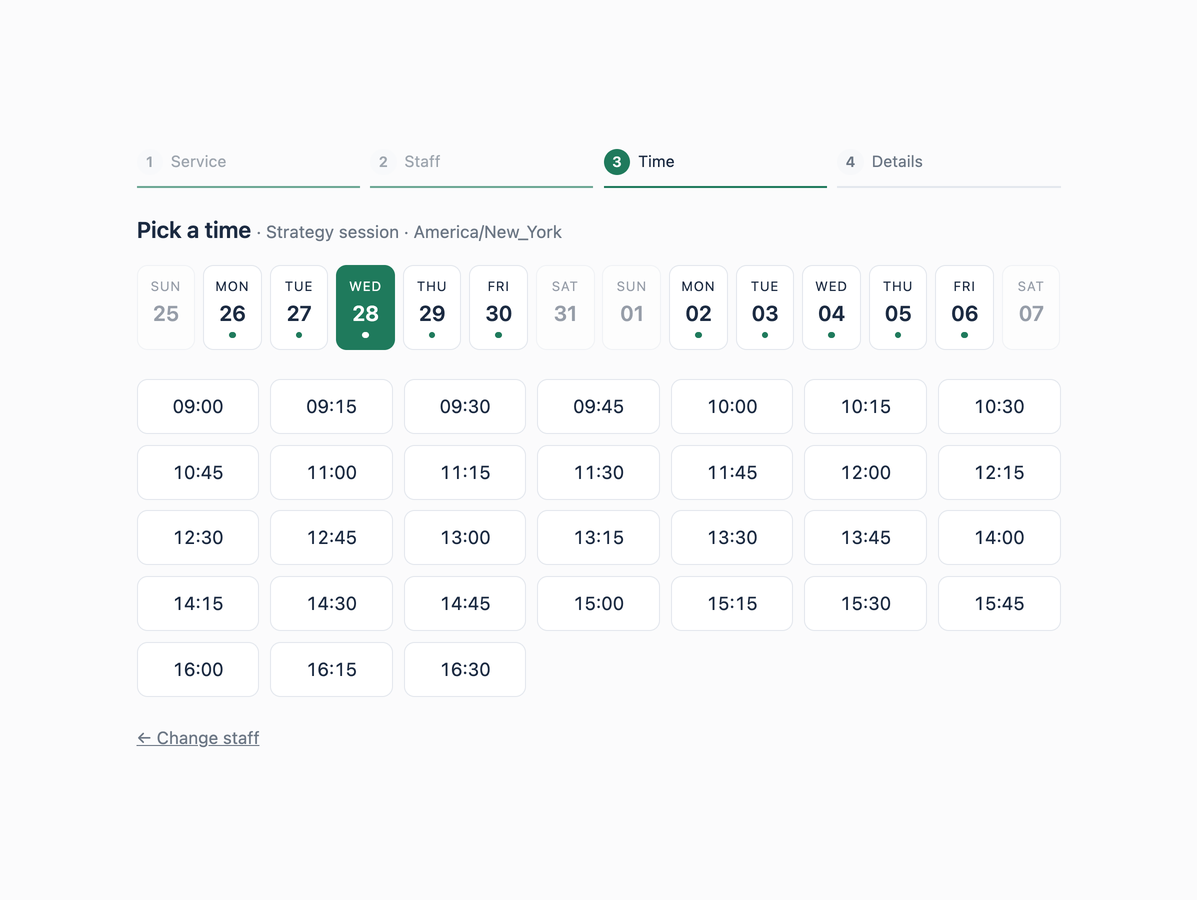
Four steps, one page, no page reloads:
- Service — duration, price, deposit shown up front.
- Who — a specific person, or "anyone available".
- When — a two-week date strip with open/closed markers, then the slots for that day. Slots disappear as they fill.
- Details — name, email, phone, notes, confirm.
They get a confirmation email with a reference. That reference plus their email opens a manage page where they can cancel (subject to a notice window you set).
What you get in the backend
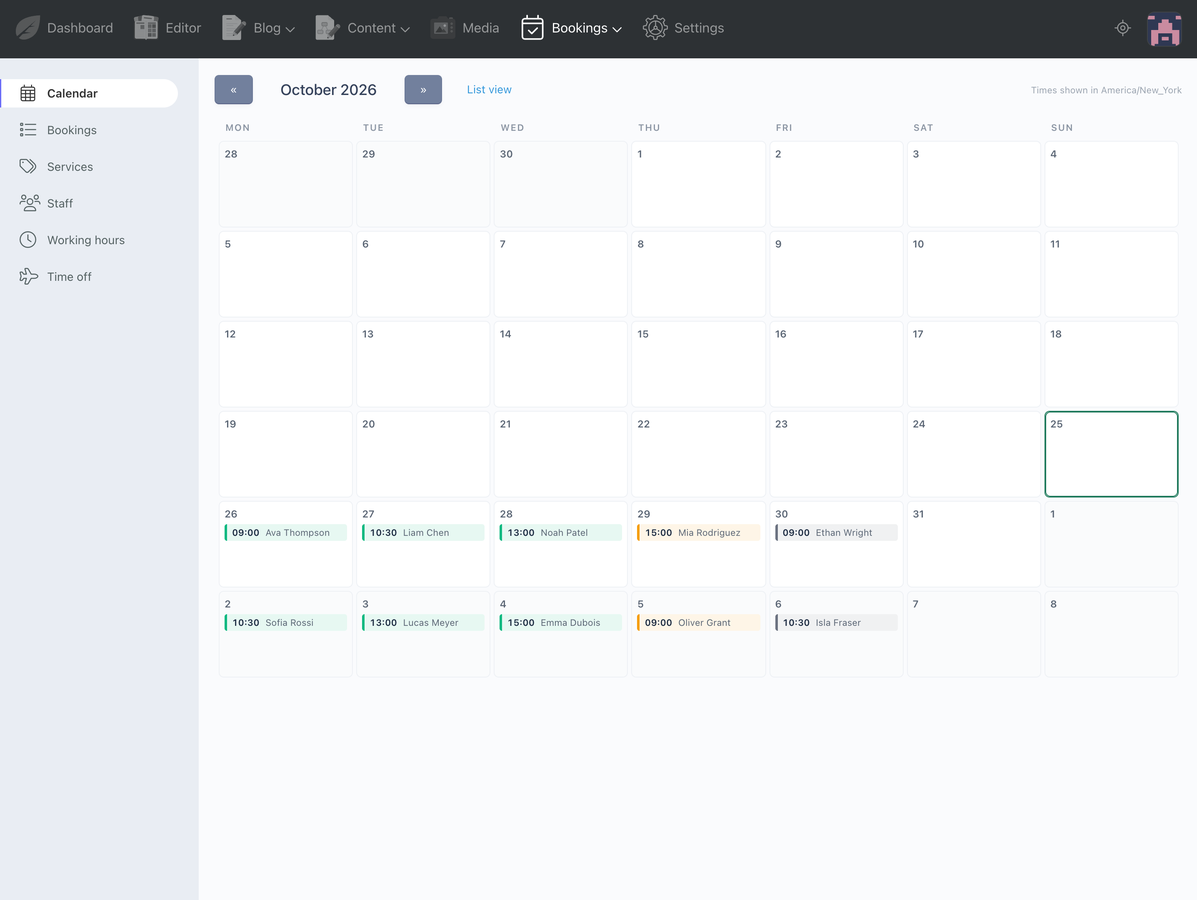
- Month calendar — every day cell shows its bookings as coloured chips, click one to open it.
- Bookings list with status/payment filters, search and record links.
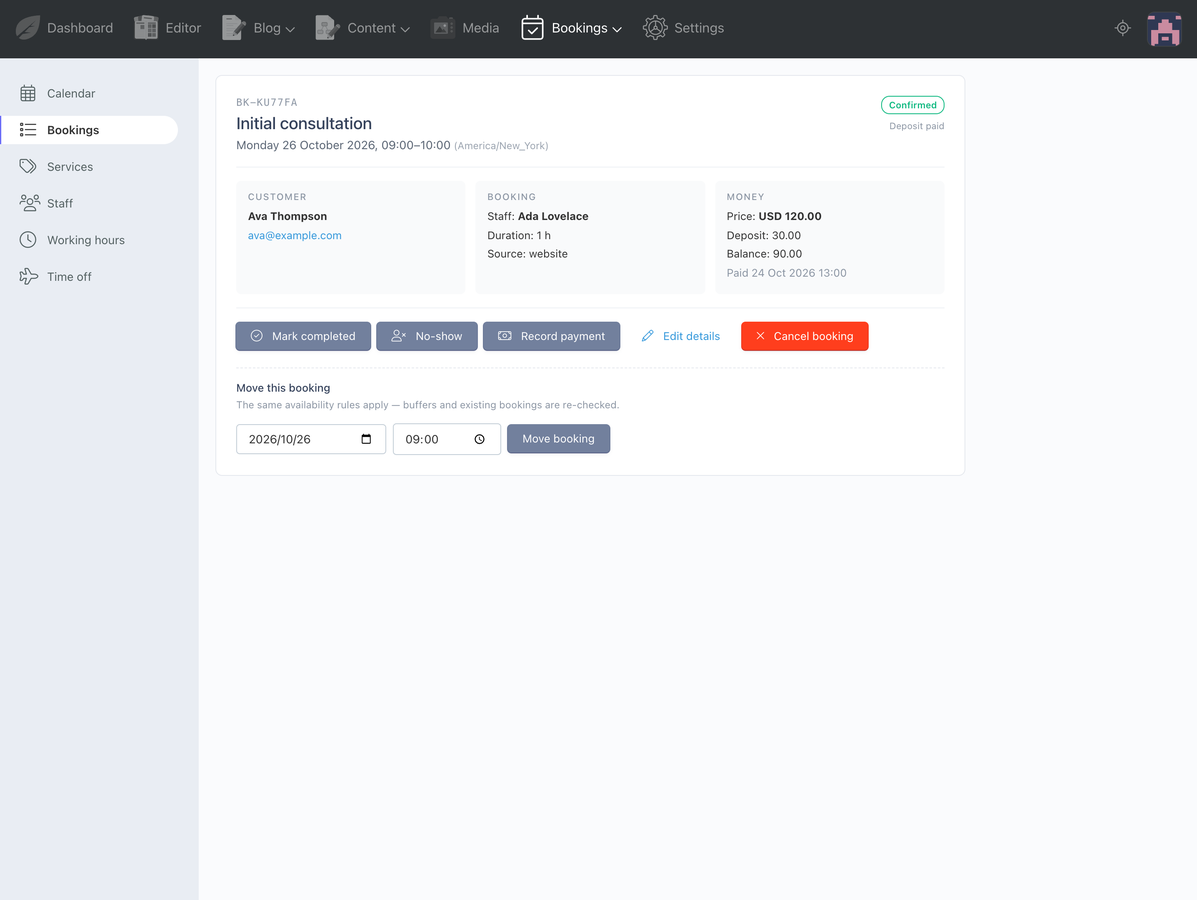
- Booking page — approve, complete, no-show, cancel, record a payment, or move the booking to another slot (the same collision rules apply).
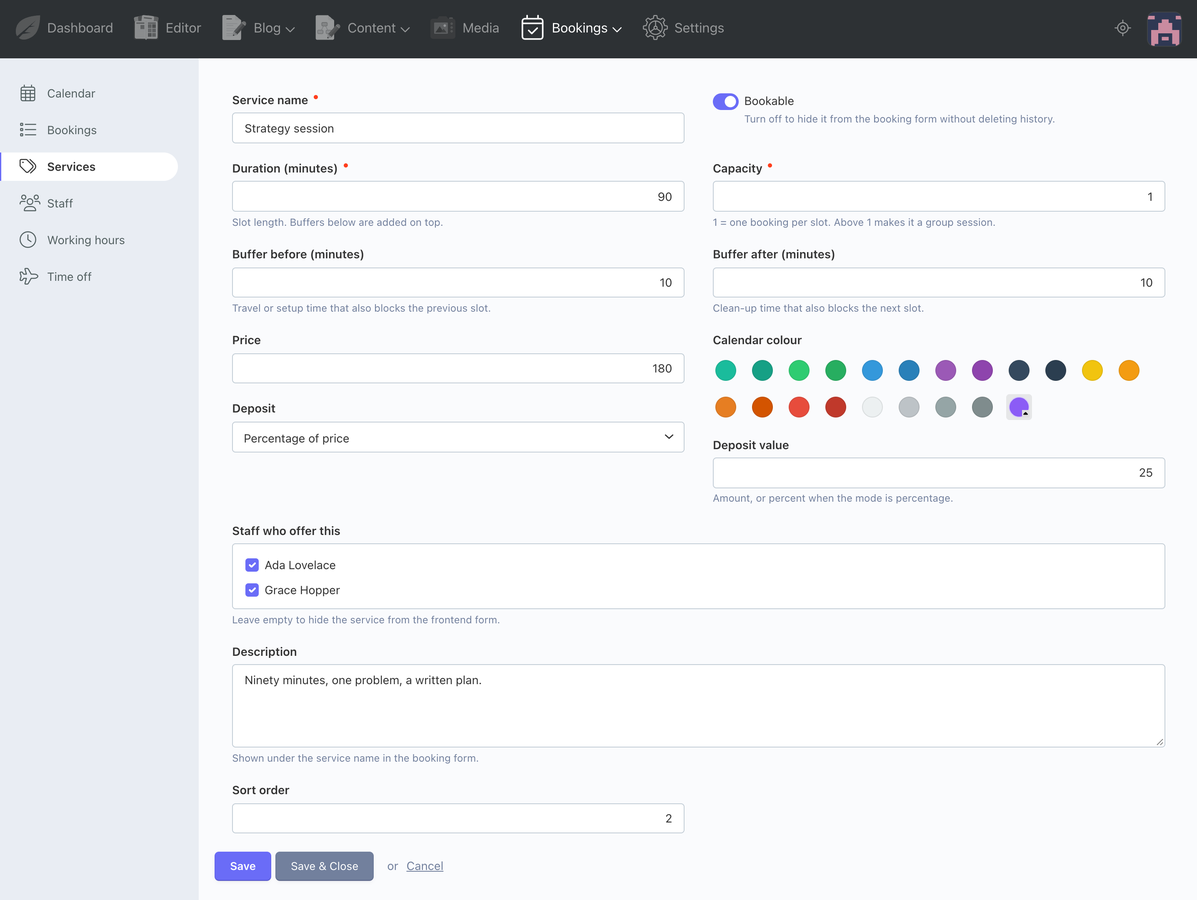
- Services — duration, price, deposit (fixed or %), before/after buffers, capacity (1 = single booking, 8 = a workshop), colour, ordering.
- Staff — services offered, contact details, colour, calendar feed URL.
- Working hours — one row per weekday; add a second row for the same day and you have a lunch break.
- Time off — whole days or partial hours, with a note.
The part that matters: real availability rules
A slot is offered only when it fits the working window, is not inside time off, respects minimum notice and the booking horizon, clears the buffers of existing bookings, and has a free seat for group services.
Two details that are usually wrong elsewhere:
- Buffers are honoured from both sides. The gap between two bookings is the larger of what the first needs afterwards and what the second needs beforehand.
- Daylight saving does not corrupt the slot grid. Times are stored in UTC and slots are generated in UTC, so the hour that does not exist locally is never offered and the hour that happens twice is billed as real time.
No double bookings
The form re-checks availability inside a transaction with the range locked, then inserts. Two customers clicking the same 09:00 get one booking and one honest error message.
Calendar feeds, not OAuth
Every staff member gets a token .ics URL that Google Calendar, Apple Calendar and
Outlook can subscribe to. No API keys, no consent screens, no token expiry at 3am.
Optional deposits
Track a price, a deposit and a balance with no payment provider at all. Or switch on Stripe Checkout: the customer pays the deposit during booking and the signed webhook confirms it. If Stripe is down, the appointment is still saved and the customer pays on the day — a payment outage never swallows a booking.
Emails
Confirmation, pending approval, cancellation, reminder and a new-booking alert to you.
Reminders run from the scheduler (php artisan bookings:reminders is also available).
Built the October way
- Behavior-driven controllers,
config_list.yaml/config_form.yaml, no custom tables outside the plugin prefix. - Four permissions, so a receptionist can take bookings without touching settings.
- No composer dependencies, no npm build step, no external service except optional Stripe.
- The availability engine has no framework dependencies and ships with a standalone test runner (26 assertions).
Requirements
- October CMS 3.5.15+ (tested) and 4.4.x (tested), PHP 8.1+
- PHP 8.2 for October 3.5 (Laravel 9), PHP 8.4 for October 4
- MySQL / MariaDB / PostgreSQL / SQLite
- Optional: Stripe account for deposits
Honest limitations
No recurring bookings, no two-way Google sync, no SMS, no waitlist, no multi-location. If you need those, this is not the plugin. What it does, it does properly.
Installation via Command Line
php artisan plugin:install BABA.Bookings
Bookings — Documentation
Developer documentation for Bookings (BABA.Bookings). Everything below is written
for the person installing and extending the plugin, not for the end customer.
1. Requirements
| October CMS | 3.5.15+ (tested on 3.5.15) and 4.x (tested on 4.4.11) |
| PHP | 8.1+ (8.2 for October 3.5 / Laravel 9, 8.4 for October 4 / Laravel 12) |
| Database | MySQL 5.7+ / MariaDB 10.3+ (tested) · SQLite (tested) · PostgreSQL not yet tested |
| Dependencies | None. No composer packages, no npm build. Stripe is optional. |
2. Installation
Marketplace: System → Updates & Plugins → search "Bookings" → Install.
Manual:
# copy the folder to plugins/baba/bookings, then
php artisan october:migrate
php artisan october:util purge manifest   # only needed when copying by hand
Migrations create seven tables (baba_bookings_*) and seed a working demo — three
services, two staff members, a week of opening hours — so the booking form works
immediately. Delete the demo rows when you add your own.
Do not install the plugin through a symlink into another directory. October's
File::checkBaseDir()rejects real paths outside the project, which makes backend views render blank without an error.
3. Two-minute setup
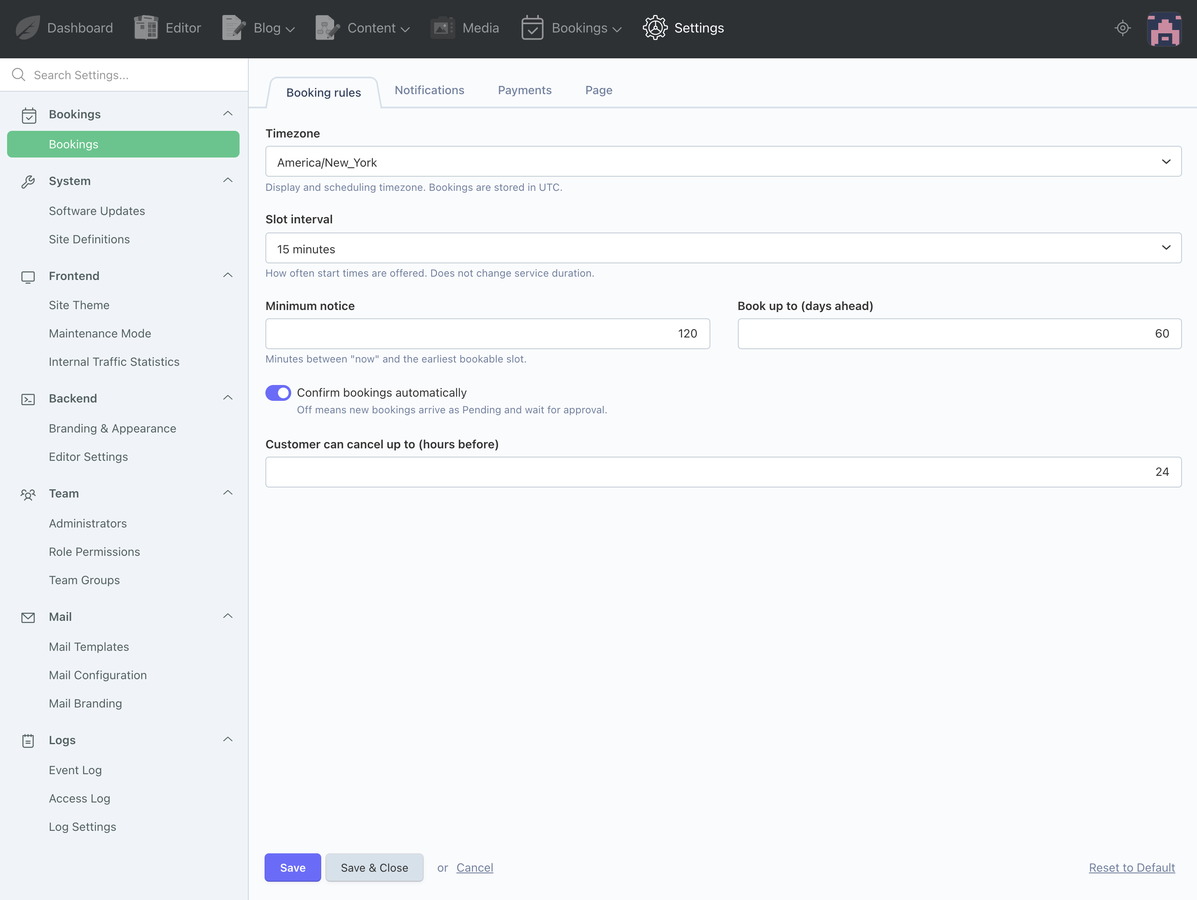
- System → Settings → Bookings — timezone, slot interval, minimum notice, booking horizon.
- Bookings → Staff — add a person, tick the services they offer. Each staff record has a Calendar feed URL (visible on the edit page) for Google/Apple/Outlook.
- Bookings → Working hours — one row per weekday (
Monday 09:00–17:00). Add a second row for the same day to model a lunch break or a split shift. - Bookings → Time off — holidays (whole day) or partial absences (e.g. 12:00–13:00).
- Bookings → Services — name, duration, price, deposit, buffers, capacity.
- Create two CMS pages (see §5) and point Settings → Booking page at the manage page.
4. The availability rules
A slot is offered only when all of the following hold:
| Rule | Where it is set | Notes |
|---|---|---|
| Fits inside a working window for that weekday | Staff → Working hours | Multiple windows per day allowed |
| Not inside time off | Staff → Time off | Whole day or a time range |
| Starts at least N minutes from now | Settings → Minimum notice | Default 120 |
| Within the booking horizon | Settings → Book up to (days) | Default 60 |
| Clears the buffers of existing bookings | Service → Buffer before/after | Gap = max(existing after, new before) |
| Has a free seat | Service → Capacity | 1 = exclusive, >1 = group session |
Slots are generated on the interval from Settings → Slot interval (default 15 min), starting at the window's opening time.
Time model. Everything is stored in UTC and displayed in the timezone from Settings. Slot generation iterates in UTC, so daylight-saving transitions behave correctly: the hour that does not exist locally is never offered, and the hour that happens twice is charged as real time.
Double bookings. BookingManager::create() opens a transaction, re-checks the slot
with the overlapping rows locked, and only then inserts. Two customers clicking the same
09:00 produce one booking and one "that time was just booked" message. Moving a booking
from the backend runs the same check.
5. Frontend
Create a page for the form and another for the customer's manage link:
title = "Book"
url = "/book"

[bookingForm]
==
{% framework %}
{% styles %}
{% component 'bookingForm' %}
{% scripts %}
title = "Manage your booking"
url = "/booking"

[bookingManage]
==
{% framework %}
{% styles %}
{% component 'bookingManage' %}
{% scripts %}
The three tags matter: without {% framework %} the buttons do nothing, without
{% styles %} the form renders unstyled, without {% scripts %} the AJAX layer never
initialises. Most themes already have them in the layout — if yours does, you only need
the {% component %} line.
Component bookingForm
| Property | Type | Default | Purpose |
|---|---|---|---|
service |
dropdown | — | Preselect a service (id or slug); skip the first step |
days |
string (int) | 14 |
Days shown in the date strip |
showStaff |
checkbox | on | Offer "anyone available" / per-person choice |
successMessage |
string | from Settings | Overrides the confirmation text |
Properties in the page file:
[bookingForm]
service = "strategy-session"
days = "10"
==
Component bookingManage
| Property | Type | Default | Purpose |
|---|---|---|---|
allowCancel |
checkbox | on | Show the cancel button |
It reads ?reference=…&email=… from the confirmation email, or ?reference=…&sig=…
from the Stripe return URL. Both are matched server-side; a guessed reference alone is
not enough.
Styling
The form uses only bk- prefixed classes in assets/css/form.css. Recolour it by
setting one custom property:
.bk-widget { --bk-accent: #1f7a5c; }
6. Backend
| Screen | What it does |
|---|---|
| Calendar | Month grid, bookings as coloured chips by status, click to open |
| Bookings | Filterable list (status, staff), search by reference or customer |
| Booking detail | Approve, complete, no-show, cancel, record payment, reschedule |
| Services | Duration, buffers, capacity, price, deposit, colour, staff assignment |
| Staff | Contact details, services offered, calendar feed token |
| Working hours | Weekly recurring windows per staff member |
| Time off | Holidays and partial absences per date |
| Settings | Timezone, slots, notifications, payments, page URLs |
Statuses: pending, confirmed, completed, cancelled, no_show. Only pending
and confirmed occupy the calendar.
7. Data model
| Table | Purpose |
|---|---|
baba_bookings_services |
duration, buffers, capacity, price, deposit mode/value, colour, active |
baba_bookings_staffs |
name, email, phone, colour, calendar_token |
baba_bookings_service_staff |
pivot: which staff offers which service |
baba_bookings_schedules |
staff_id, weekday (0=Sun), start_time, end_time |
baba_bookings_time_off |
staff_id, date, is_full_day, start_time, end_time |
baba_bookings_bookings |
starts_at/ends_at (UTC), customer, status, money, payment refs |
baba_bookings_settings |
serialised plugin settings |
Booking::starts_at and ends_at are always UTC. Use localStartsAt() /
localEndsAt() to display them.
8. Events
| Event | Payload | Fired when |
|---|---|---|
baba.bookings.created |
$booking |
After the transaction commits |
baba.bookings.rescheduled |
$booking |
After a booking is moved |
baba.bookings.cancelled |
$booking |
Customer or backend cancellation |
Event::listen('baba.bookings.created', function ($booking) {
    // send to Slack, create an invoice, tag the customer…
});
The built-in mail listeners wrap themselves in try/catch and log failures, so a broken
mailer never loses a booking. Your own listeners run after those.
9. Emails and reminders
Five Twig templates live in mail/ and are registered as
baba.bookings::mail.{confirmed,pending,cancelled,reminder,admin_new}. Edit them in
Settings → Mail Templates.
Data available to every template: booking, customer, service, staff, when,
when_short, duration, price, deposit, currency, reference, manage_url,
booking_page, backend_url, business, subject, terms_url.
Reminders need the scheduler:
* * * * * php /path/to/artisan schedule:run
The plugin registers an hourly job and marks reminder_sent_at, so it is safe to run as
often as you like. Manual run: php artisan bookings:reminders.
10. Calendar feeds
Every staff member has a token URL:
https://example.com/bookings/calendar/{token}.ics
Read-only, RFC 5545, works in Google Calendar, Apple Calendar and Outlook. The token is 32 random characters; treat the URL as a secret. Turn the whole feature off in Settings → Notifications → Publish staff calendar feeds.
11. Stripe payments (optional)
Deposits are tracked by default — nothing is charged. To actually charge the deposit:
- Settings → Payments → Payment collection = Stripe Checkout.
- Paste the
pk_…andsk_…keys. - In Stripe, add the endpoint
https://example.com/bookings/payments/stripe, listen forcheckout.session.completed, and paste thewhsec_…signing secret.
The webhook verifies the Stripe-Signature header (HMAC-SHA256 over {timestamp}.{body}
with a 300 s tolerance). Invalid or stale signatures get 400. When the session
completes, the booking is marked deposit_paid and paid_at is set.
If Stripe is unreachable during booking, the appointment is still created and the customer is told to pay on the day — a payment outage never swallows a booking.
12. Permissions
| Permission | Grants |
|---|---|
baba.bookings.access_bookings |
View/manage bookings, calendar, customer data |
baba.bookings.manage_services |
Services |
baba.bookings.manage_staff |
Staff, working hours, time off |
baba.bookings.manage_settings |
Settings |
A receptionist normally needs only access_bookings.
13. Extending
Add a field to the booking form. Three steps: add the column in a migration, add it
to controllers/bookings/config_form.yaml so it works in the backend, then render the
input in components/bookingform/body.htm and pass the posted value through
BookingForm::onSubmit() into BookingManager::create().
Change the availability rules. They live in classes/Availability.php, which has no
framework dependencies — edit it and update tests/run.php (run with
php tests/run.php).
Custom pricing. Override Service::quote() or listen to an event before creation;
Pricing::quote() is a pure function you can call anywhere.
14. Troubleshooting
| Symptom | Cause / fix |
|---|---|
| Form buttons do nothing | Page lacks {% framework %} |
| Form is unstyled | Page lacks {% styles %} |
| Backend pages render blank, no error | Plugin installed through a symlink, or manifest is stale → php artisan october:util purge manifest |
500 on October 3.5 with twig_get_attribute |
October 3.5 still calls a Twig 2 function; pin twig/twig to 3.8.* |
| No slots at all | No working hours for that weekday, staff not assigned to the service, or minimum notice covers the whole day |
| Slot shown but booking rejected | Someone took it (the re-check fired) — that is by design |
| Reminders never send | schedule:run is not in cron, or reminder_hours is 0 |
| No emails at all | Mail settings under Settings → Mail, or the queue is not running |
15. Tests
The availability engine, pricing, ICS writer and Stripe signature verifier have no framework dependencies and ship with a standalone runner:
php tests/run.php # 26 assertions
-
This plugin has not been reviewed yet.
-
| 1.0.2 |
Seed default settings so a fresh install starts populated Oct 25, 2026 |
|---|---|
| 1.0.1 |
First version of the Bookings plugin Oct 25, 2026 |
Bookings — Upgrade Guide
How updates arrive
Installed from the marketplace? System → Updates & Plugins → Check for updates.
Installed from the repository? Pull the tag and run the migrations:
git pull
php artisan october:migrate
php artisan october:util purge manifest   # only if you added/renamed plugin files
Before any update: take a database backup. No migration in this plugin has ever dropped customer data, and none are written to — but a backup turns a mistake into an inconvenience instead of an incident.
Versioning policy
- Patch (
1.0.x) — bug fixes, copy changes, no database changes, no action needed. - Minor (
1.x.0) — new features. Database changes are additive; this file lists anything you should run or reconfigure. - Major (
2.0.0) — breaking changes to the database schema, the component API or the class names. This file will contain step-by-step migration instructions.
October 3.5 and 4.x are supported from the same codebase. A release that drops one of them will be a minor bump and is listed here.
Compatibility
| Plugin | October CMS | PHP | Laravel |
|---|---|---|---|
| 1.0.2 | 3.5.15 (tested) · 4.4.11 (tested) | 8.1 – 8.4 (8.2 tested) | 9 / 12 |
1.0.2 — current release
No action needed. No schema change, no configuration change.
What changed since 1.0.1:
- Default settings are seeded on install. A fresh install now shows a populated settings page (timezone, 15-minute slots, 120-minute notice, 60-day horizon, 24-hour reminder) instead of blank number fields.
- Signed manage links. The Stripe return URL now carries an HMAC signature, so the customer lands on their booking instead of a "find your booking" form.
- Seat badges only for group services. A single-capacity service no longer shows "2 left" when two staff members can take the appointment; group services show the real remaining seat count, capped at capacity.
- Backend form buttons are plain
data-requestmarkup instead of theUihelper, which is what makes October 3.5 work.
If you already run 1.0.1 on a live site, the only thing you may want to copy across is
the new updates/seed_settings.php values — or just set them by hand in
Settings → Bookings.
1.0.1 — development release
First version. Not published to the marketplace, so there is no upgrade path from it; install 1.0.2 instead.
Template for the next release
## x.y.z — date

**Action required:** <none | run migrations | re-save settings | update component markup>

### Changed
- …

### Added
- …

### Fixed
- …

### Database
- new columns / tables, and what happens to existing rows