


VueForge lets you drop a real Vue 3 component into any October CMS backend form as a form widget, with state syncing and saving already wired up for you.
What it solves: since October CMS 4.2, the backend admin panel runs on Vue 3 and native ES Modules. Building a custom Vue 3 backend control from scratch means writing the same boilerplate every time — registering the component correctly, wiring its state to the form's save/load cycle, and connecting it to October's asset pipeline. VueForge removes that boilerplate.
What's included:
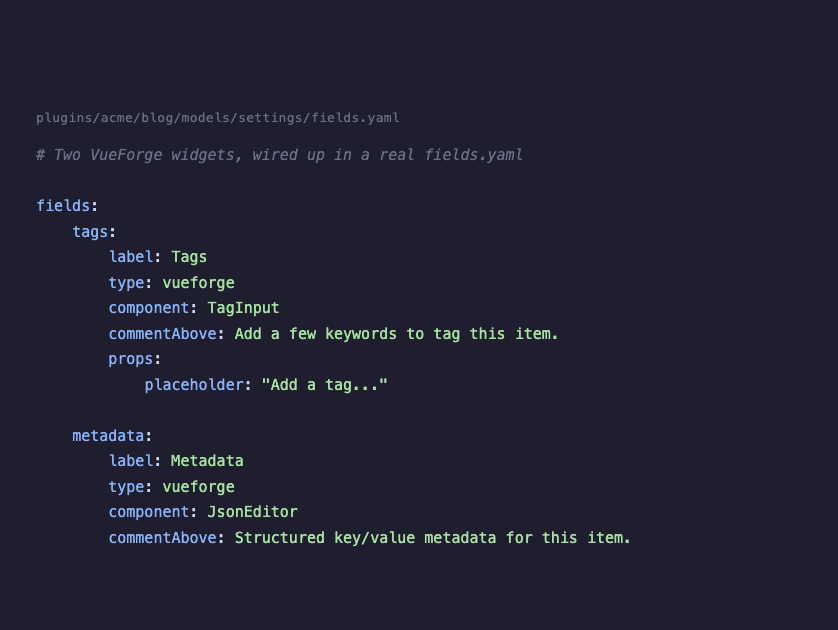
- A form widget type, "vueforge", that mounts any Vue 3 single-file component you write, with automatic prop loading and JSON saving.
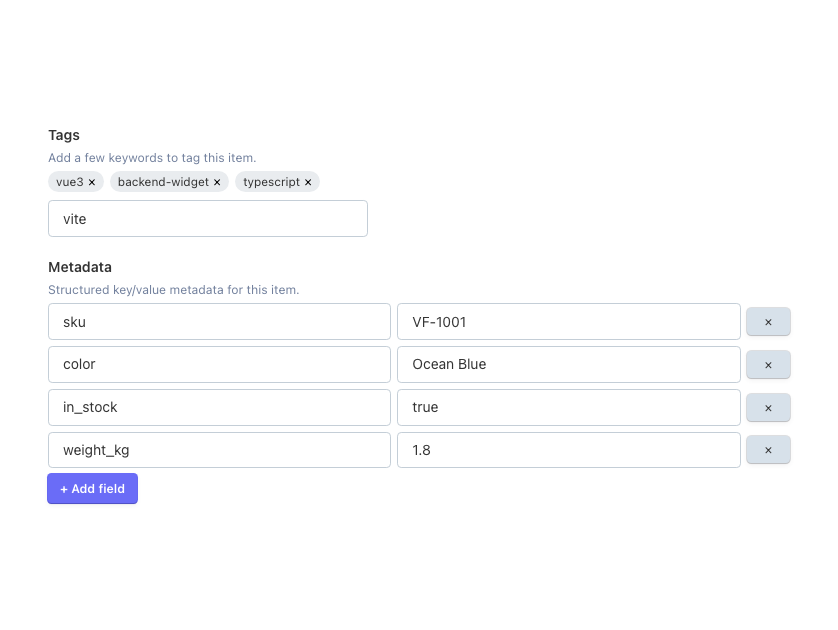
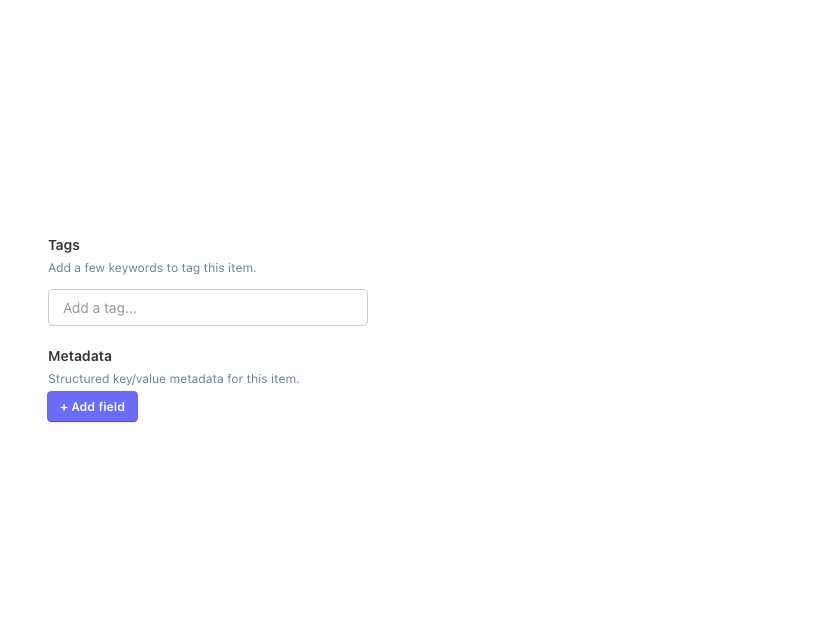
- Two ready-to-use example components: a tag input (for array-style fields like keywords or labels) and a JSON editor (for structured key/value data).
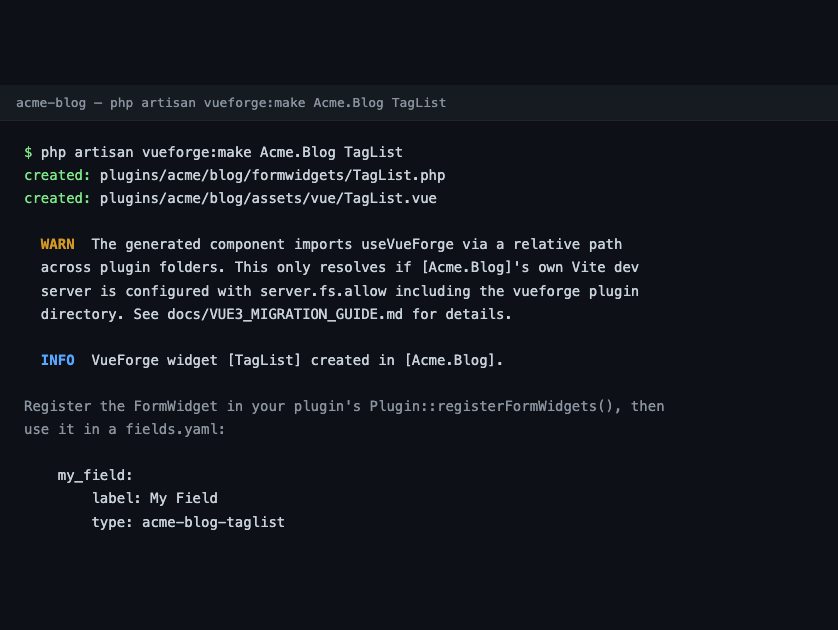
- An Artisan command, vueforge:make, that generates a new widget and its paired Vue component in seconds.
How to use it: add a field with type: vueforge to any fields.yaml, pointing at a component name. The field's underlying model attribute should be a JSON-castable column. See the Documentation tab for the full YAML reference and generator usage.
Requirements: October CMS 4.2 or later, PHP 8.2+, and Node.js 18+ / npm to build the frontend assets after installing (a build step is required — see the plugin's README for why).
License: MIT. Source on GitHub: https://github.com/amjadiqbal/oc-vueforge-plugin
Installation via Command Line
php artisan plugin:install AmjadIqbal.VueForge
FORM WIDGET: vueforge
YAML configuration:
my_field:
    label: My Field
    type: vueforge
    component: TagInput
    viteEntry: assets/vue/components/TagInput.vue
    props:
        placeholder: "Add a tag..."
Properties:
- component (string, default "JsonEditor") — the Vue component to mount. Must be registered in the plugin's ESM hydrator's component map, or via registerVueForgeComponent() for your own components.
- viteEntry (string, default "assets/vue/components/{component}.vue") — source path used to look up the built asset in Vite's manifest.
- props (array, default empty) — extra static props merged with the field's current value (passed to the component as modelValue).
Bundled example components:
- TagInput — array state (chips/tags input).
- JsonEditor — nested key/value object state.
Building your own widget:
Run: php artisan vueforge:make {Plugin} {Name}
Example: php artisan vueforge:make Acme.Blog TagList
This generates a PHP widget class (extending VueWidget, with $component/$viteEntry pre-filled) and a matching Vue 3 <script setup lang="ts"> component stub already wired to the state-sync composable. Register the generated widget in your plugin's Plugin::registerFormWidgets(), then use the printed YAML type: code in your fields.yaml.
Value round-trip:
- Load — the widget reads the model attribute, JSON-encodes it, and renders it into the mount point's data attributes plus a hidden input.
- Hydrate — the frontend hydrator finds the mount point, dynamically imports the named component, and mounts it with the parsed props.
- Edit — the component's state stays synced to the hidden input's value on every change.
- Save — October's normal form submit posts the hidden input's JSON string; the widget parses and sanitizes it (rejecting malformed JSON, stripping anything that isn't plain array/scalar data) before it's saved to the database.
Requirements: October CMS 4.2+, PHP 8.2+, Node 18+/npm for building frontend assets.
Full README and architecture notes are in the GitHub repository: https://github.com/amjadiqbal/oc-vueforge-plugin
Built by Amjad Iqbal (amjad.com.pk). Available for October CMS / Laravel / Vue freelance work: https://urlshortly.com/upwork
-
This plugin has not been reviewed yet.
-
| 0.1.11 |
Fix data loss on fields without a JSON cast (e.g. Tailor) - the saved value loaded empty and the next save erased it. Oct 11, 2026 |
|---|---|
| 0.1.10 |
Ship the compiled assets - 0.1.1 to 0.1.9 failed on every Composer/Marketplace install with "Vite manifest not found". Oct 11, 2026 |
| 0.1.9 |
Brought the GitHub repo up to this portfolio's repo standard - .gitattributes, .editorconfig, dependabot, dark-mode README banner and footer; no functional code changes. Oct 11, 2026 |
| 0.1.8 |
Reverted to the amjadiqbal identity across the board (namespace, plugin code, Composer package, install path), giving up October Marketplace eligibility under this account in exchange for a working, conflict-free Packagist/GitHub identity matching the rest of this author's packages. Oct 11, 2026 |
| 0.1.7 |
Decided to skip Packagist.org publication under the amjad vendor (already claimed by an unrelated package); no code change, October Marketplace distribution unaffected. Oct 11, 2026 |
| 0.1.6 |
Renamed the plugin namespace from AmjadIqbal to Amjad to match the registered October CMS Marketplace author code (composer package amjad/vueforge-plugin, installs at plugins/amjad/vueforge). Sep 18, 2026 |
| 0.1.5 |
Renamed the GitHub repo to oc-vueforge-plugin, matching October CMS's repository naming convention. Sep 18, 2026 |
| 0.1.4 |
Fixed composer.json package name for October CMS Marketplace compliance (must end in -plugin); added october/rain version requirement. Sep 18, 2026 |
| 0.1.3 |
Fixed CI (jsdom 30 required Node 22+, downgraded to jsdom 25); removed internal process files from the repo. Sep 18, 2026 |
| 0.1.2 |
Added README banner, icon, and CI/license/version badges. Sep 18, 2026 |
| 0.1.1 |
Restructured the repository so the plugin sits at the repo root (Packagist packaging fix, no functional changes). Sep 18, 2026 |
| 0.1.0 |
First version of VueForge. Sep 18, 2026 |
October CMS v4.2+ runs TWO separate, unrelated Vue 3 systems in the backend — confusing them is the most common mistake:
- October's own native system (System\Classes\VueComponentBase + the VueMaker trait, scaffolded by "php artisan make:vuecomponent"). No SFCs, no TypeScript, no build step — components are plain JS objects loaded as global ESM modules.
- VueForge (this plugin) — a FormWidgetBase subclass that hydrates a real Vue 3 .vue single-file component (Composition API, <script setup>, TypeScript) compiled by Vite. VueForge does NOT register through VueComponentBase/VueMaker and is not a replacement for it — it solves a different problem (arbitrary form-field UIs, not backend page chrome).
Key things that changed in October 4.2+ that affect anyone building custom Vue 3 backend controls:
- The AJAX framework is "Larajax", exposed as window.jax — not oc.ajax() or jQuery's .request().
- Backend partial/AJAX updates fire "ajax:update-complete"; Turbo page swaps fire "page:updated" — not jQuery's ajaxUpdate/ajaxComplete.
- A mitt()-based event bus replaces the old implicit Vue 2 root event bus — there is no more global $root.$on/$emit.
- Assets are resolved via Vite's manifest.json, keyed by source path, not a fixed output filename.
- File::checkBaseDir() restricts partial/view resolution to paths under the application's own base_path() by default — symlinking a plugin in from outside the app during development will silently break widget rendering; a real (non-symlinked) install does not have this problem.
If you are building a small, form-scoped interactive control (a tag list, a key/value editor, anything backed by a single field's JSON), use VueForge. If you are building backend page UI that needs to interoperate with October's own Vue components and their shared mitt event bus, use October's native VueComponentBase instead — the two systems are not meant to be mixed on the same mount point.
Full technical detail, including two real bugs found and fixed while verifying this against source: see docs/VUE3_MIGRATION_GUIDE.md in the GitHub repository.