

Comment Pro
Threaded comments, star reviews, emoji reactions and multi-layer anti-spam moderation for any page or record.
Comment Pro
Threaded comments, star reviews, emoji reactions and multi-layer anti-spam moderation for any page or record.
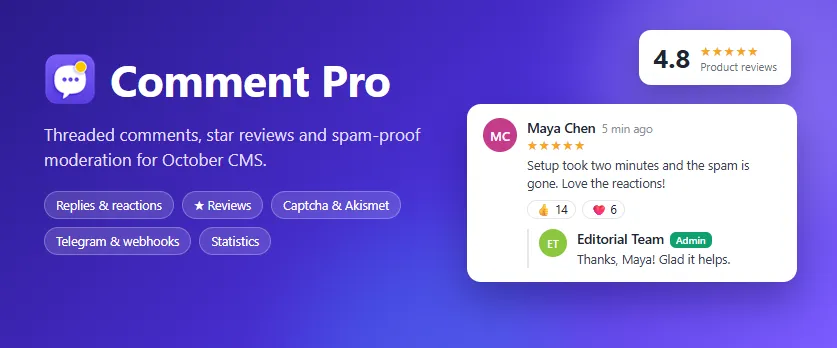
Comment Pro adds a complete discussion and review system to any October CMS website. Drop one component on a page, a blog post, a product or any record, and visitors can comment, reply in threads, rate with stars, react with emoji and follow the conversation by email. Moderators get a fast moderation queue, a statistics dashboard and several layers of spam protection, so the conversation stays useful without extra work.
The plugin works on October CMS 3.7+ and 4.x from a single code base, does not depend on any external comment service and keeps all data in your own database.
Highlights
- Works everywhere: one component for pages, blog posts, Tailor entries, products or any other record. With no options it creates a thread for the current URL.
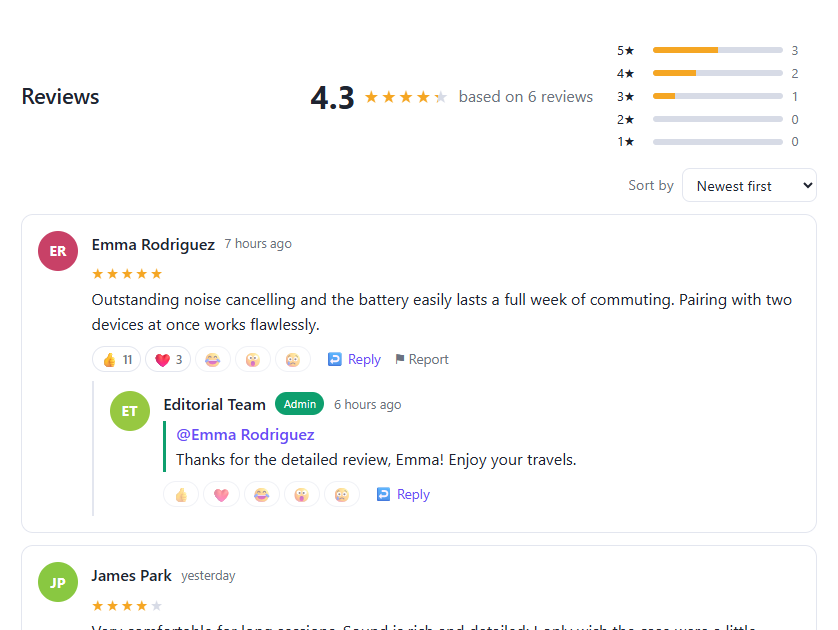
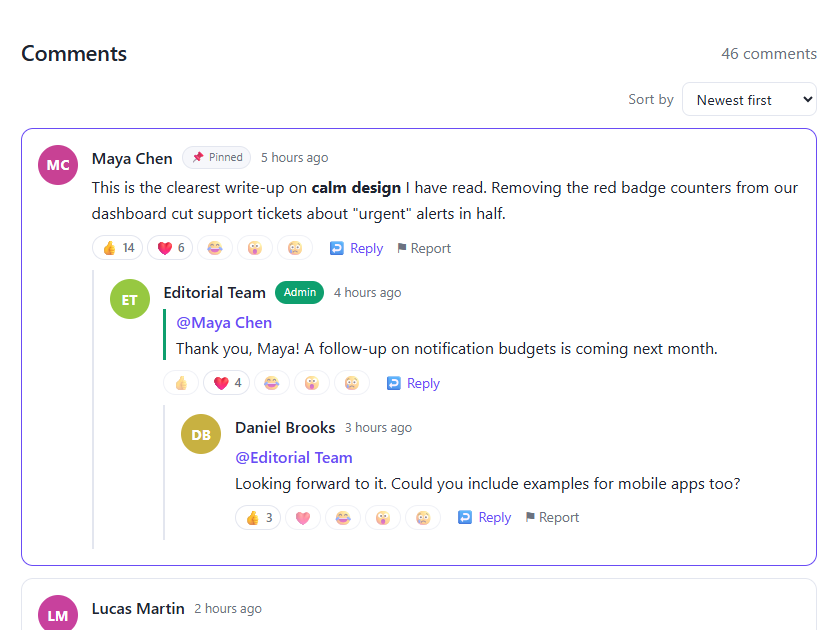
- Threaded replies with a configurable depth, @mentions, pinned comments and a direct link to every comment.
- Reviews mode: 1-5 star ratings, average score, rating distribution bars and schema.org
AggregateRatingmarkup for Google rich results. - Emoji reactions (like, love, laugh, wow and sad) for members and, optionally, guests.
- Abuse reports with reasons. After a configurable number of reports a comment is hidden automatically until a moderator reviews it.
- Author editing within a time window (15 minutes by default) with a full revision history.
- Image attachments for signed-in members (count and size limits, gallery with lightbox).
- Email subscriptions: "notify me about replies" and "notify me about all new comments", each with one-click unsubscribe links.
- Multi-layer anti-spam: honeypot, minimum submit time, rate limiting, duplicate detection, blocked words, link limits, bans, a built-in image captcha, Google reCAPTCHA v2/v3 and Akismet.
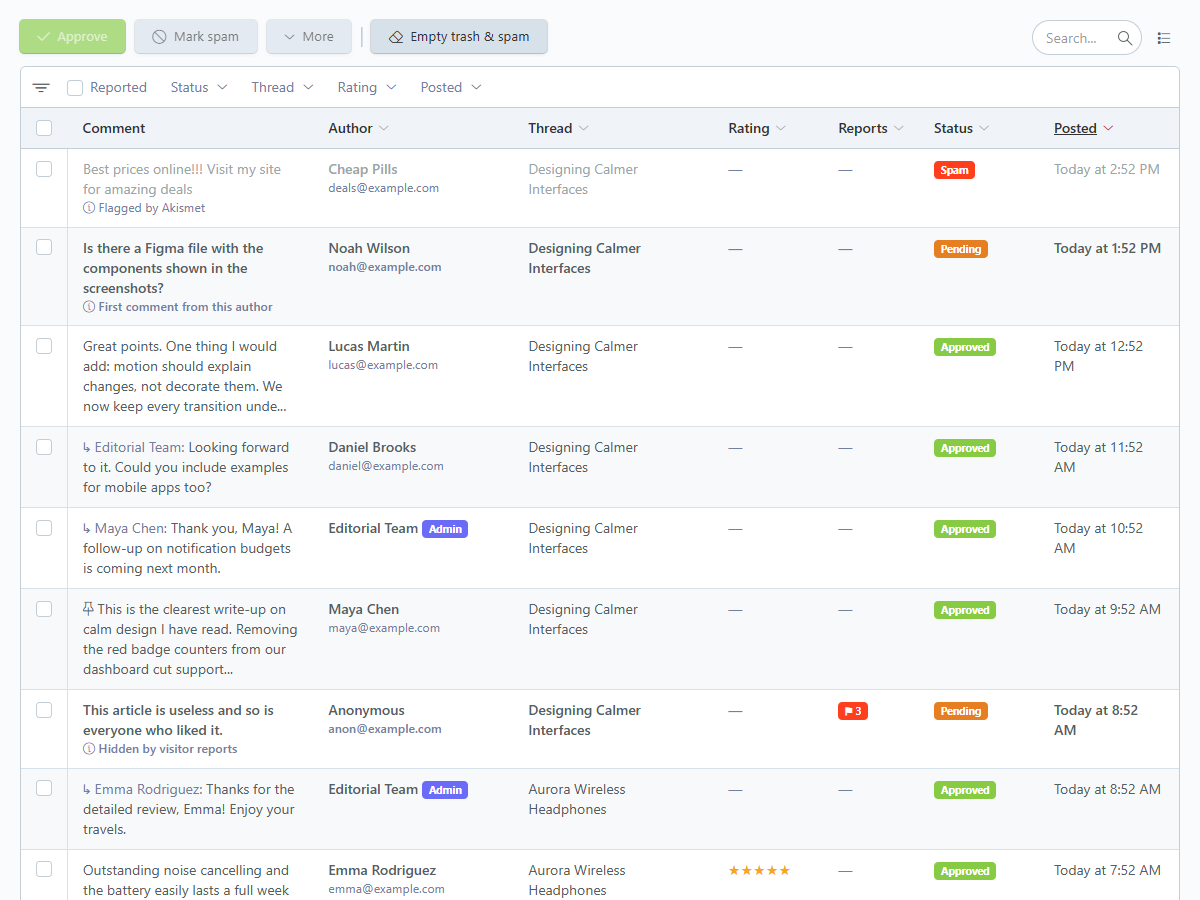
- Moderation tools: pending / approved / spam / trash statuses, filters, bulk actions, reply as administrator, one-click ban and a pending counter in the main menu.
- Content integrity: moderators can approve, hide, pin or delete a visitor's comment but can never rewrite its text, rating or author details.
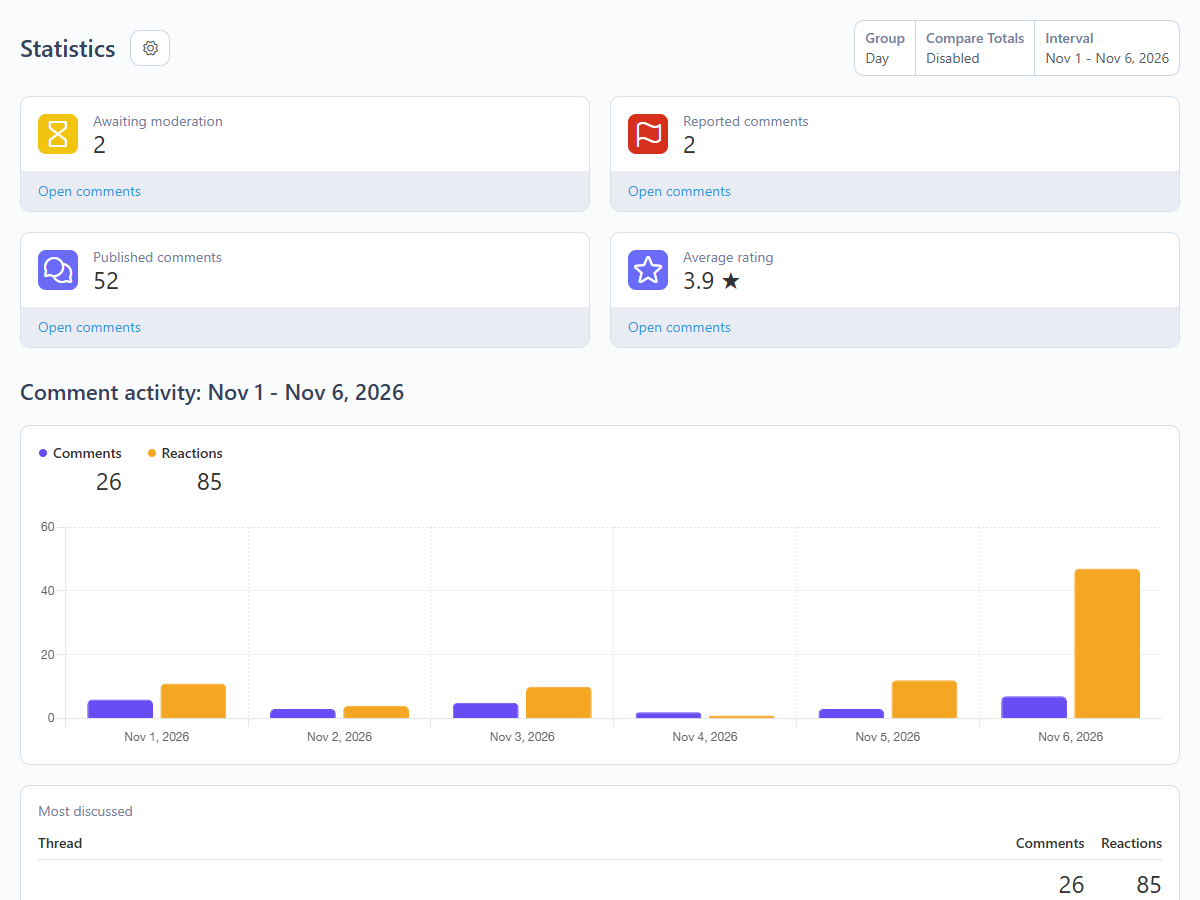
- Statistics dashboard: pending, reported and published counters, average rating, daily activity chart, most discussed threads and most active authors.
- Instant notifications: email, Telegram bot and signed webhooks for your own systems (Slack bridges, CRMs, Zapier, n8n and so on).
- Fast and accessible: server-rendered first page (good for SEO), AJAX "Load more", sorting and optional lazy loading, no jQuery, keyboard friendly, ARIA labels.
- Looks right on any theme: neutral CSS with variables, light / dark / automatic color schemes and full right-to-left (RTL) support.
- Translated: English and Persian (Farsi) for the front-end and the back-end; every string can be translated through the standard language files.
Front-end features
Visitors see a clean comment thread with avatars (colored initials or Gravatar), relative dates, Markdown formatting with a live preview, a character counter and a sort menu (newest, oldest, most reactions, highest or lowest rating). Guests can comment with a name and email, and the plugin can remember their details on the device. Members of the RainLab.User plugin comment with their account, get their avatar and can attach images.
When a thread uses reviews mode the header shows the average rating, the number of reviews and a distribution chart, and the form asks for a star rating. Replies to reviews do not carry a rating, so the average stays honest.
Links inside comments receive rel="nofollow ugc noopener", all HTML is sanitized and the first page of comments is rendered on the server, so search engines can index the discussion.
Moderation and back-end
The Comments menu contains four pages:
- Comments: the moderation queue. Filter by status, thread, rating, date or "reported", select many rows and approve, mark as spam, trash or delete them in one click. "Empty trash & spam" cleans up in one step.
- Statistics: the moderation and engagement dashboard. On October CMS 4 it is built on the native dashboard module and its data source can be added to any dashboard; on October CMS 3 a built-in page shows the same figures.
- Threads: every discussion with its counters and average rating. Close a thread, schedule an automatic close date or switch between comments and reviews mode.
- Bans: block an email address, an IP address or a member, permanently or until a date.
Opening a comment shows its status, the reasons it was held for review (first comment, blocked word, too many links, Akismet, reports and so on), the abuse reports, the reactions, the edit history and attached images. From there a moderator can reply as administrator (published immediately), ban the author or remove an image.
The pending counter appears next to the menu item, and four back-end permissions (moderate comments, manage threads, manage bans, manage settings) let you split the work between team members.
Spam protection
Every submission goes through a pipeline that is invisible for real visitors: field validation, duplicate detection, a hidden honeypot field, a minimum time to fill the form, active bans, a per-visitor rate limit and the captcha. The captcha is checked last, so a correct answer is never wasted on a form error. Blocked words, the link limit and the moderation policy then decide whether a comment is published, held for review or marked as spam.
Choose the moderation policy that fits your site: publish immediately, hold comments until the author has a number of approved comments ("trusted"), or hold every comment for review. For the captcha choose the built-in image captcha (no external requests, works offline), Google reCAPTCHA v2 (checkbox) or v3 (invisible score), or none.
With an Akismet API key, every visitor comment is also checked by Akismet. When a moderator marks a comment as spam or rescues it from spam, the plugin reports the correction back to Akismet so the filter keeps learning. Network problems never block real visitors.
Notifications and integrations
- Email: administrators can be notified about every new comment or only about comments that need review, and when reports hide a comment. Commenters can receive replies and follow whole threads. All four email templates are editable in Settings > Mail Templates.
- Telegram: receive an instant message in a chat, group or channel through your own bot, with a direct link to the comment in the back-end. A custom API address is supported for servers that need a relay.
- Webhook: a JSON payload signed with HMAC-SHA256 for the
comment.created,comment.approvedandcomment.reportedevents.
The settings page has Send test and Verify key buttons, so you can check the Telegram bot, the webhook endpoint and the Akismet key before saving.
Getting started
- Add the plugin to your project and run the update. RainLab.User is installed automatically as a dependency.
- Open Settings > CMS > Comment Pro and review the defaults: guests allowed, built-in captcha for guests, first comments held for review.
- Add the Comments component to a page or layout and place
{% component 'comments' %}where the discussion should appear. - For blog posts or products pass a stable key, for example
{% component 'comments' threadKey='post-' ~ post.id %}, or set Mode to Reviews for star ratings. - Moderate new comments under Comments in the main menu.
The Documentation tab describes every component property, page variable, Twig function, setting and the webhook format.
Requirements
- October CMS 3.7 or later, or October CMS 4.x.
- PHP 8.0.2 or later (follow the requirement of your October CMS version).
- RainLab.User (free, installed automatically). It is used for member comments, avatars, images and member bans. Guests can comment without an account.
- Optional: Google reCAPTCHA keys, an Akismet API key, a Telegram bot token.
- Outgoing HTTPS (Telegram, Akismet, reCAPTCHA, webhooks) requires PHP to have a CA certificate bundle configured, which is the case on most hosting servers.
Languages
The back-end and front-end interfaces are available in English and Persian (Farsi), including right-to-left layout. Additional languages can be added with the standard October CMS language override files.
The following plugin is required

Installation via Command Line
php artisan plugin:install Aleez.CommentPro
Comment Pro documentation
- Installation
- Quick start
- The Comments component
- Component properties
- Page variables
- Twig functions
- Threads and keys
- Reviews mode and rich results
- Members, guests and RainLab.User
- Settings reference
- Moderation workflow
- Anti-spam pipeline
- Captcha and reCAPTCHA
- Akismet
- Email notifications
- Telegram notifications
- Webhooks
- Statistics and dashboards
- Customizing the markup
- Styling, dark mode and RTL
- Permissions
- Multisite
- Privacy
- Troubleshooting
Comment Pro provides one front-end component, Comments, a moderation area in the back-end, a settings page and two Twig functions. This document explains how to place the component, every property it accepts, the variables it injects into the page, how to override its markup and how to connect it to other systems.
Installation
Add Comment Pro to your project on the October CMS Marketplace and run the update from Settings > Updates & Plugins, or install it from the command line:
php artisan plugin:install Aleez.CommentPro
The plugin requires RainLab.User, which is installed automatically. After installation, open Settings > CMS > Comment Pro to review the defaults. The database tables use the aleez_commentpro_ prefix.
Supported platforms are October CMS 3.7+ and 4.x with the PHP version required by your October CMS release. The same package works on both versions; on October CMS 4 the Statistics page uses the native dashboard module, on October CMS 3 an equivalent built-in page is shown.
Quick start
Attach the component to a page or layout and render it where the discussion should appear:
title = "Article"
url = "/article/:slug"

[comments]
==
<article>...</article>

{% component 'comments' %}
Without any properties the thread is identified by the current URL, which is perfect for static pages. For records, pass a stable key so the thread survives URL changes:
{% component 'comments' threadKey='post-' ~ post.id title=post.title %}
For star reviews of a product:
{% component 'comments' threadKey='product-' ~ product.id title=product.name mode='reviews' %}
The component includes its own CSS and JavaScript. Make sure your layout outputs {% styles %}, {% scripts %} and the October AJAX framework ({% framework %} or {% framework extras %}), which is the default in October themes.
The Comments component
The Comments component (comments) renders the full discussion: the header with the counter and sort menu, the review summary in reviews mode, the comment tree, the "Load more" button and the form. All interactions (posting, replying, loading more, sorting, previewing, reacting, reporting, editing and following) use the October AJAX framework, so no page reloads are needed.
If the page already uses a variable named comments (for example a Tailor collection with that name), register the component under a different alias:
[comments postComments]
mode = "comments"
==
{% component 'postComments' threadKey='post-' ~ post.id %}
You can use several components on one page with different aliases and keys, for example a comments thread and a reviews thread.
Component properties
| Property | Default | Description |
|---|---|---|
threadKey |
empty | Unique key of the thread. Empty means "the current URL" (url:/path). Keys can be up to 191 characters. |
mode |
comments |
comments for a discussion, reviews for star ratings with an average, distribution and schema.org markup. |
title |
page title | Thread title shown in the back-end, emails and notifications. |
perPage |
setting | Top-level comments per page. Empty uses the global setting. |
sort |
setting | Initial sort order: newest, oldest, popular (most reactions), rating_high, rating_low. Empty uses the global setting. |
loginPage |
none | CMS page linked from the "Sign in to comment" prompt when guests are not allowed. |
lazy |
false |
Load the comments with AJAX when the component scrolls into view. Good for long pages; the form is rendered immediately. |
theme |
light |
light follows the site (dark when the page uses data-bs-theme="dark" or html.dark), dark forces dark colors, auto follows the visitor's operating system. |
schemaType |
Product |
schema.org type used for the AggregateRating markup in reviews mode, for example Product, Course, LocalBusiness, Book. |
Properties can be set in the page settings (the component inspector in the Editor) or passed in Twig as shown in the quick start. Values passed in Twig take priority.
Page variables
The component injects the following variables into the page. They are mainly useful when you override the component partials. All variables are prefixed with aleez to avoid conflicts with your theme.
| Variable | Description |
|---|---|
aleezThread |
The thread model (title, key, url, mode, comments_count, rating_avg, rating_count, is_closed, closes_at). |
aleezComments |
Collection of top-level comments for the current page; each has a children collection with its replies. |
aleezHasMore |
true when another page of comments is available. |
aleezPage |
Current page number. |
aleezSort |
Active sort order. |
aleezIsReviews |
true in reviews mode. |
aleezIsOpen |
false when the thread is closed or past its closing date. |
aleezCanPost |
true when the visitor may post (member, administrator, or guests allowed). |
aleezUser |
The signed-in RainLab.User member or null. |
aleezAdmin |
The signed-in back-end administrator or null (administrators post as "Admin" from the front-end). |
aleezLoginUrl |
URL of the loginPage property or null. |
aleezSettings |
Form options: requireEmail, showUrl, markdown, notifyReplies, maxLength, maxDepth. |
aleezFeatures |
Interaction options: reactions, reactionsGuests, reports, images, maxImages, maxImageKb, editMinutes, subscriptions. |
aleezReactionTypes |
Map of reaction codes to emoji (like, love, haha, wow, sad). |
aleezMyReactions |
Map of comment ID to the visitor's own reaction. |
aleezEditable |
Map of comment IDs the visitor can still edit, with the remaining seconds. |
aleezReportReasons |
List of report reason codes (spam, offensive, harassment, misinformation, other). |
aleezFollowing |
true when the signed-in member follows the thread. |
aleezCaptcha |
Active captcha type for this visitor (builtin, recaptcha_v2, recaptcha_v3) or null. |
aleezCaptchaImage |
Data URI of the built-in captcha image. |
aleezRecaptchaKey |
reCAPTCHA site key. |
aleezTheme, aleezLazy, aleezSchemaType |
Values of the matching properties. |
aleezContext, aleezTimestamp, aleezHoneypot, aleezTsField |
Internal security fields. Keep them in the form when you override form.htm. |
Each comment in aleezComments provides: id, parent_id, display_name, initials, avatar_color, avatar_url, author_url, is_admin, is_member, is_pinned, rating, reply_to_name, content (raw text), content_html (sanitized HTML), images, created_at, edited_at, reactions_count, reactions_summary and children.
Twig functions
Two functions let you show counters anywhere, for example in a blog list or a product card, without loading the component:
{{ comments_count('post-' ~ post.id) }} comments

{% set rating = comments_rating('product-' ~ product.id) %}
{{ rating.avg }} / 5 from {{ rating.count }} reviews
comments_count(key) returns the number of approved comments in the thread. comments_rating(key) returns an array with avg and count of approved top-level reviews. Both read cached counters from the thread record, so they cost one small query. Use the same key you pass to threadKey; for URL-based threads the key is url:/your/path.
Threads and keys
A thread is created automatically the first time somebody posts. Its key decides which comments belong together. Good keys are stable and unique, such as post-15, product-42 or course-intro. Threads created without a key use the URL path, so /about?ref=x and /about share the same thread.
In the back-end, Comments > Threads lists every thread with its counters. There you can close a thread immediately, schedule a closing date, or switch its mode. The global setting Auto-close threads after (days) closes threads automatically a number of days after they were created. Closed threads stay visible but the form is replaced by a notice.
Reviews mode and rich results
In reviews mode the form requires a 1-5 star rating for top-level comments, and the header shows the average, the number of reviews and a distribution chart. Replies never carry a rating. Only approved top-level reviews count toward the average.
The component outputs a JSON-LD AggregateRating block using the thread title and the schemaType property, so search engines can show stars in results. If your page already outputs product structured data, you can read aleezThread.rating_avg and aleezThread.rating_count and include them in your own markup instead.
Members, guests and RainLab.User
Signed-in RainLab.User members comment with their account name and avatar, do not need to fill in their name and email, can attach images, follow threads with one click and edit their comments from any device within the edit window.
Guests provide a name and, by default, an email address (never shown publicly). They can optionally tick "Remember my name and email", which stores the details in the browser only. Guests can edit their own comment from the same browser within the edit window; the plugin recognizes them with an anonymous random cookie (aleez_vid) that is stored only as a hash.
Turn off Allow guest comments to require an account; set the component's loginPage property to link to your sign-in page.
Settings reference
All settings are found in Settings > CMS > Comment Pro.
General
| Setting | Default | Description |
|---|---|---|
| Allow guest comments | on | When off, visitors must sign in with RainLab.User. |
| Require guest email | on | Guests must enter a valid email address. |
| Show website field | off | Adds an optional website field for guests (links get nofollow ugc). |
| Maximum reply depth | 3 | Deeper replies attach to the last allowed level with an @mention. |
| Comments per page | 10 | Top-level comments per page; replies are always shown with their parent. |
| Default sort order | Newest first | Newest, oldest, highest rating, lowest rating. |
| Maximum comment length | 3000 | Characters. |
| Auto-close threads after (days) | 0 | 0 keeps threads open. |
| Enable Markdown formatting | on | Bold, italic, code, lists, quotes and links. Raw HTML is never allowed. |
| Use Gravatar avatars | off | When off, colored initials are used and no external requests are made. |
Moderation
| Setting | Default | Description |
|---|---|---|
| Moderation policy | Hold until trusted | Publish immediately, hold comments until the author is trusted, or hold every comment. |
| Trusted after approved comments | 3 | Authors with this many approved comments are published immediately. |
| Maximum links | 2 | Comments with more links are held for review. |
| Blocked words | empty | One word or phrase per line or comma separated, case-insensitive. |
| When a blocked word is found | Spam | Mark as pending, mark as spam, or reject the comment with a message. |
Anti-spam
| Setting | Default | Description |
|---|---|---|
| Captcha | Built-in | None, built-in image captcha, Google reCAPTCHA v2 or v3. |
| Show captcha to | Guests only | Guests only or everyone (administrators are never asked). |
| reCAPTCHA site key / secret key | empty | Keys from the Google reCAPTCHA admin console. |
| Minimum v3 score | 0.5 | From 0.0 (bot) to 1.0 (human). |
| Minimum seconds before submit | 3 | Faster submissions are treated as bots. |
| Comments per minute | 5 | Per visitor (IP address or member). |
Interactions
| Setting | Default | Description |
|---|---|---|
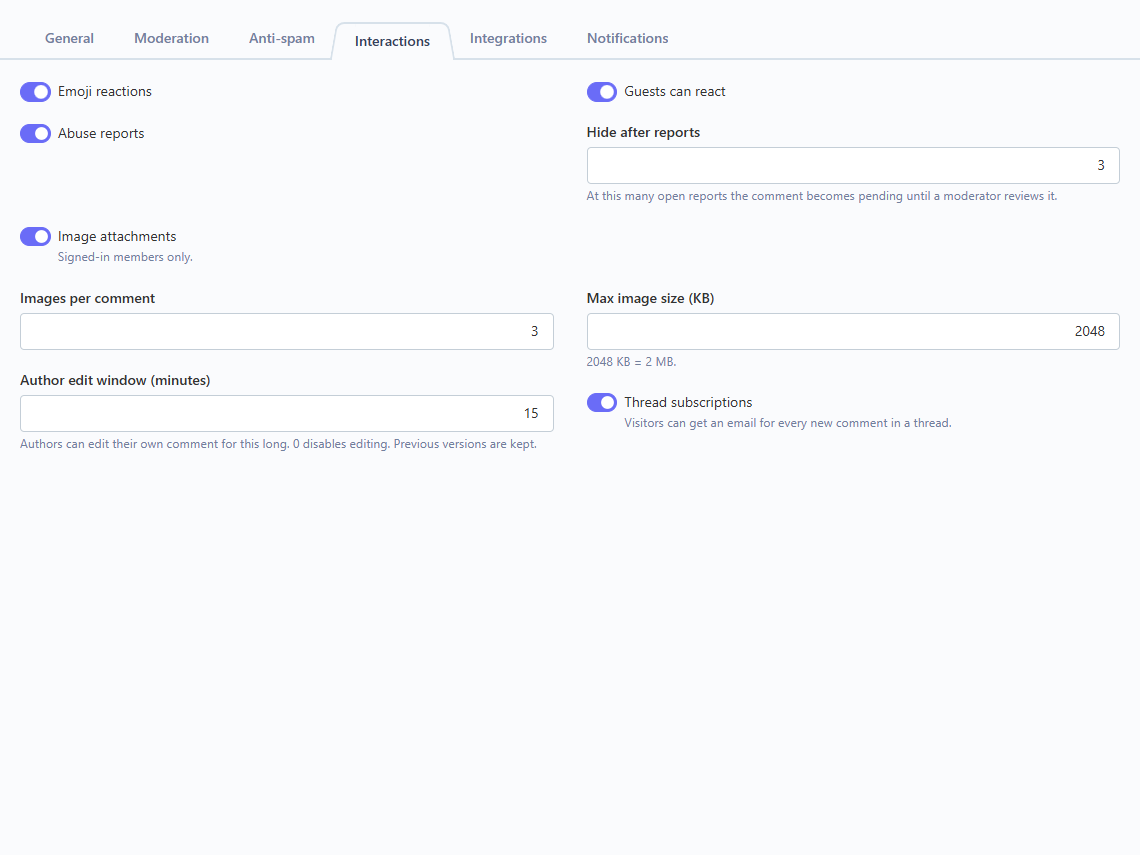
| Emoji reactions | on | One reaction per visitor per comment; clicking again removes it. |
| Guests can react | on | When off, only members can react. |
| Abuse reports | on | Shows the "Report" action. |
| Hide after reports | 3 | Open reports needed to hide a comment until a moderator reviews it. |
| Image attachments | on | Members only. |
| Images per comment | 3 | |
| Max image size (KB) | 2048 | JPG, PNG, WEBP and GIF are accepted. |
| Author edit window (minutes) | 15 | 0 disables editing. Previous versions are kept. |
| Thread subscriptions | on | "Email me about all new comments here" option and the Follow button. |
Integrations
| Setting | Description |
|---|---|
| Telegram: enable, bot token, chat ID | Instant messages through your bot. |
| Telegram: notify about | Comments that need review, every new comment, or never. |
| Telegram: comments hidden by reports | Also notify when reports hide a comment. |
| Telegram: API address | Default https://api.telegram.org. Change it when your server reaches Telegram through a relay. |
| Webhook: enable, URL, signing secret, events | Signed JSON requests on comment events. |
| Akismet: enable, API key | Spam checking and learning. |
Each integration has a Send test or Verify key button that uses the values currently in the form, before you save.
Notifications
| Setting | Default | Description |
|---|---|---|
| Email administrators | When a comment needs review | Never, when a comment needs review, or for every new comment. |
| Administrator emails | empty | Comma-separated addresses that receive the administrator emails. Leave empty to send none. |
| Reply notifications | on | Lets commenters opt in to an email when somebody replies. |
Moderation workflow
Every comment has one of four statuses: pending, approved, spam or trash. Only approved comments are visible on the website; counters and averages are recalculated automatically whenever a status changes.
When a comment is held, the back-end shows the reason: first comment from the author, blocked word, too many links, flagged by Akismet, hidden by reports, or "all comments are reviewed". Approving a comment that was hidden by reports resolves its open reports.
Moderators can change the status, pin a comment to the top of its thread, delete it, remove attached images, reply as administrator and ban the author (email, IP address and member account in one step). By design, moderators cannot change the text, rating or author details of a visitor's comment; this is enforced both in the form and in the model. Administrators can edit the comments they wrote themselves.
If you need to change content from your own code (for example an import script), set $comment->allowContentEdit = true before saving.
Anti-spam pipeline
Submissions are checked in this order:
- Field validation (name, email, length, rating in reviews mode, image limits).
- Duplicate detection (the same text posted twice in a thread within a day).
- Honeypot field invisible to humans.
- Minimum submit time, using an encrypted timestamp.
- Active bans on email, IP address or member.
- Rate limit per visitor. Only successful submissions are counted.
- Captcha. It runs last, so a correct answer is not lost when another field has an error.
- Blocked words, link limit and the moderation policy decide the final status.
- Akismet, when enabled, for comments that would otherwise be published or held.
Bot traps (honeypot and timing) return a generic message, so automated scripts cannot tell which check stopped them.
Captcha and reCAPTCHA
The built-in captcha renders a small math question as an SVG image with noise. It makes no external requests, works offline and allows three attempts per challenge; a refresh button generates a new question. Persian (Farsi) visitors see Persian digits.
To use Google reCAPTCHA, create keys at the Google reCAPTCHA admin console for your domain, choose v2 (checkbox) or v3 (score) in the Captcha setting and paste the site key and secret key. For v3, adjust the minimum score if legitimate visitors are rejected.
Akismet
Get an API key from Akismet, enable Akismet in the Integrations tab, paste the key and click Verify key. Every visitor comment that is not already spam is sent to Akismet; comments it identifies as spam receive the spam status with the reason "Flagged by Akismet". When a moderator marks a comment as spam, or moves a spam comment to approved, the correction is sent to Akismet automatically. If Akismet cannot be reached, the comment is processed normally.
Email notifications
The plugin registers four mail templates, editable in Settings > Mail Templates:
| Template | Sent to | Variables |
|---|---|---|
aleez.commentpro::mail.new_comment |
Administrators | thread_title, thread_url, author, email, content, rating, status, review_url |
aleez.commentpro::mail.reply |
Author of the parent comment (opt-in) | name, author, content, thread_title, comment_url, unsubscribe_url |
aleez.commentpro::mail.new_in_thread |
Thread subscribers | author, content, thread_title, comment_url, unsubscribe_url |
aleez.commentpro::mail.reported |
Administrators | thread_title, author, content, count, review_url |
Emails are queued when a queue is configured. Every subscriber email contains a one-click unsubscribe link handled by the routes /commentpro/unsubscribe/{token} and /commentpro/stop-replies/{id}/{token}. Make sure your mail settings in Settings > Mail Configuration are working.
Telegram notifications
- Create a bot with @BotFather in Telegram and copy its token.
- Add the bot to the chat, group or channel that should receive notifications (as an administrator for channels).
- Enter the chat ID: a numeric ID such as
-1001234567890for groups, or@channelnamefor public channels. - Choose which events to send and click Send test.
Messages include the thread title, the author and email, the rating, the number of reports, an excerpt, the status and a link to the comment in the back-end. Telegram errors are logged and never affect visitors.
Webhooks
When the webhook is enabled, the plugin sends a POST request with a JSON body for each selected event:
comment.created: a new comment was submitted (any status).comment.approved: a comment became approved.comment.reported: reports hid a comment.
Example payload:
{
    "event": "comment.created",
    "sent_at": "2026-11-06T10:15:00+00:00",
    "site": "https://example.com",
    "comment": {
        "id": 128,
        "status": "pending",
        "author": "Maya Chen",
        "email": "maya@example.com",
        "is_member": false,
        "rating": 5,
        "content": "Great article!",
        "parent_id": null,
        "reports": 0,
        "created_at": "2026-11-06T10:15:00+00:00",
        "thread": {
            "id": 7,
            "key": "post-15",
            "title": "Designing Calmer Interfaces",
            "url": "https://example.com/blog/designing-calmer-interfaces"
        },
        "admin_url": "https://example.com/admin/aleez/commentpro/comments/update/128"
    }
}
Each request has the headers X-Aleez-Event (the event name) and, when a signing secret is set, X-Aleez-Signature: sha256=<hex>, the HMAC-SHA256 of the raw body with your secret. Verify it on the receiving side:
$body = file_get_contents('php://input');
$expected = 'sha256=' . hash_hmac('sha256', $body, 'your-secret');

if (!hash_equals($expected, $_SERVER['HTTP_X_ALEEZ_SIGNATURE'] ?? '')) {
    http_response_code(401);
    exit;
}
Requests time out after 6 seconds; failures are written to the system log.
Statistics and dashboards
Comments > Statistics shows indicators for comments awaiting moderation, reported comments, published comments and the average rating, a daily activity chart of comments and reactions, the most discussed threads, the most active authors, a breakdown by status and the rating per thread. Pick any date range with the standard controls.
On October CMS 4 the page is a native dashboard, and the Comment Pro data source is available in every dashboard you build. Dimensions: date, thread, status and author. Metrics: comments, reactions, reports, average rating and unique authors. Administrator replies are excluded from the statistics.
Customizing the markup
The component is built from small partials that you can override in your theme. Create a folder named after the component alias in your theme's partials directory and copy the file you want to change:
themes/your-theme/partials/comments/comment.htm
| Partial | Purpose |
|---|---|
default.htm |
Wrapper, header, sort menu and JSON-LD. |
summary.htm |
Review summary (average and distribution). |
items.htm |
Loop over aleezComments. |
comment.htm |
A single comment with its actions and replies. |
reactions.htm |
Reaction buttons. |
more.htm |
"Load more" button. |
form.htm |
Comment and reply form. |
captcha.htm |
Built-in captcha or reCAPTCHA widget. |
Keep the data-* attributes and the hidden security fields when you override partials; the JavaScript relies on them. The root element carries data-aleez-comments, so you can scope your own styles and scripts to it.
Styling, dark mode and RTL
The default styles are framework-agnostic and use CSS custom properties on the .aleez-comments element. Override them in your theme stylesheet:
.aleez-comments {
    --ac-accent: #0f766e;
    --ac-accent-contrast: #ffffff;
    --ac-radius: 6px;
    --ac-bg: #ffffff;
    --ac-surface: #f8fafc;
    --ac-border: #e2e8f0;
    --ac-text: #0f172a;
    --ac-muted: #64748b;
    --ac-admin: #0e9f6e;
    --ac-star: #f59e0b;
    --ac-star-off: #d7dbe6;
    --ac-danger: #dc2626;
    --ac-gap: 1rem;
}
Dark colors apply automatically when the page uses data-bs-theme="dark" or the dark class on html, when the theme property is dark, or when it is auto and the visitor's system is dark. The layout uses logical CSS properties and dir="auto" for comment text, so right-to-left languages work without extra styles.
Permissions
| Permission | Allows |
|---|---|
aleez.commentpro.manage |
Moderate comments and view statistics. |
aleez.commentpro.threads |
Manage threads. |
aleez.commentpro.bans |
Manage bans. |
aleez.commentpro.settings |
Change the plugin settings. |
Multisite
Threads are stored per site. When you use October CMS multisite, the same key on two sites creates two independent threads, so each language or region keeps its own discussion. The comments_count and comments_rating functions read the thread of the current site.
Privacy
The plugin stores the name, email, IP address and user agent of each commenter for moderation and spam protection; emails are never shown on the website. Guests are recognized for editing and reactions through a random cookie that is stored only as a hash. No external service is contacted unless you enable Gravatar, reCAPTCHA, Akismet, Telegram or webhooks. Mention these services in your privacy policy if you enable them.
Troubleshooting
The component does not appear or the page shows a variable conflict. Your page probably has another variable called comments. Register the component with an alias such as [comments postComments].
Posting does nothing. Check that your layout includes {% framework %} (or {% framework extras %}) and {% scripts %}.
Telegram, Akismet or the webhook test fails with "cURL error 60". PHP cannot verify HTTPS certificates. Set curl.cainfo and openssl.cafile in php.ini to a CA bundle (for example cacert.pem from the curl website) and restart the web server.
Every comment from my computer is rejected. You may have banned your own IP address while testing (for example 127.0.0.1 on a local server). Remove it in Comments > Bans. Administrators signed in to the back-end are never blocked by bans.
reCAPTCHA v3 rejects real visitors. Lower the Minimum v3 score, or switch to the built-in captcha.
Emails are not delivered. Test Settings > Mail Configuration first, and check that Administrator emails is filled in on the Notifications tab.
-
This plugin has not been reviewed yet.
-

| 1.2.1 |
New plugin icon on the settings page and README banner Nov 08, 2026 |
|---|---|
| 1.2.0 |
Statistics dashboard, Telegram and signed webhook notifications, Akismet spam filtering Nov 08, 2026 |
| 1.1.1 |
Fill default values for the v1.1 settings on existing sites Nov 08, 2026 |
| 1.1.0 |
Emoji reactions, abuse reports with auto-hide, thread subscriptions, image attachments and author editing with revision history Nov 08, 2026 |
| 1.0.0 |
First version of Comment Pro - threaded comments, star reviews, moderation, built-in captcha and reCAPTCHA Nov 08, 2026 |