How would I populate a list on the front-end that has all activated users (from front-end user plugin)? I've been scratching my head about this for a while now. Thanks.
--
For context, I've learned about about loops and what not, but whatever loop I try is not seeming to recognize. I am mostly front-end, so I am sure it is a stupid simple answer that I have been missing, but documents on twig just give basic loop commands, and I am certain I am missing the correct way to reference the proper model needed.
Thanks for this solution. Works well inside pages. However, I'm trying to display a userlist inside a custom built component VisitorForm (outside of user component).
So in my VisitorForm.php file, I've included use October\Rain\Auth\Models\User;
What do I need to do to get the userList available through twig tags inside my default.htm file?
This is the file that displays a form in which I want to have a dropdown.
I'm thinking it has to be something like this, but I can't get my head around it:
<?php namespace Chocolata\VisitorRegistration\Components;

use Cms\Classes\ComponentBase;
use Input;
use Mail;
use Validator;
use Chocolata\VisitorRegistration\Models\Visitor;
use October\Rain\Auth\Models\User;

class VisitorForm extends ComponentBase {
    public function componentDetails()
    {
        return [
            'name' => 'Visitor Form',
            'description' => 'Het aanmeldformulier waarmee bezoekers zich registreren.'
        ];
    }
    // Here I want to initialize the list of activated users.
    public function onInit() {
        return $this['activatedUsers'] = User::whereIsActivated(true)->get();
    }
    public function onSave() {
         // Code for saving everything to the database
    }
}
Now, I have a default.htm file, with a form, in which I need to access the userList via twig tags.
<form class="form c-visitor__form" data-request="{{ __SELF__ }}::onSave">
    <select name="users">
        {% for user in activatedUsers %}
        <option value="{{ user.id }}">{{ user.full_name }}</option>
        {% endfor %}
    </select>
</form>
Any views on this please? Thanks for looking into this.
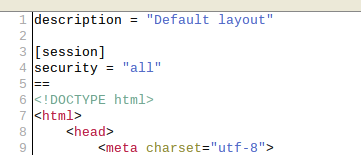
Add the session component to the default.htm.
With that you will be able to call upon the user database.
This goes in the default.htm file itself.
Using this, you will be able to call upon the userlist in every webpage that uses the default layout.
Like this:
I'm using an image cause I'm clearly not good at this markdown syntax...
maarten23692 said:
Thanks for this solution. Works well inside pages. However, I'm trying to display a userlist inside a custom built component VisitorForm (outside of user component).
So in my VisitorForm.php file, I've included use October\Rain\Auth\Models\User;
What do I need to do to get the userList available through twig tags inside my default.htm file?
This is the file that displays a form in which I want to have a dropdown.
I'm thinking it has to be something like this, but I can't get my head around it:
use Cms\Classes\ComponentBase;
use Input;
use Mail;
use Validator;
use Chocolata\VisitorRegistration\Models\Visitor;
use October\Rain\Auth\Models\User;
class VisitorForm extends ComponentBase {
public function componentDetails()
{
return [
'name' => 'Visitor Form',
'description' => 'Het aanmeldformulier waarmee bezoekers zich registreren.'
];
}
// Here I want to initialize the list of activated users.
public function onInit() {
return $this['activatedUsers'] = User::whereIsActivated(true)->get();
}
public function onSave() {
// Code for saving everything to the database
}
}
Now, I have a default.htm file, with a form, in which I need to access the userList via twig tags.
Any views on this please? Thanks for looking into this.
Thank you for your answer. Unfortunately default.htm is not a CMS-page. It is the default html that is rendered through the component. See the folder structure below please:
Thank you so much. The answer is much simpler than I thought. I now added the session component into the layout as you said and now I can access the user list without issue. October rocks. And you rock. Thanks so much for taking the time to look into this.