


Turn any model into a REST API in seconds, without writing code.
API Generator creates complete CRUD endpoints for your plugin models and Tailor blueprints, straight from the October CMS backend. Pick a model, choose an endpoint, click save, and your API is live.
Why API Generator
- No code, no files. APIs are served at runtime, so nothing is generated in your project, and your APIs keep working after plugin updates and on every server
- Tailor ready. Works with entries, streams, structures, singles and globals
- Secure when you need it. Protect any API with a bearer token using RainLab.User, with login, refresh and profile endpoints included
- Shape your response. Choose the columns to return and eager load relations with a simple JSON condition
- Consistent JSON. Every endpoint returns the same
status_code,message,dataformat, ready for mobile apps and frontends - See your endpoints. Every API lists its URLs, methods and auth requirements in the backend
How it works
- Open API Generator in the backend and click Create
- Enter a name and an endpoint, for example
api/v1/posts - Select a model or a Tailor blueprint
- Optionally limit the columns, add relations or turn on authentication
- Save. Your API is ready:
| Method | URL | Action |
|---|---|---|
| GET | api/v1/posts |
List records |
| GET | api/v1/posts/{id} |
Show a record |
| POST | api/v1/posts |
Create a record |
| PUT / PATCH | api/v1/posts/{id} |
Update a record |
| DELETE | api/v1/posts/{id} |
Delete a record |
Compatibility
| Plugin | October CMS |
|---|---|
| 2.x | 4.x |
| 1.x | 1.x – 3.x |
Requires RainLab.Builder. RainLab.User is optional and only needed for authentication.
Demo Video
The video shows version 1.x, but the workflow in the backend is the same.
Support
Found a bug or have an idea? Open an issue on GitHub. Pull requests are welcome.


Installation via Command Line
php artisan plugin:install AhmadFatoni.ApiGenerator
Requirements
Version 2.x requires October CMS 4 and RainLab.Builder. RainLab.User 3.x is optional and only needed for authentication.
Installation
php artisan plugin:install AhmadFatoni.ApiGenerator
or with composer:
composer require ahmadfatoni/apigenerator-plugin
php artisan october:migrate
If composer runs out of memory, prefix the command with COMPOSER_MEMORY_LIMIT=-1.
Usage
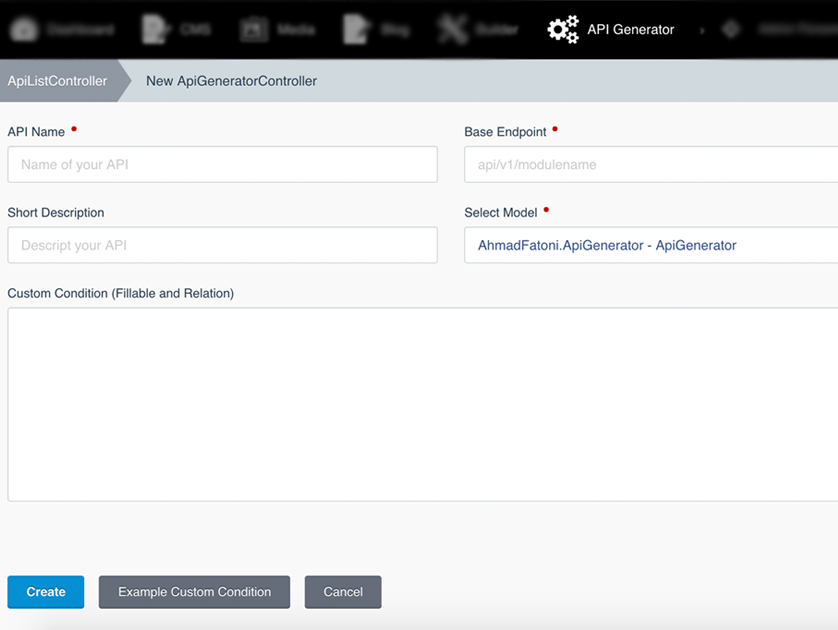
Open API Generator in the backend menu and click Create. You need the Manage the API Generator permission.
| Field | Description |
|---|---|
| API Name | A unique name for the API. Letters, numbers and spaces, starting with a letter. |
| Base Endpoint | Base URL of the API, for example api/v1/posts. |
| Short Description | Optional note for yourself. |
| Select Model | A plugin model, or a Tailor blueprint shown as Tailor: Blog\Post (stream). |
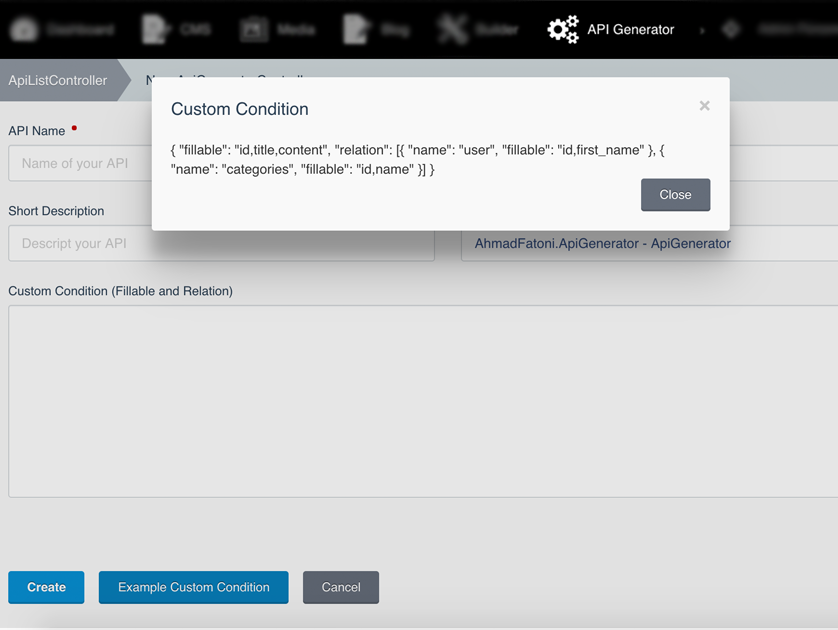
| Custom Condition | Optional JSON to limit columns and load relations, see Custom Condition below. |
| Require Authentication | Protect every endpoint of this API with a bearer token, see Authentication below. |
Saving the form makes the endpoints available immediately. The edit page of each API lists all of its URLs.
The API definitions are cached and the cache is cleared whenever an API is saved or deleted. If you change the ahmadfatoni_apigenerator_data table directly, for example after a database import, run php artisan cache:clear.
Custom Condition
Use fillable for the columns of the model, and relation for the relations to eager load and their columns. Both are comma separated lists.
{
    "fillable": "id,title,slug,author_id",
    "relation": [
        {
            "name": "author",
            "fillable": "id,title"
        },
        {
            "name": "categories",
            "fillable": "id,title"
        }
    ]
}
For belongsTo relations, include the foreign key (for example author_id) in fillable, otherwise the relation comes back empty. Leave the field empty to return all columns without relations.
Endpoints
For a Base Endpoint of api/v1/posts:
| Method | URL | Action |
|---|---|---|
| GET | api/v1/posts |
List all records |
| GET | api/v1/posts/{id} |
Show a record |
| POST | api/v1/posts |
Create a record |
| PUT / PATCH | api/v1/posts/{id} |
Update a record |
| DELETE | api/v1/posts/{id} |
Delete a record |
| GET | api/v1/posts/{id}/delete |
Delete a record (legacy) |
Send the body as JSON (Content-Type: application/json) or x-www-form-urlencoded. PHP does not read multipart/form-data on PUT requests.
Response format
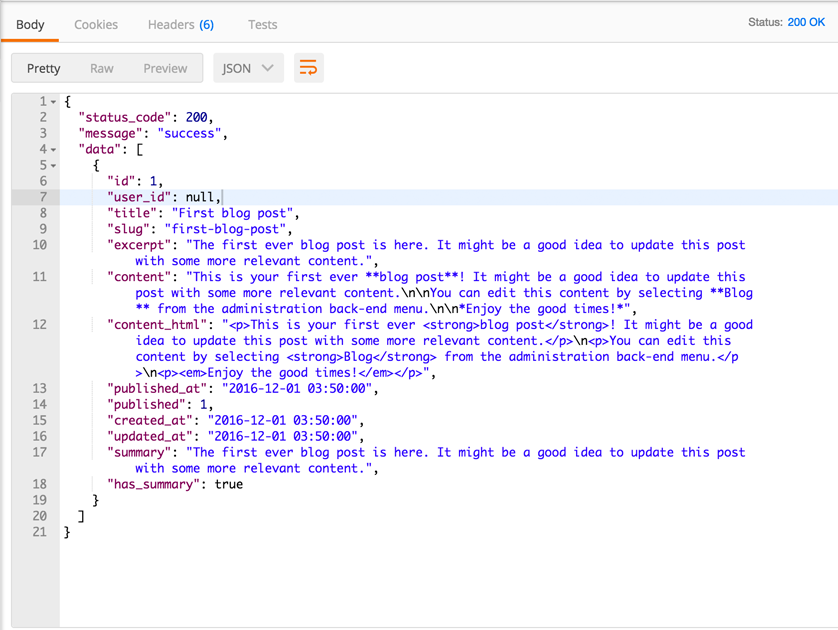
Every response has the same shape:
{
    "status_code": 200,
    "message": "success",
    "data": []
}
| Status | Message | When |
|---|---|---|
| 200 | success |
Read, update or delete succeeded |
| 201 | created |
Record created, data contains the new id |
| 400 | fail / bad request |
Validation failed or an unknown field was sent |
| 401 | unauthorized |
Missing or invalid bearer token |
| 404 | not found |
No record with that id |
Example
curl -X POST "https://example.com/api/v1/posts" \
    -H "Accept: application/json" \
    -H "Content-Type: application/json" \
    -d '{"title":"Hello","slug":"hello","content_group":"regular_post"}'
For Tailor entries that use groups, send content_group with the group handle from the blueprint.
Authentication
Requires RainLab.User. Turn on Require Authentication for an API, and every one of its endpoints then needs a bearer token. APIs with the switch off stay public.
The plugin adds these endpoints while RainLab.User is installed:
| Method | URL | Description |
|---|---|---|
| POST | api/v1/auth/login |
Sign in with email and password, returns a token |
| POST | api/v1/auth/refresh |
Returns a new token, needs a valid token |
| GET | api/v1/auth/me |
Returns the current user, needs a valid token |
The login field follows the RainLab.User Login attribute setting, so use username instead of email if you changed it. Logins go through RainLab.User, so its throttling and events still apply. Accounts with two factor authentication enabled cannot sign in through the API.
Sign in:
curl -X POST "https://example.com/api/v1/auth/login" \
    -H "Accept: application/json" \
    -H "Content-Type: application/json" \
    -d '{"email":"user@example.com","password":"secret"}'
{
    "status_code": 200,
    "message": "success",
    "data": {
        "token": "eyJ0eXAiOiJKV1QiLCJhbGciOiJIUzI1NiJ9...",
        "token_type": "Bearer",
        "expires_in": 3600,
        "user": {
            "id": 1,
            "first_name": "John",
            "last_name": "Smith",
            "email": "user@example.com"
        }
    }
}
Then send the token with every request to a protected API:
curl "https://example.com/api/v1/posts" \
    -H "Accept: application/json" \
    -H "Authorization: Bearer TOKEN"
Tokens expire after 60 minutes. You can change the lifetime and signing key through the rainlab.user::bearer_token config.
Contributing
Source code, tests and issues are on GitHub. Pull requests are welcome.
-

Александр Волошин
Found the plugin useful on 5 Oct, 2020
I am using RainLab.Blog plugin. Created an API at api/v1/posts. Now I am getting all posts. How can I get a post for example with id 2?
-

Ahmad Fatoni author
Replied on 28 Jun, 2023
Thanks for your feedback, We can user api/v1/posts/{id} to get detail data, in your case you can use api/v1/posts/2
-

PrestaSafe
Found the plugin useful on 21 Nov, 2019
Nice plugin ! It's possible to choose an middleware for an endpoint ?
Or can we securise this by the json field ? Thanks !
-
Ahmad Fatoni author
Replied on 28 Jun, 2023
Thanks for your feedback, Currently this plugin not supported middleware
-

Innovation Box
Found the plugin useful on 6 May, 2019
Nice work! I have a question. Is this compatible with Translate plugin?
-
Ahmad Fatoni author
Replied on 18 Jul, 2019
I am sorry, this plugin does not support translate plugin.
-

vijay Kumbhar
Found the plugin useful on 12 Mar, 2019
Can We Update Record using put method?
-
Ahmad Fatoni author
Replied on 18 Jul, 2019
should we change to put method?
-

Santosh
Found the plugin useful on 22 Dec, 2018
@Ahmad Fatoni, When I create 2 or more endpoints of 2 or more different models, they stop working except the last one. The first return a 404 error. Any fix for this issue?
-
Ahmad Fatoni author
Replied on 18 Jul, 2019
I have tried 4 endpoints, it works well. Do you use same name or same endpoint?
-

Johnny Wen
Found the plugin useful on 23 Jun, 2018
Great plugin ! Will you add permissions ? It may configure which backend user can use this plugin.
-
Ahmad Fatoni author
Replied on 3 Nov, 2018
Great idea, I will add this feature to "to do list", feel free to contribute to this plugin, thanks :)
-

Mohamad Yusuf
Found the plugin useful on 18 Jun, 2018
hi, what a great plugin I think I'm going to love this plugin... But unfortunately I got following error when showing specified blog post thru following url:
http://mylocalwebsite.com:8181/api/v1/posts/1
Error We're sorry, but an unhandled error occurred. Please see the details below.
count(): Parameter must be an array or an object that implements Countable /var/www/plugins/ahmadfatoni/apigenerator/controllers/api/PostListController.php line 34
Could you please let me know about how to fix that error please ?
Thank in advance
-
Ahmad Fatoni author
Replied on 18 Jul, 2019
May I know the PHP version you are using?
-

qross
Found the plugin useful on 26 Feb, 2018
I can't believe how nice October CMS is these days.
-
Ahmad Fatoni author
Replied on 18 Jul, 2019
Hopefully better
-

Mattia Volpicella
Found the plugin useful on 4 Dec, 2017
@Gonzalo, on the last version of the plugin I've the same problem, I thinks there is a something with on router.php, when a new endpoint is created the prefix "api/v1/" is stripped from previous routes listed in route.php. The controller is not generated neither. Fix this by hand will resolve your problem.
-

Gonzalo Faro
Found the plugin useful on 17 Oct, 2017
Hi!
When I create 2 or more endpoints of 2 or more different models, they stop working except the last one. The first return a 404 error. Do you know why?
Regards
-

Codebugs
Found the plugin not useful on 5 Oct, 2017
Hi,
Could you please help me how to send POST or DELETE request to the API generated by this plugin?
GET request works fine but when I try to post or delete data I receive 404 error message.Thank you,
Cb -
Ahmad Fatoni author
Replied on 5 Oct, 2017
Hello, thanks for review
Please check your routes list in CLI, you can use
php artisan route:listand try to request to available route. Careful with the method you are using when requesting. If you found error when delete data, please update your plugin to latest version. Hope you enjoying this plugin. -

Stefan
Found the plugin useful on 30 Aug, 2017
Nice plugin, one question, what would be the best way to implement JWT or some other kind of authentication before API usage?
-
Ahmad Fatoni author
Replied on 31 Aug, 2017
I have never tried it, but you can try this one : https://luketowers.ca/blog/how-to-use-laravel-packages-in-october-cms-plugins/
You can try to use JWT auth in API Generator. Thank you
-

Sunny
Found the plugin useful on 28 Aug, 2017
I installed and created an api endpoint, but always get this error:
Class AhmadFatoni\ApiGenerator\Controllers\API\booksController does not exist /var/www/html/vendor/laravel/framework/src/Illuminate/Container/Container.php line 741
I checked the generated source code there is such file: ubuntu@ip-172-31-0-101:/data/webroot/october/src/plugins/ahmadfatoni/apigenerator$ ls controllers/API/ booksController.php readme.txt
-
Ahmad Fatoni author
Replied on 28 Aug, 2017
Please update your API Generator. Thanks
-

mike
Found the plugin useful on 4 Jun, 2017
how can you make it without Set-Cookie in the header? Thanks
-
Ahmad Fatoni author
Replied on 6 Jun, 2017
What do you mean "Set-Cookie in the header" ?
-

Oleksiy Roshchyn
Found the plugin useful on 27 Mar, 2017
Just started to use it. Nice plugin! Simple and effective. Thanks Ahmad. BTW, please check pull request I sent you with some fix for custom backend url.
-
Ahmad Fatoni author
Replied on 29 Mar, 2017
Thanks, I has been approved your pull request
-

dayanithi
Found the plugin useful on 31 Jan, 2017
Thanks for very useful plugin. How to combine two models.
-
Ahmad Fatoni author
Replied on 1 Feb, 2017
Thanks, You can use "custom condition" feature. You can see an example in the documentation.
-

Shayan Khaksar
Found the plugin useful on 29 Jan, 2017
does it support POST methods?
-
Ahmad Fatoni author
Replied on 29 Jan, 2017
Yes, its support post method
-

Fahmi Idris
Found the plugin useful on 26 Dec, 2016
Very useful plugin :*
-


| 2.2.0 |
Serve APIs at runtime instead of generating controller and route files Oct 18, 2026 |
|---|---|
| 2.1.0 |
Optional authentication with RainLab.User bearer tokens per API Oct 18, 2026 |
| 1.0.9 |
Compatibility with October CMS v4, Tailor blueprint support and generate API on save Oct 18, 2026 |
| 1.0.8 |
fixing bug on October CMS v3 Jun 28, 2023 |
| 1.0.7 |
fixing bug on October CMS v1.0.456 Jul 18, 2019 |
| 1.0.6 |
fixing bug on generate endpoint Nov 03, 2018 |
| 1.0.5 |
fixing bug on request delete data Oct 05, 2017 |
| 1.0.4 |
fixing bug on PHP 7 Aug 28, 2017 |
| 1.0.3 |
add builder plugin on requirements Apr 10, 2017 |
| 1.0.2 |
Created table ahmadfatoni_apigenerator_data Nov 30, 2016 |
| 1.0.1 |
Initialize plugin. Nov 30, 2016 |
Upgrading to 2.x
Version 2.x supports October CMS 4 only. If your site runs October CMS 1, 2 or 3, keep using version 1.x.
Before you upgrade
- Upgrade your site to October CMS 4 first.
- Back up your database, including the
ahmadfatoni_apigenerator_datatable. - Write down your API endpoints, so you can check them after the upgrade.
Steps
-
Update the plugin and run the migrations:
php artisan plugin:install AhmadFatoni.ApiGenerator
php artisan october:migrate
php artisan cache:clear
-
Open API Generator in the backend and check each API.
-
For APIs built on a Tailor blueprint, select the model again and save. Tailor models are now stored as
tailor:Handle, for exampletailor:Blog\Post. -
Call a few endpoints to confirm they respond as before.
What changed
- No generated files. From 2.2, APIs are served at runtime. The files in
plugins/ahmadfatoni/apigenerator/controllers/api/from older versions are no longer used and can be deleted. - Generator routes removed. The
fatoni/generate/api,fatoni/update/apiandfatoni/delete/apiroutes are gone. APIs are created and updated by saving the form in the backend. - Stricter validation. API names may only contain letters, numbers and spaces and must start with a letter. Endpoints may only contain letters, numbers, dashes, underscores and slashes. The model must be one of the options in the dropdown.
- Correct 404 responses. Requesting a record that does not exist now returns a 404 JSON response instead of an empty 200.
- DELETE route.
DELETE {endpoint}/{id}now works, and the oldGET {endpoint}/{id}/deleteroute still works. - Optional authentication. APIs stay public by default. Turn on Require Authentication to protect an API with a RainLab.User bearer token.